
Known Participant
June 13, 2020
Answered

Adding rounded border with a fill to a table in InDesign

  • June 13, 2020
  • 6 replies
  • 960 views

Hi there,


I am trying to create a table with rounded corners on the top left and right of the top and bottom of a table with some lines on the rows in between, but I cannot work out how to do this.


This is what is happening in InDesign:
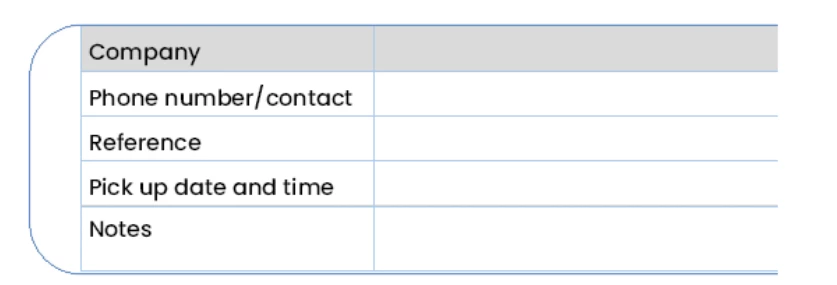
As you can see, the grey background is not going to the far left of the header table and the lines do not go all the way across either.


This is what I am trying to acheive (I have done this in really roughly in Photoshop)
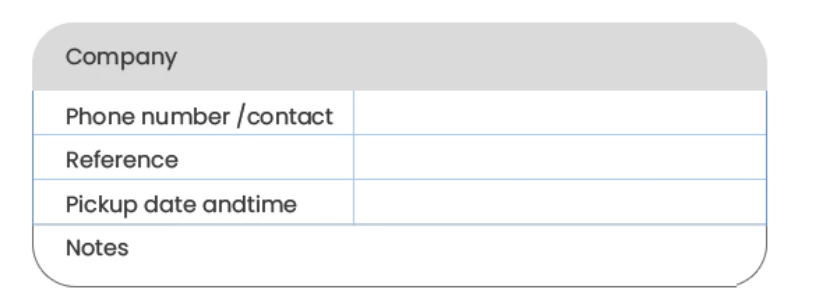
This is how I would like the table to look.


Can anyone tell me or show me how I can acheive this?


Thank you.

This topic has been closed for replies.
Correct answer Barb Binder

Does anyone have an example on file they can send me with something similar to my screenshot? 

Here you go: https://www.dropbox.com/s/lboxv94d0r9ibqt/sample%20table.indd?dl=0


~Barb


Likes


6 replies

Barb Binder
Community Expert
Community Expert
June 16, 2020

We are always happy to help. 😊

~Barb

~Barb at Rocky Mountain Training
Barb Binder
Community Expert
Barb BinderCommunity ExpertCorrect answer
Community Expert
June 15, 2020

Does anyone have an example on file they can send me with something similar to my screenshot? 

Here you go: https://www.dropbox.com/s/lboxv94d0r9ibqt/sample%20table.indd?dl=0


~Barb


Likes


~Barb at Rocky Mountain Training
Known Participant
June 15, 2020

Hi Barb,


Thank you very much, that is exactly what I needed 🙂


I will have a play around with it so I can work out how to do it next time.


Thanks again, it is very much appreciated 🙂

Willi Adelberger
Community Expert
Community Expert
June 14, 2020

You cannot add rounded border to a table.

BUt you can define paragraph styles with shadow and border. This would allow you to create a paragraph style with rounded border.


A way to perform what you want is to use paragraph styles and define them as part of the cell styles and use the cell styles as part of the table style. Don't define borders and areas in table and cell cell styles if you go this way. Only the border styles from the paragraph styles.


Diane Burns
Inspiring
June 13, 2020

Scott's reply is basically correct. If you have access to LinkedIn Learning/Lynda.com, I have a video on this topic in my course InDesign: Tables. https://www.linkedin.com/learning/indesign-tables/creating-tables-with-rounded-corner-borders

Known Participant
June 14, 2020

Thank you for the reply.


I have been playing around for hours and stil can't figure this out!


Does anyone have an example on file they can send me with something similar to my screenshot? I am happy to pay for someones time. I'm getting so frustrated 😮 

Derek Cross
Community Expert
Community Expert
June 13, 2020
Scott Falkner
Community Expert
Community Expert
June 13, 2020

Tables cannot have rounded corners. Text frames can, but a table is not clipped to the text frame, so even a rounded corner text frame won’t do what you want.


What will is creating the table as usual with sharp corners then cutting the text frame containing the table. Next, use Edit > Paste Into to paste the text frame into another frame which will clip it. You can give that frame the rounded corners you need. The text is still editable.