Participant
August 29, 2023
Answered

Adding swatches to CC Library

  • August 29, 2023
  • 3 replies
  • 1376 views

Hi,


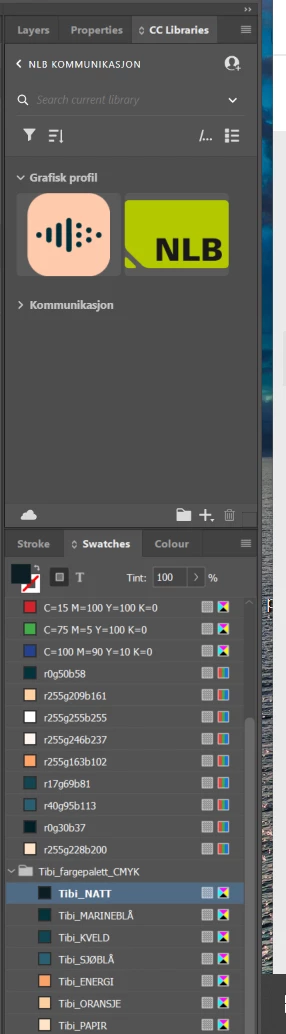
I'm trying to add swatches to my CC Library, but it doesn't work. I tried to drag and drop the swatches from Swatches to CC Libraries, but nothing happens. 
Running on InDesign version 18.5. x64.
 

Correct answer Barb Binder

Hi @Urda23011044qmtb:


Select the frame with the desired swatches and click the + button at the bottom of the CC Library panel > Fill Color (or Stroke color). 


There are multiple ways of adding assets to the library, but I prefer to use the + button because I can decide what I wan to add to the library.


~Barb

3 replies

Participant
August 23, 2024

The original problem wasn't addressed. Why doesn't the drag and drop option work? It states that this is possible. When following the other answer, how would someone add a gradient? 

Barb Binder
Community Expert
Community Expert
August 23, 2024

Hi James:


You said:

The original problem wasn't addressed.


The OP asked:

I'm trying to add swatches to my CC Library, but it doesn't work.

I answered the question on 8/29/23—select a frame with the desired swatches and click the Plus button. I then showed the result with the magenta swatch added to the Library. 


You can read about this method and others on this page: https://helpx.adobe.com/indesign/using/creative-cloud-libraries-sync-share-assets.html. Scroll down to the heading Work with library assets: Colors. You can use any technique listed there. 


Gradient swatches are not supported in CC Libraries.


~Barb

~Barb at Rocky Mountain Training
Participant
August 23, 2024

Understood. And this wasn't to say your answer wasn't correct. My point was that the OP also said this "I tried to drag and drop the swatches from Swatches to CC Libraries, but nothing happens". The drag and drop option is supposed to work, but it doesn't. That was what I meant.

Barb Binder
Community Expert
Barb BinderCommunity ExpertCorrect answer
Community Expert
August 29, 2023

Hi @Urda23011044qmtb:


Select the frame with the desired swatches and click the + button at the bottom of the CC Library panel > Fill Color (or Stroke color). 


There are multiple ways of adding assets to the library, but I prefer to use the + button because I can decide what I wan to add to the library.


~Barb

~Barb at Rocky Mountain Training
Community Expert
August 29, 2023
Community Expert
August 30, 2023

<removed, wrong thread>