
leilagold
Inspiring
June 16, 2018
Answered

adding text to top margin

  • June 16, 2018
  • 2 replies
  • 425 views

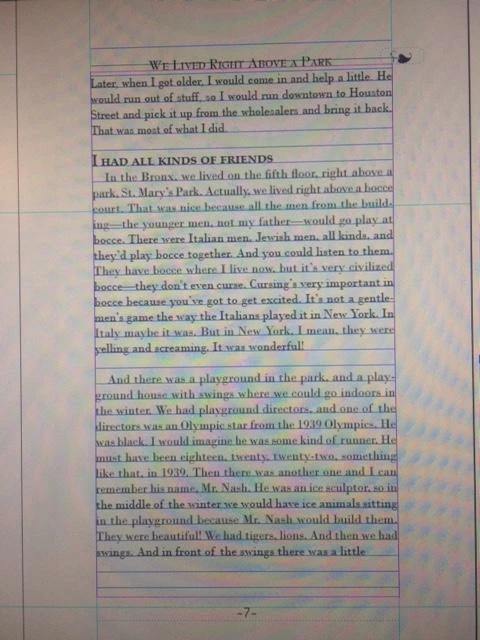
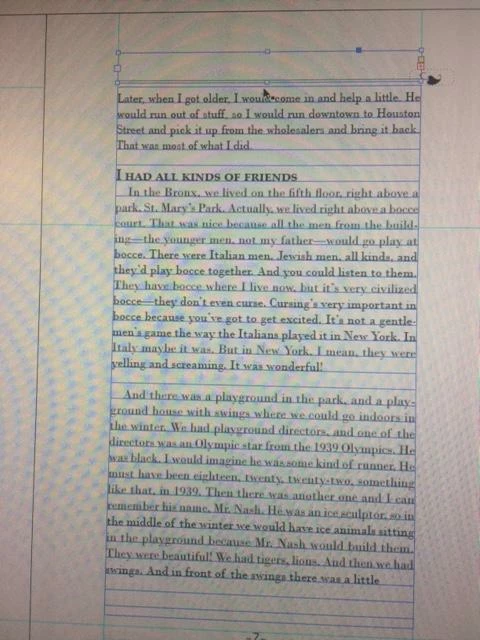
Hi - I'm trying to add a running head to a book I'm designing, but the text won't go above a stroke line I've created. Could I somehow have blocked the top margin so that nothing will appear there? 

When I place my text frame with one line of type - or even a glyph, the frame adds a plus sign, as if there's no room for it there. Thanks for your help!!
    This topic has been closed for replies.
    Correct answer Jongware

    You have Align to Baseline Grid enabled for your text, and the grid starts at your top margin.

    Disable Align to Baseline Grid for that header line so you can place it anywhere you want, or make the Baseline Grid start at the top of the page, rather than frame.

    (Inrelated but: a photo of your screen, really You can make exact screenshots right off your monitor with both Windows and Mac OS...)

    2 replies

    Jongware
    Community Expert
    JongwareCommunity ExpertCorrect answer
    Community Expert
    June 16, 2018

    You have Align to Baseline Grid enabled for your text, and the grid starts at your top margin.

    Disable Align to Baseline Grid for that header line so you can place it anywhere you want, or make the Baseline Grid start at the top of the page, rather than frame.

    (Inrelated but: a photo of your screen, really You can make exact screenshots right off your monitor with both Windows and Mac OS...)

    winterm
    Legend
    June 16, 2018

    Do not align your running head text to baseline grid, or edit the grid itself - in Edit > Preferences > Grids > Baseline grid set Start to lower value.

    leilagold
    leilagoldAuthor
    Inspiring
    June 16, 2018

    thank you! I forgot I had done that...

    I don't know how to mark two answers as correct!!