
Inspiring
October 17, 2018
Answered

Adjust Layout on by default?

  • October 17, 2018
  • 6 replies
  • 5915 views

Not sure I like the fact that Adjust Layout is the default setting in latest InDesign.

Very first file I opened with new version almost turned into a disaster.

I like to clean up supplied files so I can see what I'm looking at and that usually means removing unnecessary guides and margins. A real pet hate is people just lazily leaving default 12.7mm (0.5in) margins that serve no purpose and clutter things up.

Removing the margins moves the content. Almost messed up the layout without noticing. Seems this is on by default. How can it be turned off by default? If I want to use it for a specific file I would rather turn it on then.
    This topic has been closed for replies.
    Correct answer rowlandnewell

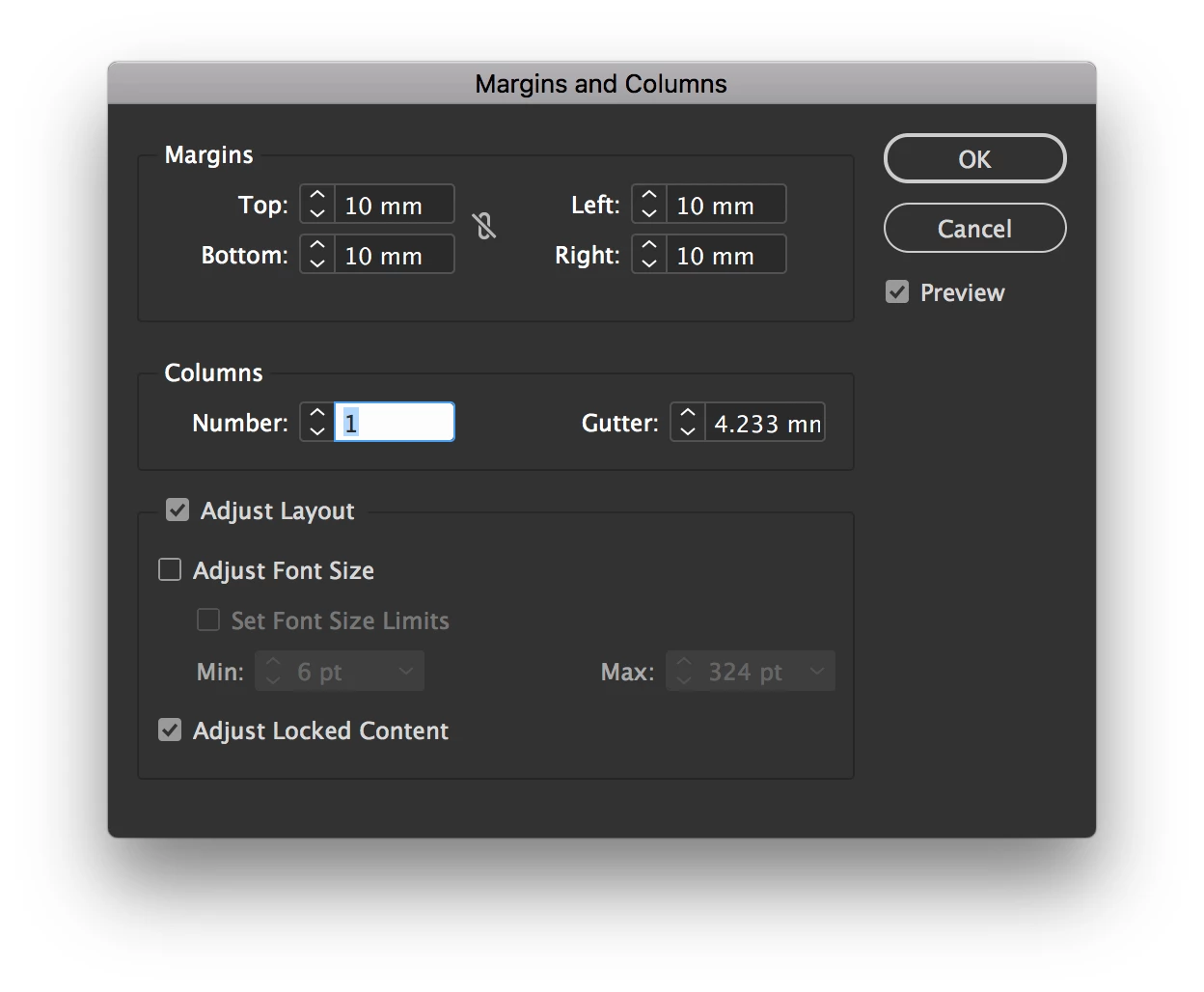
    When one goes to the Margins and Columns dialog it seems to be on. I've tried opening this with no documents open but its is on and greyed out.

    6 replies

    Inspiring
    September 6, 2022

    I can't figure out how to adjust an existing document's dimensions without Indesign stretching elements across the pages and losing all the spatial relationships. 

    Workaround is to adjust *page* dimensions with Page Tool in toolbar (Shift+P), also available in Properties panel's Edit Page button.

    This adjust's page size without touching any elements on the page.

    Then, update *document* dimensions to reflect the new page size.

    As this is an individual page change, try applying it to your parent pages for multi-page documents.

    Participant
    April 1, 2019

    I'm glad the problem was fixed with a patch. As a pre-press operator having to fix client's jobs was a real hazardous feature.

    Today I was going crazy with a client's layout that kept moving every time I tried to resize the margins of the background picture (even with all the "Adjust layout" off). In the end I found out that "LIQUID LAYOUT" acts very similar to "Adjust layout" and I had to uncheck it in the LAYOUT menu.

    I hope this helps someone else

    Silvano

    Srishti Bali
    Community Manager
    Community Manager
    April 4, 2019

    Hi All,

    The fix for this issue is now available in the latest update (14.0.2) of InDesign 2019.

    If you are unable to see the update notification, open the menu (three dots) from the top-right of Creative Cloud desktop application and click on ‘Check For App Updates’.

    Once the update button is shown against InDesign, click on the button to update to Id 14.0.2.

    Regards,

    Srishti

    Community Expert
    April 9, 2019

    Highly recommended:

    Install a hotfix that was released not through CC Desktop App and came after the release of version 14.0.2 that is fixing a serious bug with GREP Find/Replace:

    GREP search fails to find all the matching instances in long InDesign documents

    Regards,
    Uwe

    nickm74821483
    Participating Frequently
    November 4, 2018

    I have the same concern. I am tempted to downgrade to the previous version, as having Adjust Layout enable is very dangerous to my process.

    Participating Frequently
    November 2, 2018

    This is absolutely not good for a prepress situation. Needs to be OFF by default and at this time it is grayed out when no docs are open. Don't want to check it every single time with the hundreds of jobs we go through. Just makes sense that it should be checked when needed.

    cinziamarotta
    Participating Frequently
    October 17, 2018

    Hi,

    I don't think the default option is a problem because in InDesign 2019 you can disable it in each window (Document setup / Adjust Layout / Margins and columns...). Into Document Setup now you can modify margins.

    Community Expert
    October 17, 2018

    cinziamarotta  wrote

    Hi,

    I don't think the default option is a problem because in InDesign 2019 you can disable it in each window (Document setup / Adjust Layout / Margins and columns...). Into Document Setup now you can modify margins.

    Hi cinziamarotta ,

    true, but if the user is not aware of the new feature and it's turned on by default this could lead to confusion ( and bitter remarks ).

    Regards,
    Uwe

    Inspiring
    October 17, 2018

    That is exactly it. It is bound to trip people up if they don't know. I am used to changing margins in the Margins and Columns dialog (which iI think is quite logical). I can see this can now also be done in the Document Set Up without adjusting layout. It just isn't very clear and therefore a bit of a liability.

    Community Expert
    October 17, 2018

    Hi,

    strange, I think it's turned off by default. From my German InDesign CC 2019 on Windows 10:

    Did you migrate preferences from previous versions?

    Not that this should make a difference since the feature is new with CC 2019; but one never knows…

    Regards,
    Uwe

    rowlandnewellAuthorCorrect answer
    Inspiring
    October 17, 2018

    When one goes to the Margins and Columns dialog it seems to be on. I've tried opening this with no documents open but its is on and greyed out.

    Community Expert
    October 17, 2018

    Ah! Indeed. Thank you for this observation!

    It's turned on by default under Margins and Columns.

    To turn it off I would have suggested to close all documents and then turn it off.

    But unfortunately that's not possible:

    Maybe a script could help?
    I'll come back if I can find something in the document object model for ExtendScript/JavaScript.

    Best,
    Uwe