Known Participant
December 22, 2024
Answered

Adjusting the frame width on a page in flowing text

  • December 22, 2024
  • 4 replies
  • 1245 views

Hi guys, 

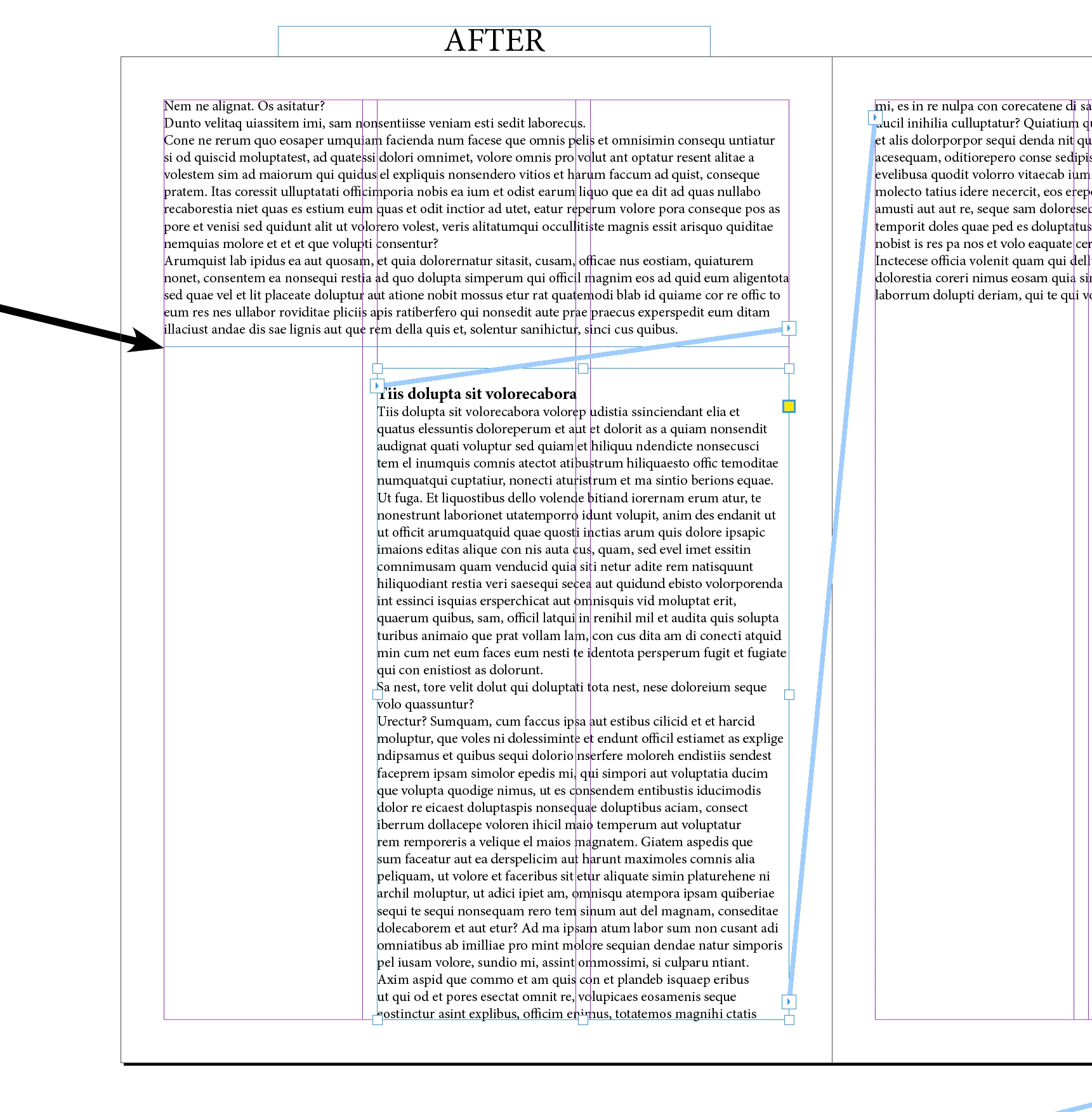
Indesign has a flowing text and every time the frame needs to be reduced by a third of the left and right page. For example, after running the script, can it perform this reduction process from the point where I click with the mouse to the end of the page? (Note: Sometimes the opposite is needed. I need to spread the text all the way to the end of the page)

This topic has been closed for replies.
Correct answer m1b

Hi @uniq1, here is a quick script for it. See if it works for you. First put your cursor somewhere in the paragraph where you want to split and run script.

- Mark


/**
 * @file Indent Split Text Frame.js
 *
 * Place cursor in text and script will split
 * into two text frames, the second one indented
 * up until the next margin column position.
 *
 * @author m1b
 * @version 2024-12-23
 * @discussion https://community.adobe.com/t5/indesign-discussions/adjusting-the-frame-width-on-a-page-in-flowing-text/m-p/15052834
 */
function main() {

    var settings = {
        addFrameBreakCharacter: false,
        overlap: 0,
    }

    app.scriptPreferences.measurementUnit = MeasurementUnits.POINTS;

    const OVERLAP = settings.overlap,
        TOLERANCE = 0.01;

    var doc = app.activeDocument,
        item = doc.selection[0];

    if (!item || !item.isValid)
        return alert('Please place text cursor into your text and try again.');

    if (
        !item.hasOwnProperty('paragraphs')
        || !item.hasOwnProperty('parentTextFrames')
    )
        return alert('Please place your cursor into text frame and try again.');

    var frame = item.parentTextFrames[0],
        oldFrameBounds = frame.geometricBounds.slice(),
        newFrameBounds = oldFrameBounds.slice(),
        page = frame.parentPage;

    if (!page.isValid)
        return alert('Text Frame is no on a page.');

    // the place where the frame will split
    var splitHeight = item.paragraphs[0].characters[0].baseline - item.paragraphs[0].characters[0].ascent;

    oldFrameBounds[2] = splitHeight + OVERLAP;
    newFrameBounds[0] = splitHeight;

    if (page.marginPreferences.columnsPositions.length <= 2)
        return alert('This page has no margin columns.');

    var x,
        i,
        columnFound;

    if (PageSideOptions.RIGHT_HAND === page.side) {

        // loop over the column positions, right to left
        for (i = page.marginPreferences.columnsPositions.length - 3; i >= 0; i = i - 2) {

            x = page.bounds[1]
                + page.marginPreferences.left
                + page.marginPreferences.columnsPositions[i];

            if (x + TOLERANCE < frame.geometricBounds[3]) {
                newFrameBounds[3] = x;
                columnFound = true;
                break;
            }
        }

    }

    else {
        // loop over the column positions, left to right
        for (i = 2; i <= page.marginPreferences.columnsPositions.length; i = i + 2) {

            x = page.bounds[1]
                + (doc.documentPreferences.facingPages ? page.marginPreferences.right : page.marginPreferences.left)
                + page.marginPreferences.columnsPositions[i];

            if (x - TOLERANCE > frame.geometricBounds[1]) {
                newFrameBounds[1] = x;
                columnFound = true;
                break;
            }
        }

    }

    if (!columnFound)
        // no columns available
        return;

    if (settings.addFrameBreakCharacter)
        // insert a frame break
        item.paragraphs[0].insertionPoints[0].contents = SpecialCharacters.FRAME_BREAK;

    var newFrame = page.textFrames.add({ geometricBounds: newFrameBounds });

    frame.geometricBounds = oldFrameBounds;
    frame.nextTextFrame = newFrame;

};
app.doScript(main, ScriptLanguage.JAVASCRIPT, undefined, UndoModes.ENTIRE_SCRIPT, 'Indent Split Text Frame');


Edit 2024-12-22: added handling of right-hand pages, as per comment below.

Edit 2024-12-23: fixed bug in handling left-hand facing page, as per comment below.

4 replies

James Gifford—NitroPress
Legend
December 22, 2024

After reading all exchanges, it still seems to me that this need could be better handled by one or more Parent pages that have a split frame and guidelines for quick adjustment of either's width. Apply the page (with perhaps two or more configurations to choose from), adjust the frame heights, snap the narrow frame to the correct guideline... done. Given that manual adjustment is necessary, a script to do the first steps on the fly would gain little.

Robert at ID-Tasker
Legend
December 22, 2024

@uniq1


Do you want to do this only by putting cursor in the specific place - or by selecting ParaStyle and automaticaly reformat whole Story / Document?


And when / why switching from 3x columns to 4x columns should happen? Or you want to decide each time? 


uniq1Author
Known Participant
December 22, 2024

Hi @Robert at ID-Tasker 

I want to intervene manually. It should be from where the cursor is. Thanks

Robert at ID-Tasker
Legend
December 22, 2024
quote

Hi @Robert at ID-Tasker 

I want to intervene manually. It should be from where the cursor is. Thanks


By @uniq1


Do you work on a PC and are you open to a paid solution? 


m1b
Community Expert
m1bCommunity ExpertCorrect answer
Community Expert
December 22, 2024

Hi @uniq1, here is a quick script for it. See if it works for you. First put your cursor somewhere in the paragraph where you want to split and run script.

- Mark


/**
 * @file Indent Split Text Frame.js
 *
 * Place cursor in text and script will split
 * into two text frames, the second one indented
 * up until the next margin column position.
 *
 * @author m1b
 * @version 2024-12-23
 * @discussion https://community.adobe.com/t5/indesign-discussions/adjusting-the-frame-width-on-a-page-in-flowing-text/m-p/15052834
 */
function main() {

    var settings = {
        addFrameBreakCharacter: false,
        overlap: 0,
    }

    app.scriptPreferences.measurementUnit = MeasurementUnits.POINTS;

    const OVERLAP = settings.overlap,
        TOLERANCE = 0.01;

    var doc = app.activeDocument,
        item = doc.selection[0];

    if (!item || !item.isValid)
        return alert('Please place text cursor into your text and try again.');

    if (
        !item.hasOwnProperty('paragraphs')
        || !item.hasOwnProperty('parentTextFrames')
    )
        return alert('Please place your cursor into text frame and try again.');

    var frame = item.parentTextFrames[0],
        oldFrameBounds = frame.geometricBounds.slice(),
        newFrameBounds = oldFrameBounds.slice(),
        page = frame.parentPage;

    if (!page.isValid)
        return alert('Text Frame is no on a page.');

    // the place where the frame will split
    var splitHeight = item.paragraphs[0].characters[0].baseline - item.paragraphs[0].characters[0].ascent;

    oldFrameBounds[2] = splitHeight + OVERLAP;
    newFrameBounds[0] = splitHeight;

    if (page.marginPreferences.columnsPositions.length <= 2)
        return alert('This page has no margin columns.');

    var x,
        i,
        columnFound;

    if (PageSideOptions.RIGHT_HAND === page.side) {

        // loop over the column positions, right to left
        for (i = page.marginPreferences.columnsPositions.length - 3; i >= 0; i = i - 2) {

            x = page.bounds[1]
                + page.marginPreferences.left
                + page.marginPreferences.columnsPositions[i];

            if (x + TOLERANCE < frame.geometricBounds[3]) {
                newFrameBounds[3] = x;
                columnFound = true;
                break;
            }
        }

    }

    else {
        // loop over the column positions, left to right
        for (i = 2; i <= page.marginPreferences.columnsPositions.length; i = i + 2) {

            x = page.bounds[1]
                + (doc.documentPreferences.facingPages ? page.marginPreferences.right : page.marginPreferences.left)
                + page.marginPreferences.columnsPositions[i];

            if (x - TOLERANCE > frame.geometricBounds[1]) {
                newFrameBounds[1] = x;
                columnFound = true;
                break;
            }
        }

    }

    if (!columnFound)
        // no columns available
        return;

    if (settings.addFrameBreakCharacter)
        // insert a frame break
        item.paragraphs[0].insertionPoints[0].contents = SpecialCharacters.FRAME_BREAK;

    var newFrame = page.textFrames.add({ geometricBounds: newFrameBounds });

    frame.geometricBounds = oldFrameBounds;
    frame.nextTextFrame = newFrame;

};
app.doScript(main, ScriptLanguage.JAVASCRIPT, undefined, UndoModes.ENTIRE_SCRIPT, 'Indent Split Text Frame');


Edit 2024-12-22: added handling of right-hand pages, as per comment below.

Edit 2024-12-23: fixed bug in handling left-hand facing page, as per comment below.
uniq1Author
Known Participant
December 22, 2024

Hi @m1b thank you very much

I want to do this. But sometimes this four-column page structure happens. It would be perfect if it was right aligned on even pages and left aligned on odd pages.


m1b
Community Expert
Community Expert
December 22, 2024

I've updated the script.

Community Expert
December 22, 2024

Is it not possible to add the text frames on the Parent Pages in this configuration and then reflow the text? 


Why is a script needed? What's your issue here, I'm not sure I fully understand what issue you're facing.

uniq1Author
Known Participant
December 22, 2024

Hi @Eugene Tyson 

Many times I have to use the same process in different situations. Thanks...