Inspiring
April 22, 2021
Answered

Adobe font looks wrong on PDF

  • April 22, 2021
  • 4 replies
  • 8812 views

I used the Adobe Font Cloister Black, then saved the document as a PDF to show my editor. It was fine when I looked at it on my MAC, but when he saw it on his PC it didn't register properly. Why would this be? Should I anticipate a printing problem when it goes to the printer? (Yes, we still print the Knight Letter, the magazine of the Lewis Carroll Society of North America* on paper.)


*Shameless plug. Information on the Society is available at www.LewisCarroll.org)

This topic has been closed for replies.
Correct answer Dov Isaacs

Thanks for providing the original PDF file. That file plus a download of the font file in question resolves this issue completely.


As can be seen here in Document Properties => Fonts, the CloisterBlack-Light font is not embedded in the PDF file at all:
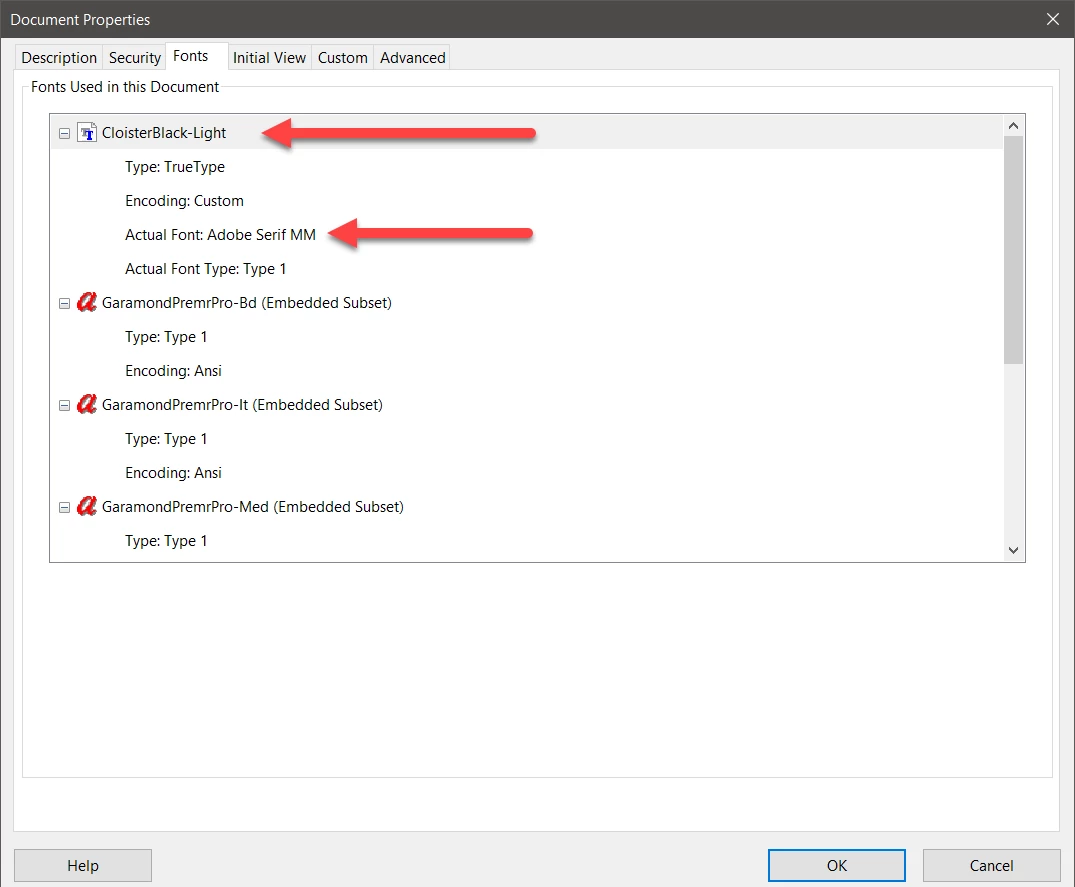


As such, unless the font is installed on the system viewing the PDF file and the Use local fonts option is enabled, Acrobat does a font substitution, which in this case is Adobe Serif MM leading to the ugly rendition that you see.


I tried installing the CloisterBlack-Light font on my system and reopening Acrobat and the PDF file resulted in the text being properly displayed with this font.


You may then ask, why didn't InDesign embed the font in the PDF file that it generated? Simple! The font has its security flags set to disallow any embedding whatsoever:
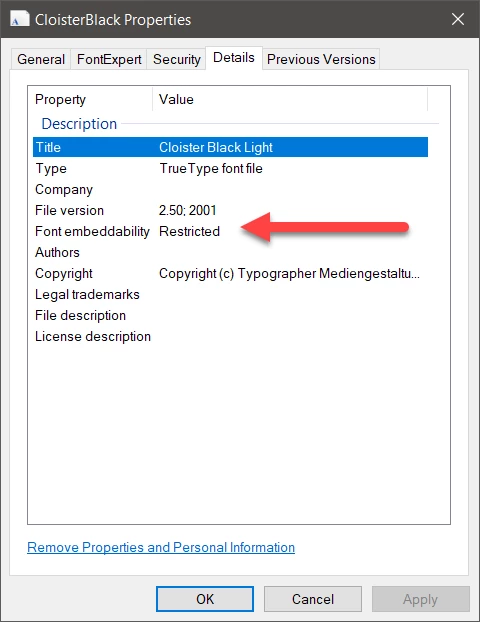


Normally, InDesign, Illustrator, and Photoshop all embed fonts as subsets unless the embedding flag prohibits such embedding.


The font might technically be problematic, but the issue here has nothing to do with those other technicalities!!!!


Your solution is to find another font that allows embedding. Note that for fonts that disallow embedding, their licenses oftne also prohibit so-called “outlining” or rasterization. Doing either of these two hacks may be get you into legal trouble unless you can find the license itself, ascertain that thee are no prohibitions or get permission of the font's designer or foundry to do so. (If you find that designer or foundry, maybe you can pursuade them to provide a non-restricted version of that font!) Note that “outlining” or rasterization can seriously degrade output quality both for display and print!!

 

4 replies

Dov Isaacs
Dov IsaacsCorrect answer
Legend
April 22, 2021

Thanks for providing the original PDF file. That file plus a download of the font file in question resolves this issue completely.


As can be seen here in Document Properties => Fonts, the CloisterBlack-Light font is not embedded in the PDF file at all:


As such, unless the font is installed on the system viewing the PDF file and the Use local fonts option is enabled, Acrobat does a font substitution, which in this case is Adobe Serif MM leading to the ugly rendition that you see.


I tried installing the CloisterBlack-Light font on my system and reopening Acrobat and the PDF file resulted in the text being properly displayed with this font.


You may then ask, why didn't InDesign embed the font in the PDF file that it generated? Simple! The font has its security flags set to disallow any embedding whatsoever:


Normally, InDesign, Illustrator, and Photoshop all embed fonts as subsets unless the embedding flag prohibits such embedding.


The font might technically be problematic, but the issue here has nothing to do with those other technicalities!!!!


Your solution is to find another font that allows embedding. Note that for fonts that disallow embedding, their licenses oftne also prohibit so-called “outlining” or rasterization. Doing either of these two hacks may be get you into legal trouble unless you can find the license itself, ascertain that thee are no prohibitions or get permission of the font's designer or foundry to do so. (If you find that designer or foundry, maybe you can pursuade them to provide a non-restricted version of that font!) Note that “outlining” or rasterization can seriously degrade output quality both for display and print!!


- Dov Isaacs, former Adobe Principal Scientist (April 30, 1990 - May 30, 2021)
Inspiring
April 22, 2021

Many thanks. I was mistaken about the source of the font I was using and have replaced it with a font from Typekit (or whatever it's called now). I have used it many times before without this problem occuring, which is why I was confused.


Community Expert
April 22, 2021

Hi Grundoon Groundhog,

as others already said: The font is not embedded in the PDF.

From Acrobat Pro on my Windows 10 system:


You could check if the font has restrictions for embedding in InDesign.

Go to Type > Find Font…

Select the listed font and under Info check category Restrictions.


From my German InDesign 2021 on Windows 10 where I placed the PDF:


The German word for "Restrictions" is "Beschränkungen" in that screenshot.

Because I do not have access to your InDesign document and the font the value for "Restrictions" is "unknown" ( typeface is missing).


Regards,
Uwe Laubender

( ACP )

Inspiring
April 22, 2021

Hi Grundoon Groundhog,

After I have analyzed your pdf I could see You are using a very old bad font.

There are many font tables missing in this font.

It looks this font was converted using an old program called Alltype (1992), probably the worst font program in the history.
You really should change this font for a new and better font.
Regards
Sami

Inspiring
April 22, 2021

HI Grundoon,

probably is a font CMAP table problem.

May I ask which version is your font and how old It is?
An workaround would be convert to outlines the "In Memoriam" text.

Regards

Sami

Dov Isaacs
Legend
April 22, 2021

Such a “workaround” will degrade quality.


It is highly unlikely that a “font CMAP table problem” would cause a PDF file to display correctly on a MacOS system but not look correct on a Windows system, both running either Adobe Acrobat Reader or Adobe Acrobat Pro.


A more likely possibility is that the font was not embeddable. It displayed correctly on @Grundoon Groundhog's system because Acrobat could find the font installed on the system that created the PDF file, but couldn't find that font on the Windows system and substituted Adobe Serif MM.


That's exactly why we need to see the PDF file.


- Dov Isaacs, former Adobe Principal Scientist (April 30, 1990 - May 30, 2021)
Inspiring
April 22, 2021

Hi Mr. Isaacs,

IMHO If You are seeing the font in the PDF in Windows, the font is embedded.

That is the reason I think the problem is in the CMAP table.


Dov Isaacs
Legend
April 22, 2021

Unless you post a sample PDF file that exhibits this problem, we can't assist you one iota. Sorry!


- Dov Isaacs, former Adobe Principal Scientist (April 30, 1990 - May 30, 2021)
Inspiring
April 22, 2021

I did! Perhaps they didn't show up? Oh, they were PNG screen captures; perhaps they didn't appear.