


Joely10623436
Community Expert
Community Expert
Jun 25, 2025 8:36 AM UTC
Answered

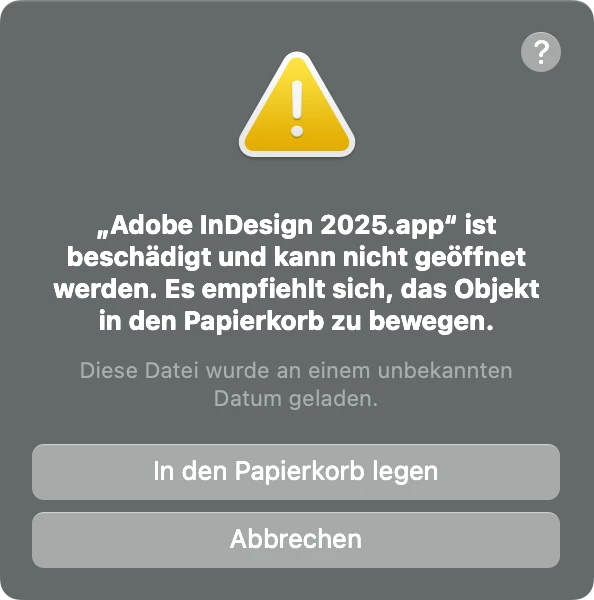
Adobe InDesign 2025.app ist beschädigt und kann nicht geöffnet werden.

Liebe ID-User: Wer kennt dieses Problem auch bzw. hat eine Lösung?

  • MacOS Sequoia 15.5
  • Creative Cloud 6.7.0.278
  • InDesign 20.4


Fehler trat plötzlich auf. Deinstallieren/Installieren, Neustart etc. half nicht.
 

Frans v.d. Geest
Frans v.d. GeestCorrect answer
Community Expert
Mar 20, 2026 2:07 PM UTC

Easy fix: right click on the app in the finder and choose Open. You still get the message but now you can go to Apple System Preferences, Privacy and scroll down until you see the blocked app. The again click allow to open, enter your user password and you’re done. The whole ‘cleaner tool’ is nonsense and not necessary.

8 replies

Frans v.d. Geest
Community Expert
Frans v.d. GeestCommunity ExpertCorrect answer
Community Expert
Mar 20, 2026 2:07 PM UTC

Easy fix: right click on the app in the finder and choose Open. You still get the message but now you can go to Apple System Preferences, Privacy and scroll down until you see the blocked app. The again click allow to open, enter your user password and you’re done. The whole ‘cleaner tool’ is nonsense and not necessary.

Translate
Participating Frequently
Mar 20, 2026 8:50 AM UTC

Unfortunately, this seems to be a kind of “collateral damage” after a MAC OS update which comes up sometimes - not every time and not with all InDesign versions … however, InDesign CC 2025 seems to be a favourite candidate for this. I’ve encountered this phenomenon already twice and both times with CC 2025, having a handful of other InDesign versions installed (2021 through 2026).

What really causes it … no idea, only assumptions. Most probably no one will even be able to tell you the actual reason. (Which is symptomatic for dealing with errors nowadays: you don’t really try to understand what happens, but you use any technique advised by someone to fix it, hoping it actually might fix the issue … ) 

Translate
Abhishek Rao
Community Manager
Community Manager
Mar 20, 2026 12:21 PM UTC

Hi ​@rudiwarttmann,


Sorry to hear you’re running into this, I understand how frustrating it can be, especially when it happens suddenly after an update.

I’d recommend trying the suggestion shared in this similar community post and checking if it helps in your case:
https://community.adobe.com/questions-671/indesign-2026-doesn-t-open-on-mac-898070?postid=898070#post898070

If the issue still persists after that, please try performing a clean reinstall by removing the Creative Cloud Desktop app, CCLibrary, InDesign and CoreSync using the Creative Cloud Cleaner Tool from here: https://adobe.ly/4mkYJCc, then reinstall the Creative Cloud Desktop app using https://adobe.ly/43fQrCS and install InDesign again through it. Once done, relaunch InDesign and check how it behaves.


Let me know how it goes, and I’ll be happy to assist further.

Abhishek

Translate
Abhishek Rao
Community Manager
Community Manager
Jun 25, 2025 10:04 AM UTC

Hi @Joely10623436,


Thanks for sharing the details and the screenshot. Since reinstalling InDesign through normal means didn't help, I'd recommend using the Creative Cloud Cleaner Tool to completely remove all traces of InDesign from your system. This ensures that any corrupt or residual files are cleared out before a fresh install. You can find the steps here:
https://adobe.ly/4lIdoX1

Once you’ve removed InDesign using the cleaner tool, please reinstall it using the official guide here:
https://adobe.ly/4k6h6bq

After reinstalling, try launching the app again and let me know if the issue is resolved.


Happy to follow up if needed!

Abhishek 

Translate
Joely10623436
Community Expert
Community Expert
Jun 25, 2025 9:02 PM UTC

Many thanks @Abhishek Rao – the link to the Cleaner Tool is broken 😞
https://swupmf.adobe.com/webfeed/AdobeLogCollectorTool/macarm/LogCollectorTool.dmg

Translate
Harshika Verma
Community Manager
Community Manager
Jun 26, 2025 11:31 AM UTC

Hi Joel,


Thank you for reporting the issue. Strange to hear that the Cleaner tool is not working for you. I checked on my end, and it seems to be working fine.

Would you mind checking this direct link: https://adobe.ly/4eloTB3 and let me know if that works for you?


Thanks,

Harshika

Translate
