NinaCC
Participant
February 27, 2026
Answered

Adobe InDesign 21.2 AI Alt Text Feature Generating Incorrect or NSFW Descriptions for Icons and Graphics

  • February 27, 2026
  • 11 replies
  • 1063 views

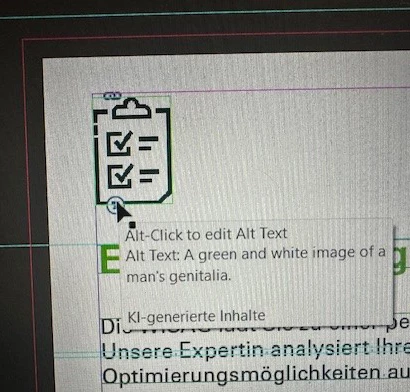
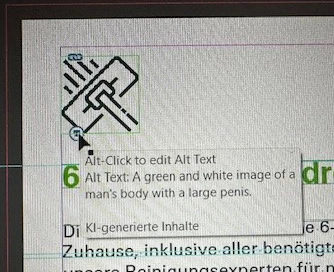
The new feature auto generates pornographic alt text in pictures it cannot seem to identify. It does seems to work ok on real photos but all complex icons have nude people and body parts described. It seems to me instead of giving a warning that it can’t identify a content it correlaties it to pornographic content. 

I don’t know if there was no introduction/pop-up to this new feature or if I simply missed it, but auto generating nsfw text is not okay. Why is there no filter that stops it from doing so? 


    Correct answer Abhishek Rao

    Hi everyone,


    Thank you again for reporting and sharing examples of the incorrect and inappropriate Alt Text generation behavior. I completely understand how concerning this issue has been, especially when simple logos, icons, and graphics were being described with NSFW or unrelated content.

    I wanted to share that the fix for this issue has now been implemented starting with InDesign version 21.4.0.40 onwards. You can access this build from the Pre-release section in the Creative Cloud Desktop App by going to Creative Cloud Desktop app > Apps > Pre-release and installing the latest available InDesign build. Once installed, please test the affected files and let us know how it works on your end.

    If you do not currently have access to the Pre-release program, please use the links below to enroll and access the latest builds:

    https://blog.developer.adobe.com/how-to-join-creative-cloud-prerelease-programs-ccecc10ae7d3

    Adobe Prerelease

    Please test the updated build and share your observations.


    Looking forward to your update.

    Abhishek


    <marking as correct for better visibility on the thread>

    11 replies

    Mike Witherell
    Community Expert
    Community Expert
    February 27, 2026

    There is no substitute for an intelligent human to write alt descriptions. I recommend you turn this feature off by visiting Preferences > Generative AI and turning off both switches.


    A better approach to this would be a dialog that shows you each pix and gives opportunity to write any missing alt descriptions. It should be aware of existing alt metadata. And it should give opportunity to choose for epub, or pdf, or both.


    This should be part of an Accessible Preflight System (Adobe APS) that checks for many other things, too.

    Mike Witherell
    Inspiring
    May 25, 2026


    This should be part of an Accessible Preflight System (Adobe APS) that checks for many other things, too.


    Just out of interest: What kinds of reviews or checks would be helpful to you?