
Participating Frequently
May 20, 2026
Answered

Adobe InDesign - JSX Scripts

  • May 20, 2026
  • 2 replies
  • 59 views

Hello! Hoping someone can shed some light on this for us. We have a series of JSX scripts we use in InDesign that were working in MacBook Pro Intel but not in MacBook Pro M4. Same verison of InDesign too. When we run the scripts in Intel they execute but when we run the same scripts in M4, they do nothing. Are we missing something here? We also tried the Open In Rosetta option which did not work. Please advise.
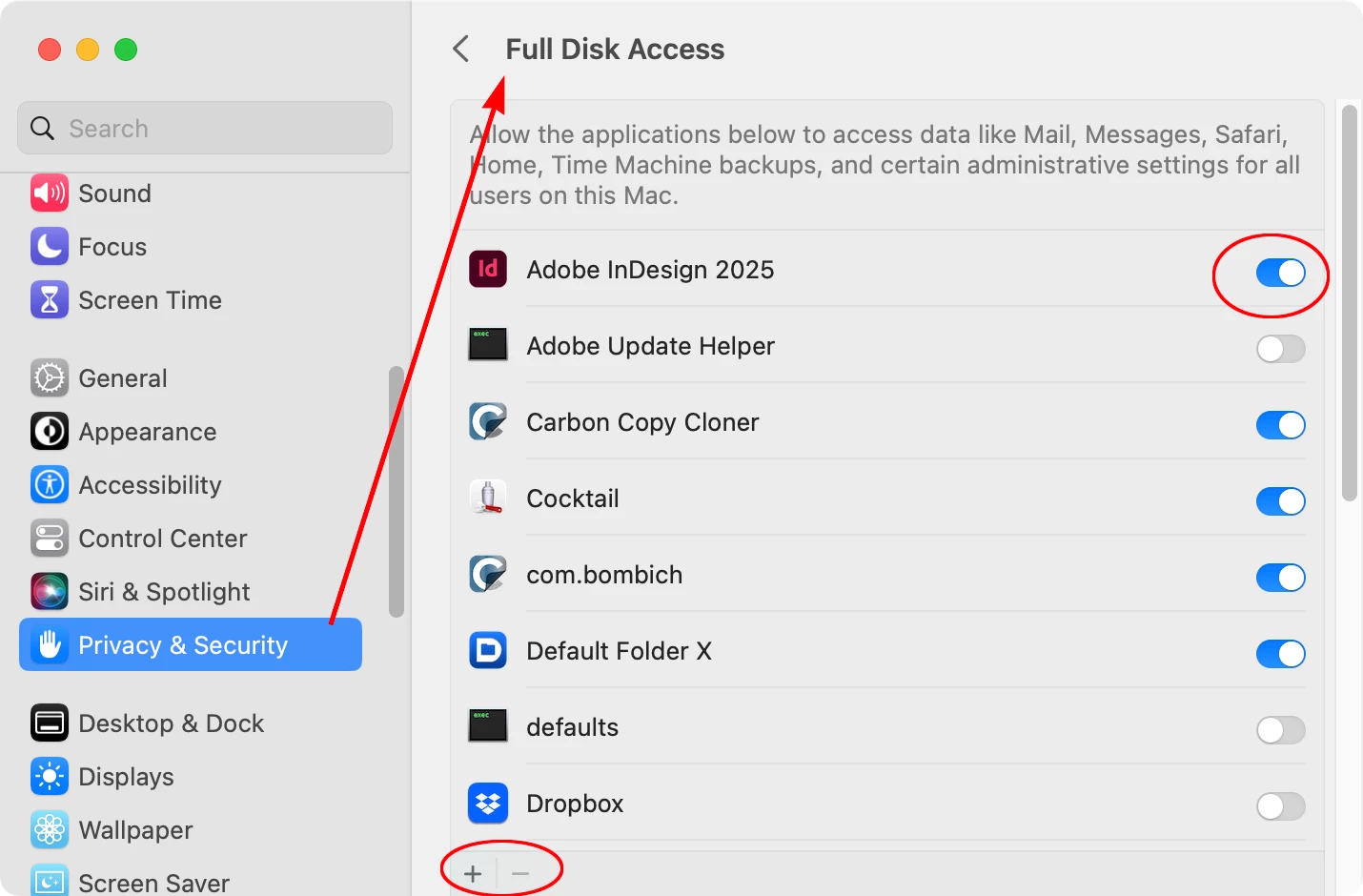
    Correct answer rob day

    Does Adobe InDesign have Full Disk Access under System Settings>Privacy & Security>Full Disk Access?


    2 replies

    rob day
    Community Expert
    Community Expert
    May 20, 2026

    Hi ​@MacHattan , Just to clarify are you running the scripts from the InDesign Scripts panel, and if so where are they saved? Are they in your System’s User folder, or the InDesign Application’s Scripts Panel folder? Have you checked the permissions for the folder you are using?

    MacHattanAuthor
    Participating Frequently
    May 20, 2026

    Hello ​@rob day yes, we place the scripts in /Applications/Adobe InDesign 2024/Scripts/Scripts Panel and then users just double click the script from the Scripts Panel under Application drop down.

    rob day
    Community Expert
    Community Expert
    May 20, 2026

    Have you tried running a script from the User folder? Move a test script to:


    /Users/usrname/Library/Preferences/Adobe InDesign/Version X/en_US/Scripts/Scripts Panel


    And it should show in the Script panel’s User folder

    Mike Witherell
    Community Expert
    Community Expert
    May 20, 2026

    Do these scripts involve any BridgeTalk? If you open in Rosetta, you would have to open all the Adobe apps in Rosetta, too.


    Another idea: 

    Some scripts start with a directive like #target indesign. On M4 Macs, if it cannot map the legacy code identifier to the native Apple Silicon app layer, the script engine stops silently. A work-around could be where you edit the script , removing the #target!--> header entirely, saving it, and test if it works.

    Mike Witherell
    MacHattanAuthor
    Participating Frequently
    May 20, 2026

    Hello ​@Mike Witherell yes, we tried Rosetta mode, no good! Let me check the scripts code to see.