Abhishek Rao
Community Manager
Community Manager
October 14, 2024
Question

Adobe InDesign MAX Release: Generate HTML5 output for the content.

  • October 14, 2024
  • 15 replies
  • 8773 views


Hello Everyone,

We are thrilled to introduce the new Export Content as HTML5 feature in InDesign. With this update, you can now export pages, spreads, or selected objects to HTML5 format with just a few clicks. HTML5 makes your content more accessible and compatible across platforms and boosts both user engagement and SEO! Plus, you have control over how text is exported for optimized web performance.

Please try it and let us know what you think. We can’t wait to see how you use this powerful new feature in your projects.


Quick and easy steps to export content as an HTML5 Package

  1. Go to File > Export.
  2. Choose HTML5 from the Save as type (Windows) or Format (macOS) dropdown.
  3. Choose Use InDesign Document Name as the Output Filename to keep the same file name, then click Save.
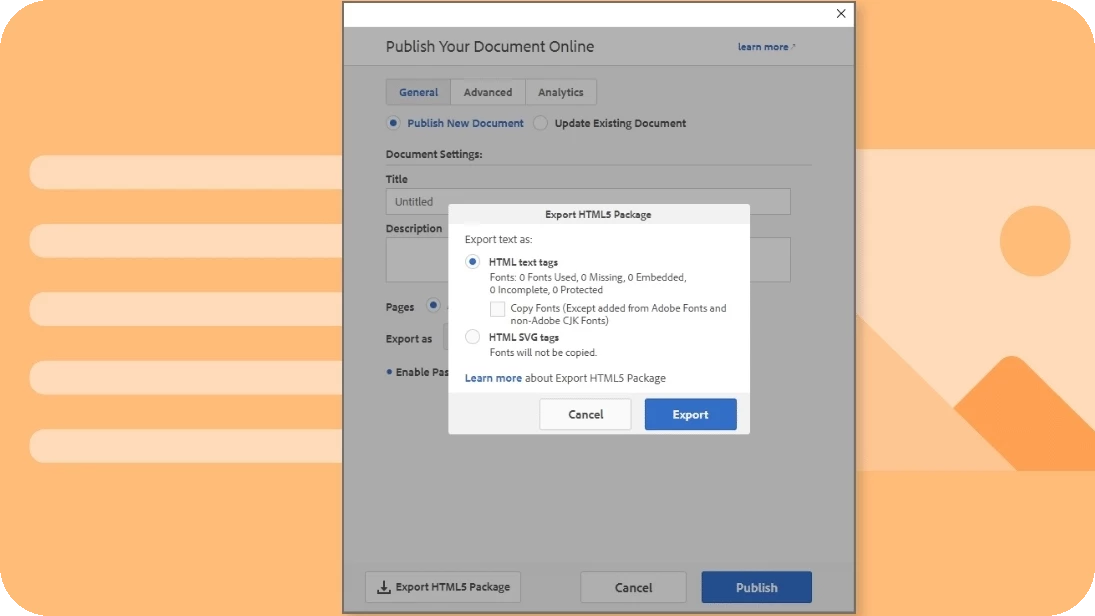
  4. In the Export HTML5 Package dialog, choose HTML text tags or HTML SVG tags.
  5. Click Export. Your document is now an HTML5 package.
 

Key Properties from the Publish Online Dialog

  • Title: Used to name the exported folder.
  • Description: Not exported.
  • Pages: All pages included if exporting directly from File > Export > HTML5.
  • Export as:
    • Single: Each page as an individual HTML file, linked to index.html.
    • Spread: Each spread as a single HTML file, linked to index.html.
  • Cover Thumbnail: Included in the HTML5 package.
  • Image Settings: Applied from the Publish Online dialog.
  • Google Analytics: Tag added to index.html if included in the Publish Online dialog.


For more details, please click here. 

We’d love to hear from you!

Try out the new Export to HTML5 package feature in InDesign 2025 version 20.0, and let us know your thoughts. Feel free to reach out if you have any questions or need more tips!

If this was helpful, please click the Upvote icon in the top left corner of this post. Your feedback helps us improve the experience. Thank you!


Have questions? Click 'Reply' below to ask.

Click 'Follow' below to bookmark this post for easy reference.

15 replies

Community Expert
October 21, 2024

Will this eventually get similar features that Muse had?

BobLevine
Community Expert
Community Expert
October 21, 2024

I hope not. There are too many core features of InDesign that need some serious attention. Creating websites with it should not even be close to a priority.


Just my $0.02 worth on that. The right tool for the right job and for websites there are a ton of tools out there.

Participating Frequently
October 17, 2024

If anyone has a live website built in InDesign, definitely post it below. Would love to see how it handles in practice.

Any idea how to address responsiveness? HTML is nice to have, but if we have to re-write it, that's only so useful.

@mj
Community Expert
Community Expert
October 18, 2024

Agreed @social_GazelleB82A , responsiveness and wireframing with XD not being developed anymore.

mj

iMSD

Participating Frequently
October 18, 2024

This was the aim of Liquid Layouts a few versions ago, but I think that was aimed mainly at print or digital graphics like social media, rather than a single website. But it seems like that workflow was removed. I really never made use of it. But I do still rock some Liquid Guides, mainly for their dashed appearance!

Community Expert
October 17, 2024

Seems like a cool feature, but I don't think I will need it for what I do.

Known Participant
October 8, 2025

Well, THAT is one helpful comment ... 

GeekyGirlRex7295714
Community Expert
Community Expert
October 17, 2024

THIS is amazing! Cannot wait to use it.

Writer | Developer | Facilitator | Geek!
Inspiring
October 14, 2024

Hi When trying this feature I cannot access the export options  The Smaller dialogue box launches on top with the main box greyed over,  showing only the font option or the SVG option as your visual. Cancel quits the Export and Export works well exporting the document. but not as  I would like it, the help page shows the various options available but  I cannot access area. Am I missing something?     I tried in both 25 and  ID Beta  same problem in both 

Community Manager
October 15, 2024

Hi, Sorry for the trouble. Please share a screen recording depicting the issue along with your OS details so that we can better assist you.


^VS

Inspiring
October 15, 2024

Apple Studio M2 Max  96GB Mac OS 15.01