Abhishek Rao
Community Manager
Community Manager
Oct 14, 2024 2:00 PM UTC
Question

Adobe InDesign MAX Release: MathML Support to create math expressions

748186iD52E699AFACA8EF5.gif


Hello Everyone,

We are thrilled to introduce the new MathML feature in InDesign. Now, you can easily create, style, and edit math expressions with the new MathML panel. Seamlessly integrate complex equations into your documents, styled to match your text. Perfect for scientific and academic content!


Insert a math expression

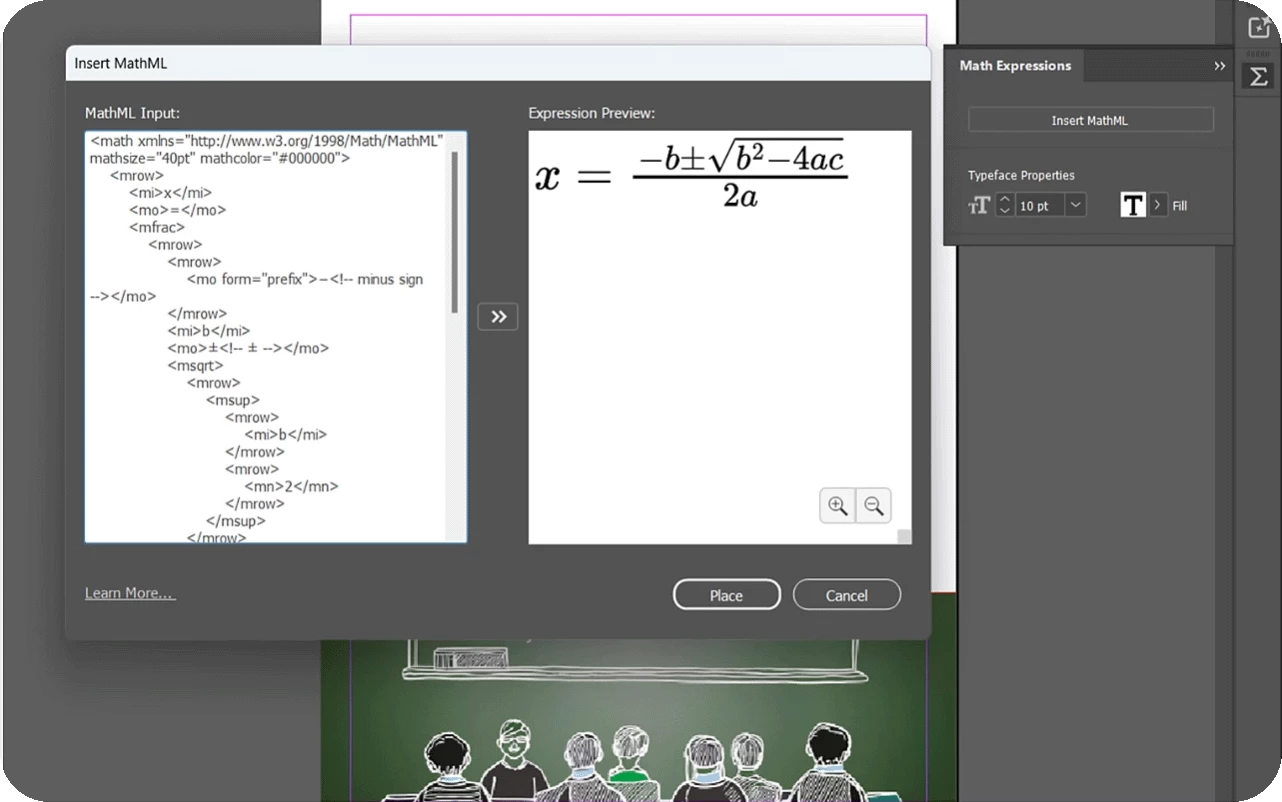
  1. Create or open any InDesign document and select Object > Insert MathML.
  2.  Add the MathML code in the MathML Input section.
  3. Select the Preview Expression icon to see the expression in the Expression Preview section.
  4.  Select Place. Your math expression is placed as an SVG file in your document. You can anchor it just like any other SVG.
    5. Update the Font Size and Fill color (including document colors) in the Math Expressions panel to match the rest of your document.
748414i65E483C62D2D0B31.png


Edit a math expression

1. Right-click the math expression and select

2. Update the MathML code in the MathML Input section.

3. Select the Preview Expression icon to see the updated expression in the Expression Preview section.

4. Select Save.


For more details, please click here. 

Have questions? Click 'Reply' below to ask.

Click 'Subscribe' below to bookmark this post for easy reference.

47 replies

Participant
Dec 10, 2024 1:07 PM UTC

I find it very commendable that Adobe is implementing MathML into the program. It is a step in the right direction, even though the tool will not yet meet the requirements for scientific typesetting at the time of release. I see the following points as necessary to eliminate the need for third-party programs in the long term:

  1. Editability of formulas with respect to text, color, spacing/kerning, line representation and line thickness, as well as glyph selection.
    2. Introduction of (object) styles for formulas that store these settings, enabling more efficient workflows for extensive works.
    3. Support for CMYK and spot colors for print output.
    4. Editability of the formula in plain text for more user-friendly handling.
    5. Proper tagging and passing of MathML code as alternative text for output in ePub and PDF/UA.
Translate
Known Participant
Nov 28, 2024 2:24 PM UTC

Hello Experts,

I have an doubt on how to configure the Math job fonts (e.g., STIX General and Mathmatical PI and Symbol fonts etc.,) to new feature MathML.

The most of the Books and Journals are typesetted in base Job fonts, please guide me how to configure the fonts in MathML new feature and also is it possible to apply the CMYK color?

Thanks for your guidance and support.

Translate
jctremblay
Community Expert
Community Expert
Nov 28, 2024 2:47 PM UTC

Hi @suntech 
Unfortunately both of your request can’t be done in this introduction feature of MathML. You can’t use a specific font and Math object are SVG (in RGB since CMYK is not supported in SVG file).

You can add this request here:
https://indesign.uservoice.com/


Translate
justlearn
Community Expert
Community Expert
Oct 28, 2024 12:01 AM UTC

30 years ago I decided there was no way I can become an accountant because my math was super bad. Now they bring in MathML Support to create math expressions to InDesign...I ran away from math....now it's going to haunt me...

Granted, when my kids ask help with math equations, I can now 'cheat' a little?! 

Translate
m
Participant
Oct 24, 2024 10:08 PM UTC

When I start adding crossouts, carries or extra color to MathML addition or subtraction, msline seems to break, is that to be expected?

Translate
Christelle RD
Community Expert
Community Expert
Oct 23, 2024 11:16 AM UTC

I found how to create equations with MathML on Drillster. It will be more complicated than expected but it's OK. I don't know if it's the good place to ask this question, but do you know (if it has already been created) where to find the symbols of Real Numbers components, I mean : N, Z, D, Q and R with the double bar like as below (last page of my worksheets on real numbers) - of course I can create those glyphs in a font designed by myself, but I'm sure anybody linked to Maths would need those. Pi is also complicated to be found.


Translate
jctremblay
Community Expert
Community Expert
Oct 23, 2024 11:44 AM UTC

Voici...

<math>
  <mrow>
    <mi>&naturals;</mi>
    <mo>&subset;</mo>
    <mi>&integers;</mi>
    <mo>&subset;</mo>
    <mi>&rationals;</mi>
    <mo>&subset;</mo>
    <mi>&reals;</mi>
    <mo>&subset;</mo>
    <mi>&complexes;</mi>
  </mrow>
</math>


Translate
Christelle RD
Community Expert
Community Expert
Oct 23, 2024 11:49 AM UTC

Merci beaucoup Jean-Claude 🙂

Translate
Christelle RD
Community Expert
Community Expert
Oct 22, 2024 10:15 PM UTC

I enjoy that feature so much!
I "sell" (do my best to catch interest for) Maths to middle school students, this will be very useful 🙂

Translate
Community Expert
Oct 21, 2024 8:03 PM UTC

Looks good

Translate
Community Expert
Oct 17, 2024 6:36 PM UTC

cool feature but I have ADHD, this will just have my brain going all tweet tweet. 

Translate
@mj
Community Expert
Community Expert
Oct 18, 2024 5:16 PM UTC

🤣

Translate
Inspiring
Oct 16, 2024 8:57 PM UTC

Please, can you stop using these annoying animated gifs in community forums? I think, just static image will be OK (like in Photoshop forum). Not in this subpage, but in main thread. Or am I the only one who finds them annoying?

Translate
James Gifford—NitroPress
Legend
Oct 22, 2024 10:30 PM UTC

Most browsers can be set to block GIF animations. Here's one link —

https://www.howtogeek.com/257408/how-to-stop-animated-gifs-from-playing-in-your-web-browser/

Translate
Inspiring
Nov 23, 2024 12:13 AM UTC

Thank you, it works (Animation Policy for Chrome).


Hmm, but this plugin breaks the Outlook web interface in Chrome. so i im back with animated s_it here.

Translate
Frans v.d. Geest
Community Expert
Community Expert
Oct 16, 2024 11:39 AM UTC

...a SVG in RGB colors... and no way to change that. Half baked.

Translate
Vivek-Sharma
Community Manager
Community Manager
Oct 16, 2024 11:48 AM UTC

Hi, Sorry for the trouble. Please share a screen recording depicting the issue, and we will share it with our product team for further suggestions. 


^VS

Translate
jctremblay
Community Expert
Community Expert
Oct 16, 2024 1:59 PM UTC

@Vivek12 Adobe and InDesign product team is well aware of the limitations and issues with Math ML Object being internal SVG content with color defined in RGB.

Translate