


dannyc61906470
Participant
May 15, 2023
Question

Adobe Stock InDesign template file error

  • May 15, 2023
  • 1 reply
  • 358 views

Hi all.

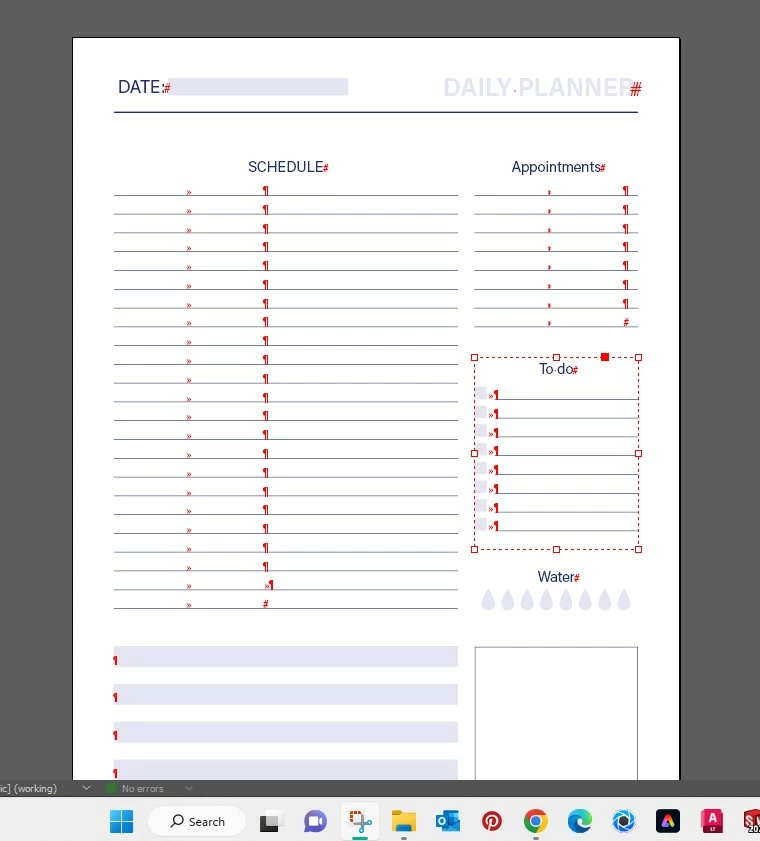
I'm facing an issue here. Just downloaded a file from Adobe Stock and after activating the right fonts for the document, still have text in red and when trying to delete doesnt work. Does anyone else know what's happening ?  - thanks guys 

Just payed 1 credit for this and its a bit frustating not working.


Kind regards,

Catarina

This topic has been closed for replies.

1 reply

jmlevy
Community Expert
Community Expert
May 15, 2023

Hi Catarina

What you see is the layer color, but not a missing font (which are displayed with a pink highlight). If you can't delete text it can be either because:

  • the text frame is on a parent page
  • the text frame is locked
  • the text frame is on a locked layer


dannyc61906470
Participant
May 15, 2023

Hi jmlevy,


Thanks for your reply. I had the same thoughts at first time and tryed the basics to fix it but unfortantly did not work. No layers blocked, nothing.


jmlevy
Community Expert
Community Expert
May 15, 2023

Did you check the parent page? Can you post a new screenshot showing the frame edges?