


rehana36276218
Known Participant
August 2, 2024
Question

advance Kerning

  • August 2, 2024
  • 5 replies
  • 3042 views

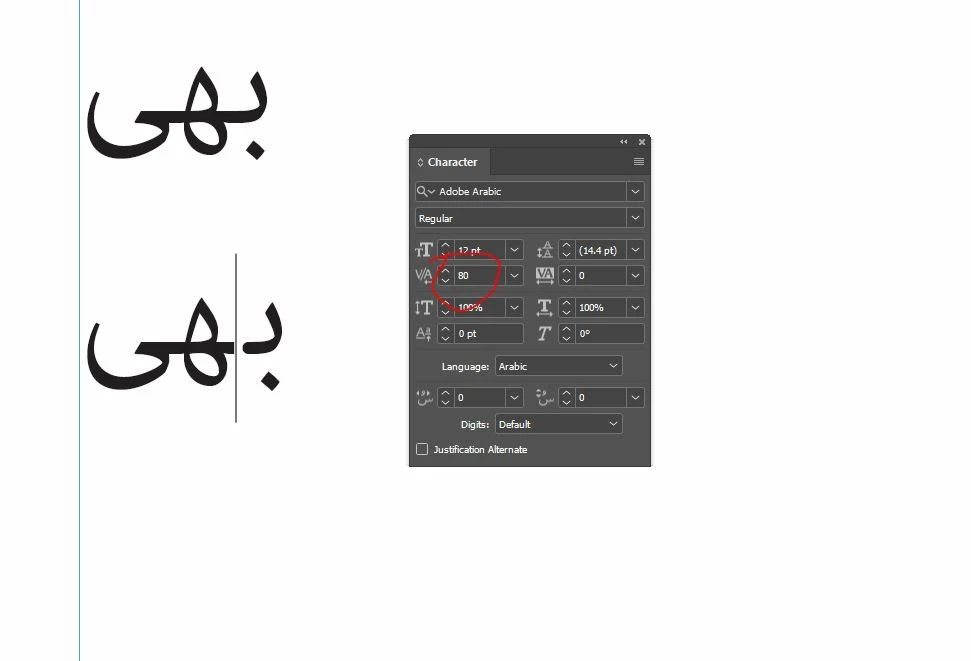
hi everyone see in this pic i have set kerning 80 (kerning in thousand of an em) , these are 100 pages of book , where many many places words are like this with different names kerning set, how we can change these kerning value to 100 through find and replace or grep or any other way fastly ,  i try alot but fail . any help please. thanks in advance. 
 

This topic has been closed for replies.

5 replies

James Gifford—NitroPress
Legend
August 12, 2024

I'd just like to note that after a week, many exchanges and this long detour into a scripted solution, I have absolutely no idea what it is the OP wants to accomplish. Just maybe some clarity on the actual task/process would help focus things, here.

m1b
Community Expert
Community Expert
August 12, 2024

Yep! I really thought I knew. But... not so sure anymore. 

m1b
Community Expert
Community Expert
August 3, 2024

Okay, @rehana36276218  so it sounds like you need something a bit customised. I thought this was an interesting tool to have, so I have written a script that may help you. See if you can follow what it does and how, and let me know if it works in your situation. It is quite configurable via the `kerns` array.

- Mark


/**
 * @file Kern Words.js
 *
 * Finds particular words and sets the kerning of those words explicitly.
 *
 * Tips:
 *   -  Edit the `kerns` array to suit your words and kerning.
 *   -  The `properties` object can contain any valid `findGrepPreferences`
 *      properties and values.
 *
 * Important:
 *   -  The `kerning` values correspond to the words' insertionPoints
 *      so the first kern value is BEFORE the first letter of the word.
 *      for example the word 'cat' will have 4 insertionPoints, and the
 *      kern object might look like this: {word: 'cat', kerning [-5, 6, -30, 8] }
 *
 * @author m1b
 * @version 2024-08-03
 * @discussion https://community.adobe.com/t5/indesign-discussions/advance-kerning/m-p/14777177
 */
function main() {

    var kerns = [
        {
            word: 'tight',
            kerning: [0, -50, -10, -30, -50, 0],
            properties: { appliedCharacterStyle: 'RED' },
        },
        {
            word: 'loose',
            kerning: [5, 10, 20, 30, 40, 5],
            properties: { appliedParagraphStyle: 'Body' },
        },
        {
            word: 'spaced',
            kerning: [100, 100, 100, 100, 100, 100, 100],
            properties: { appliedFont: 'Minion Pro	Bold Cond' },
        },
    ];

    var settings = {
        wholeWords: true,
        showResults: true,
    };

    if (0 === app.documents.length)
        return alert('Please open a document and try again.');

    var doc = app.activeDocument;

    for (var i = 0, kern, words, bracket; i < kerns.length; i++) {

        kern = kerns[i];
        kern.counter = 0;
        bracket = settings.wholeWords ? '\\b' : '';

        app.findGrepPreferences = NothingEnum.NOTHING;
        app.findGrepPreferences.findWhat = bracket + kern.word + bracket;

        if (kern.properties)
            app.findGrepPreferences.properties = kern.properties;

        words = doc.findGrep();

        for (var j = 0, word, len; j < words.length; j++) {

            word = words[j];
            len = Math.min(word.insertionPoints.length, kern.kerning.length);
            word.kerningMethod = 'None';

            for (var k = 0; k < len; k++)
                word.insertionPoints[k].kerningValue = kern.kerning[k];

            kern.counter++;

        }

    }

    if (settings.showResults) {

        var results = ['Kern Words'];

        for (var i = 0, kern; i < kerns.length; i++)
            results.push(kerns[i].word + ' x ' + kerns[i].counter);

        alert(results.join('\n'));
    }

};
app.doScript(main, ScriptLanguage.JAVASCRIPT, undefined, UndoModes.ENTIRE_SCRIPT, 'Kern Words');


rehana36276218
Known Participant
August 3, 2024


Thanks m1b , i am having this error while execute your given script


m1b
Community Expert
Community Expert
August 3, 2024

Hi @rehana36276218, can you please share a small demo .indd document that shows the error? Also share your "kerns" array. When I've got that, I'll be able to fix. - Mark


Edit: Alternatively, you could comment out the line 

// app.doScript(main, ScriptLanguage.JAVASCRIPT, undefined, UndoModes.ENTIRE_SCRIPT, 'Kern Words');

and add, on the very next line:

main();

 and run it again. It will show a more useful error now. If you do this, please post the error.

rehana36276218
Known Participant
August 3, 2024

not resolve my issue please someone look on this challenging job

James Gifford—NitroPress
Legend
August 2, 2024

If you set an override or global value for kerning, it will be applied regardless of what the font data specifies for each character. More importantly, it will override the many kerning pairs defined in most fonts, including, most likely, one for the two letters above.


Start by resetting this style, or all styles, to "Metrics" kerning (the default) and removing all overrides you may have applied. That should eliminate all these gaps, which your global setting has created. Also check the other two settings noted, for each affected style, as they can have similar effects:


rehana36276218
Known Participant
August 3, 2024

i want to increase kerning gap between characters , how we can do it in paragraph style . didn't solve my issue. i dont wana eliminate all these gaps ...

James Gifford—NitroPress
Legend
August 3, 2024

Do you want to increase the overall spacing of the letters but retain the connections between them? I don't think that can be done with any fixed-glyph font. I don't know if any kind of variable font is available for Arabic, as it would be needed for English italic or handwriting characters.


Fixed fonts are usually created to remain within a kerning limit so that the connections are made and script flow continuous.

m1b
Community Expert
Community Expert
August 2, 2024

Hi @rehana36276218, you could try this script by @Peter Kahrel. It applies custom kerning pairs.

- Mark