
wspcintern123
Participant
May 30, 2018
Answered

Advice on line breaks

  • May 30, 2018
  • 2 replies
  • 686 views

Hi, this is my first question on the forum and I'm still fairly inexperienced with indesign.

As you can see from the image, I am trying to create an index of titles. I am using the tab setting to create dotted lines to the corresponding page number. (Ignore the heavy handed drop cap).
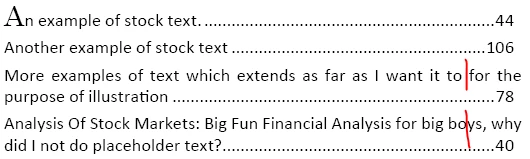
My question is how do I create an automated line break at the red marker for text only and make sure that the numbers remain aligned to the right of the text box? I have tried searching for the answer but I'm not sure of what the right terminology for this kind of setting is.

Thanks in advance.

This topic has been closed for replies.
Correct answer TᴀW

The trick is to apply a right-indent to the paragraph (you're using paragraph styles, I hope, so do it in the paragraph style definition).

And then, you'll notice that InDesign has a "last-line" indent option. Set the last line indent to the opposite of your right indent.

For example, if you set your right indent to 40pt, set the last line indent to -40 points.

Since the page numbers are always on the last line, this effectively means that everything will be pushed away from the right margin except the page numbers on the last line.

By the way, setting tabs for this sort of thing is a little fiddly. InDesign has a character called a "right-indent tab" which pushes all text off to the right margin. It's much easier than setting tabs -- just press Shift+Tab to insert one. I use it all the time.

HTH,

Ariel

2 replies

wspcintern123
Participant
May 30, 2018

This worked, thank you, it all looks a lot neater!

TᴀW
TᴀWCorrect answer
Legend
May 30, 2018

The trick is to apply a right-indent to the paragraph (you're using paragraph styles, I hope, so do it in the paragraph style definition).

And then, you'll notice that InDesign has a "last-line" indent option. Set the last line indent to the opposite of your right indent.

For example, if you set your right indent to 40pt, set the last line indent to -40 points.

Since the page numbers are always on the last line, this effectively means that everything will be pushed away from the right margin except the page numbers on the last line.

By the way, setting tabs for this sort of thing is a little fiddly. InDesign has a character called a "right-indent tab" which pushes all text off to the right margin. It's much easier than setting tabs -- just press Shift+Tab to insert one. I use it all the time.

HTH,

Ariel

Visit www.id-extras.com for powerful InDesign scripts that save hours of work — automation, batch tools, and workflow boosters for serious designers.
Jongware
Community Expert
Community Expert
May 30, 2018

Unfortunately that only works for two or more lines. If you have a single line, followed by a right tab or shift+tab and then the page number, that "last line indent" will not be honored (because it is the last line).

TᴀW
Legend
May 30, 2018

Not sure what you mean. The system works fine whether the paragraph in question has one line or more than one. In every case, the shift+tab will push the number to the right. The right indent will push it back leftwards, and finally the negative last line indent will move it to the right again where it needs to be.

Ariel

Visit www.id-extras.com for powerful InDesign scripts that save hours of work — automation, batch tools, and workflow boosters for serious designers.