
Answered
After update to Indesign 2023 I can't see my spreads showing
Hi
My spreads in the page panel have disappeared, but I still can see how many pages I have...
Attached file below.
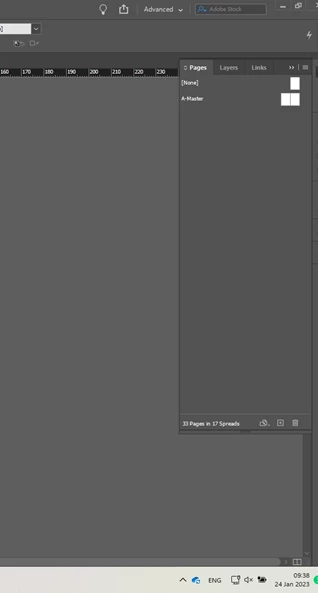
Any suggestion would appreciate. Thanks!
Hi
My spreads in the page panel have disappeared, but I still can see how many pages I have...
Attached file below.
Any suggestion would appreciate. Thanks!
It looks like the panel is only showing the Master (now called Parent) pages.
Either, the line separating the Master and Spreads is moved all the way down. Just locate it with your cursor and move it up.
Or, the panel did not load properly. In that case, I would reset preferences.
Windows: Start InDesign, and then press Shift+Ctrl+Alt. Click Yes when asked if you want to delete preference files.
macOS: While pressing Shift+Option+Command+Control, start InDesign. Click Yes when asked if you want to delete preference files.
Already have an account? Login
Enter your E-mail address. We'll send you an e-mail with instructions to reset your password.
 AdChoices