Participant
October 25, 2017
Answered

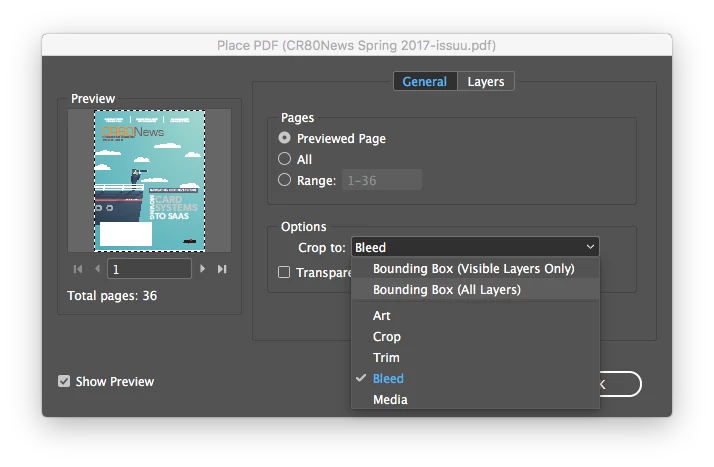
After update to Indesign CC 2018 Place Import Options not holding

  • October 25, 2017
  • 1 reply
  • 243 views

As seen below, I can not change the crop options in CC 2018 version. It allows you to click on the different choice, but won't move from the last used option "Bleed" which is a "sticky" option. Anyone know how to fix the issue?
This topic has been closed for replies.
Correct answer amaarora

Hi,

Try clearing you cache and preference by going to the folder location and manually deleting them.

Troubleshooting 101: Replace, or "trash" your InDesign preferences

-Aman

1 reply

amaarora
amaaroraCorrect answer
Inspiring
October 25, 2017

Hi,

Try clearing you cache and preference by going to the folder location and manually deleting them.

Troubleshooting 101: Replace, or "trash" your InDesign preferences

-Aman