AI file linked in InDesign appears with new lines that are not present in original file
Hello,
I created architectural plan in Illustrator - it was based on imported dwg file. I organized all lineweights, fonts etc. to look satisfying.
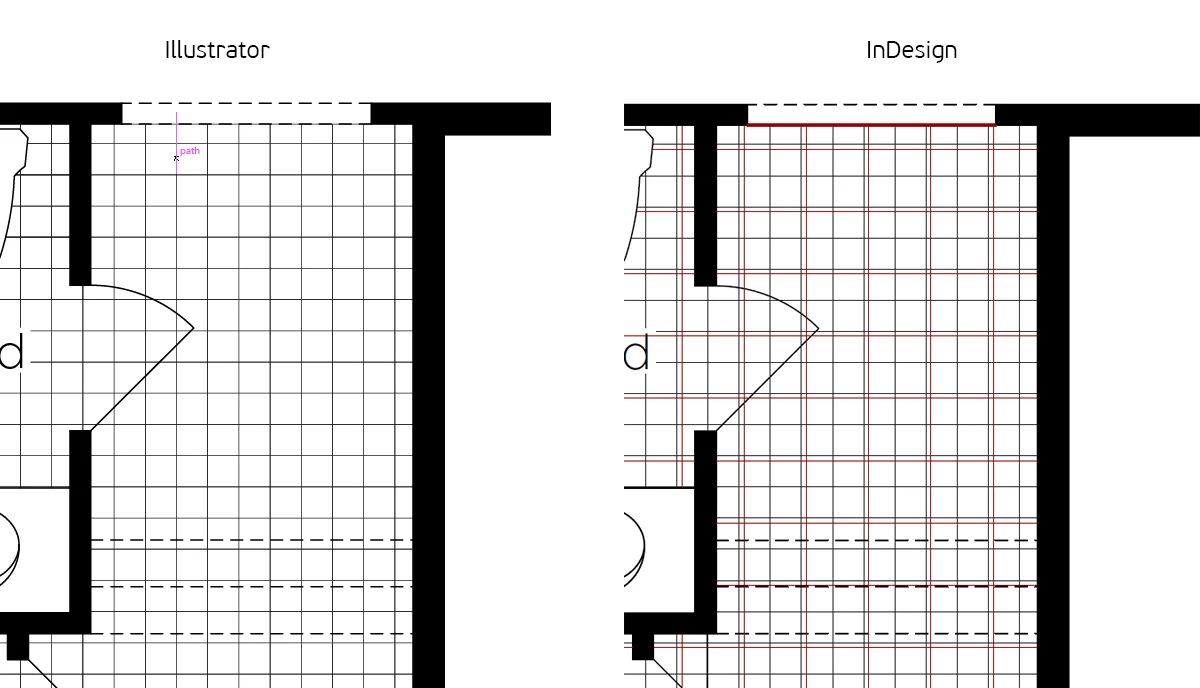
After that I wanted to put them in brochure created in InDesign. But these linked ai files shows with some extra red lines, that are not visible in original file. As I found out, these are some clipping masks lines created while importing dwg file to Illustrator, but for some reason they're shifted few millimiters.
It's strange to me that these red line aren't visible neither in Illustrator nor pdfs exported from Illustrator. But they appear in InDesign and pdfs created with it. Even when link pdf exported from Illustrator - there are no red lines while viewing it with Acrobat, but they appear in InDesign and pdf created with it.
I found out that I can remove these lines manually, but it would take hours as I have to select each line (these are actualluy little squares) and Select > Same is not helpful here.
Do you have any ideas why does it happen and how can I get rid of these lines in InDesign?
Thanks!
 AdChoices