Participating Frequently
May 7, 2025
Answered

Ajustar tamaño de texto a una caja de tamaño fijo

  • May 7, 2025
  • 2 replies
  • 1119 views

Hola buenos días
Tengo una caja de texto de tamaño fijo, y tengo que ir introduciendo difrentes textos, me gustaria que el texto tubiera una tamaño inicial de por ejemplo 20/22 pt y a medida que el texto se desborde fuera de caja, se vaya reduciendo el tamaño del texto automàticamente dependiendo de lo largo que sea ese texto.

Me explico un poco.
El ejemplo es para unos carteles de productos individuales, y la descripción varia mucho de unos a otros, en unos quizas simplemente pone PAN (imagen inicip.png), y en otros LAVAVAJILLAS ULTRACONCENTRADO PERFUME MARINO, y la caja de texto donde van a ir tiene sempre el mismo tamaño, me gustaria que PAN o descripciones similares (en número de caracteres) aparezcan a un cuerpo X pt y a medida que se amplien los caracteres de la descripción se vaya reduciendo el texto para que se desborde fuera de caja. Vaya que no quede como la imagen problema.png, y quede como resultado.png

Alguna idea?

Muchas gracias por vuestro tiempo!

Correct answer m1b

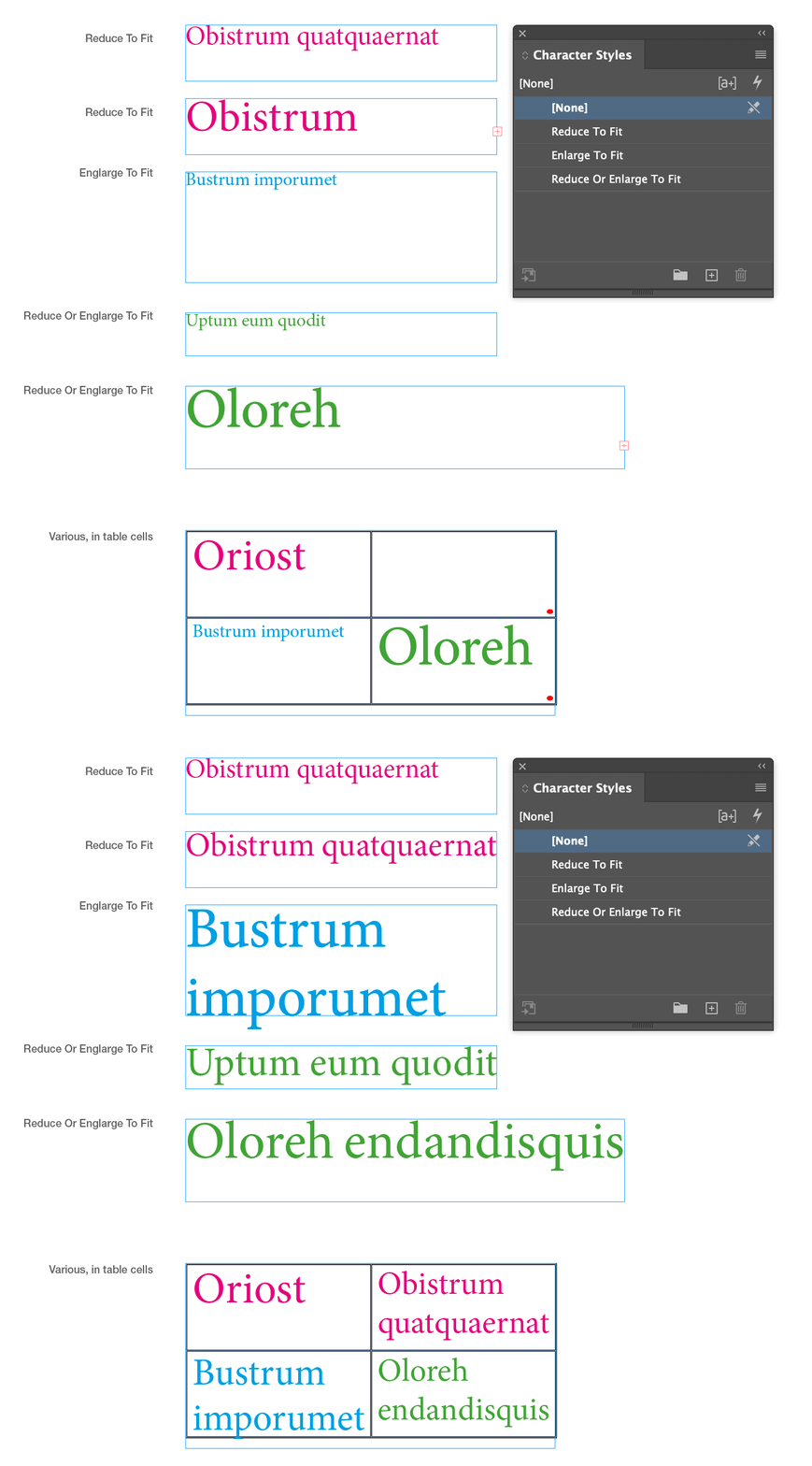
Hi @MMAJORAL, I've written a script to get you started. You have to put in the names of the character style(s). Let me know if it's useful. I've also attached a demo .indd so you can see it working.

- Mark
/**
 * @file Fit Text By CharacterStyle.js
 *
 * Usage:
 * 
 *  1. First configure the script by editing the `fittings` array.
 *     - each fitting object must have a `characterStyleName` property
 *       that matches a character style in the document.
 *     - each fitting object has switches for `enlargeToFit` and/or `reduceToFit`
 * 
 *  2. Run script - will search whole document for those-character-styled texts.
 *
 * @author m1b
 * @version 2025-05-08
 * @discussion https://community.adobe.com/t5/indesign-discussions/ajustar-tamaño-de-texto-a-una-caja-de-tamaño-fijo/m-p/15308760
 */
function main() {

    /** 
     * Edit the `fittings` array to suit your needs:
     *   - add or remove fittings objects
     *   - set the enlarge/reduce options on each fitting
     */
    var fittings = [

        // example fitting 1
        {
            characterStyleName: 'Reduce Or Enlarge To Fit',
            enlargeToFit: true,
            reduceToFit: true,
        },

        // example fitting 2
        {
            characterStyleName: 'Reduce To Fit',
            enlargeToFit: false,
            reduceToFit: true,
        },

        // example fitting 3
        {
            characterStyleName: 'Enlarge To Fit',
            enlargeToFit: true,
            reduceToFit: false,
        },
    ];

    var doc = app.activeDocument,
        counter = 0;

    for (var i = 0, style, found; i < fittings.length; i++) {

        style = getThing(doc.allCharacterStyles, 'name', fittings[i].characterStyleName);

        if (!style) {
            alert('Character Style "' + fittings[i].characterStyleName + '" not found.');
            continue;
        }

        app.findGrepPreferences = NothingEnum.NOTHING;
        app.changeGrepPreferences = NothingEnum.NOTHING;
        app.findGrepPreferences.properties = {
            appliedCharacterStyle: style,
        };

        found = doc.findGrep();

        foundLoop:
        for (var j = 0; j < found.length; j++) {

            if (!found[j].parent.hasOwnProperty('overflows'))
                continue foundLoop;

            if (fittings[i].enlargeToFit) {

                while (!found[j].parent.overflows) {
                    found[j].pointSize = found[j].characters[0].pointSize + 1;
                    found[j].parent.recompose()
                }

            }

            if (
                fittings[i].reduceToFit
                || fittings[i].enlargeToFit
            ) {

                while (found[j].parent.overflows) {
                    found[j].pointSize = found[j].characters[0].pointSize - 0.1;
                    found[j].parent.recompose()
                }

            }

            counter++;

        }

    }

    alert('Adjusted ' + counter + ' texts.');

};
app.doScript(main, ScriptLanguage.JAVASCRIPT, undefined, UndoModes.ENTIRE_SCRIPT, 'Do Script');

/**
 * Returns a thing with matching property.
 * If `key` is undefined, evaluate the object itself.
 * @author m1b
 * @version 2024-04-21
 * @param {Array|Collection} things - the things to look through.
 * @param {String} [key] - the property name (default: undefined).
 * @param {*} value - the value to match.
 * @returns {*?} - the thing, if found.
 */
function getThing(things, key, value) {

    for (var i = 0; i < things.length; i++)
        if ((undefined == key ? things[i] : things[i][key]) == value)
            return things[i];

};

 

2 replies

m1b
Community Expert
m1bCommunity ExpertCorrect answer
Community Expert
May 8, 2025

Hi @MMAJORAL, I've written a script to get you started. You have to put in the names of the character style(s). Let me know if it's useful. I've also attached a demo .indd so you can see it working.

- Mark

/**
 * @file Fit Text By CharacterStyle.js
 *
 * Usage:
 * 
 *  1. First configure the script by editing the `fittings` array.
 *     - each fitting object must have a `characterStyleName` property
 *       that matches a character style in the document.
 *     - each fitting object has switches for `enlargeToFit` and/or `reduceToFit`
 * 
 *  2. Run script - will search whole document for those-character-styled texts.
 *
 * @author m1b
 * @version 2025-05-08
 * @discussion https://community.adobe.com/t5/indesign-discussions/ajustar-tamaño-de-texto-a-una-caja-de-tamaño-fijo/m-p/15308760
 */
function main() {

    /** 
     * Edit the `fittings` array to suit your needs:
     *   - add or remove fittings objects
     *   - set the enlarge/reduce options on each fitting
     */
    var fittings = [

        // example fitting 1
        {
            characterStyleName: 'Reduce Or Enlarge To Fit',
            enlargeToFit: true,
            reduceToFit: true,
        },

        // example fitting 2
        {
            characterStyleName: 'Reduce To Fit',
            enlargeToFit: false,
            reduceToFit: true,
        },

        // example fitting 3
        {
            characterStyleName: 'Enlarge To Fit',
            enlargeToFit: true,
            reduceToFit: false,
        },
    ];

    var doc = app.activeDocument,
        counter = 0;

    for (var i = 0, style, found; i < fittings.length; i++) {

        style = getThing(doc.allCharacterStyles, 'name', fittings[i].characterStyleName);

        if (!style) {
            alert('Character Style "' + fittings[i].characterStyleName + '" not found.');
            continue;
        }

        app.findGrepPreferences = NothingEnum.NOTHING;
        app.changeGrepPreferences = NothingEnum.NOTHING;
        app.findGrepPreferences.properties = {
            appliedCharacterStyle: style,
        };

        found = doc.findGrep();

        foundLoop:
        for (var j = 0; j < found.length; j++) {

            if (!found[j].parent.hasOwnProperty('overflows'))
                continue foundLoop;

            if (fittings[i].enlargeToFit) {

                while (!found[j].parent.overflows) {
                    found[j].pointSize = found[j].characters[0].pointSize + 1;
                    found[j].parent.recompose()
                }

            }

            if (
                fittings[i].reduceToFit
                || fittings[i].enlargeToFit
            ) {

                while (found[j].parent.overflows) {
                    found[j].pointSize = found[j].characters[0].pointSize - 0.1;
                    found[j].parent.recompose()
                }

            }

            counter++;

        }

    }

    alert('Adjusted ' + counter + ' texts.');

};
app.doScript(main, ScriptLanguage.JAVASCRIPT, undefined, UndoModes.ENTIRE_SCRIPT, 'Do Script');

/**
 * Returns a thing with matching property.
 * If `key` is undefined, evaluate the object itself.
 * @author m1b
 * @version 2024-04-21
 * @param {Array|Collection} things - the things to look through.
 * @param {String} [key] - the property name (default: undefined).
 * @param {*} value - the value to match.
 * @returns {*?} - the thing, if found.
 */
function getThing(things, key, value) {

    for (var i = 0; i < things.length; i++)
        if ((undefined == key ? things[i] : things[i][key]) == value)
            return things[i];

};


MMAJORALAuthor
Participating Frequently
May 13, 2025

Genial em funciona, però hi hauria alguna manera de poder aplicar el script automàticament a una sola caixa del document de indd quan el text es desbordi? no se si per grep existeix algun metode d'enllaçar script amb caixes de text debordades…
Moltes gràcies

Robert at ID-Tasker
Legend
May 13, 2025

@MMAJORAL


Are you a Windows user and need to automate more things like that?


My tool isn't free - but then you don't have to be a coder to create Tasks - just be able to "write down" your manual steps. 


If you're interested - I can give you access to the full version for free for a few days. And will help you to create Tasks. 


Mike Witherell
Community Expert
Community Expert
May 7, 2025

Hola! Majoral,

Watch this Colecandoo video. He explains the use of passive GREP styles.

https://www.youtube.com/watch?v=TFzWt_hrS-A

In the youtube video notes, you can download his PDF example. Inside the PDF he has also attached the example .indd file which contains the GREP style built into the paragraph style, as well as the Character Styles that activate according to the number of characters.

This is perfect for you.

Mike Witherell
MMAJORALAuthor
Participating Frequently
May 13, 2025

És un bon metode, molt elaborat,  seria una primera setmana de feina i després aplicar repetidament, amb la feina feta. Gràcies