Known Participant
March 30, 2023
Answered

alert the story

  • March 30, 2023
  • 6 replies
  • 802 views

Hello all,

        I have a doubt.

        I have 5 different texframes with some text on it.

        How to alert the stories one by one using java script?


  Thanks in advance!

   

This topic is closed to new replies. Start a new post to keep the conversation going.
Correct answer Laubender

Hi @John_devs ,

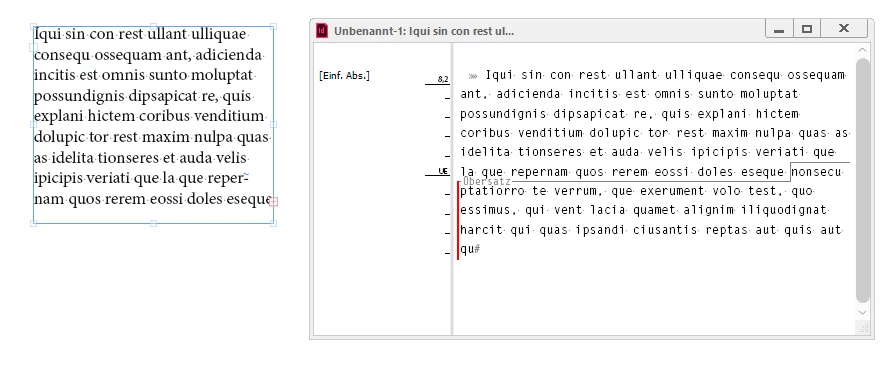
how about using a Story Editor window?

Select the frames and just hit Cmd + y (Mac) or Ctrl + y (Windows) on the keyboard.

You would be able to see overset text as well.


From my German InDesign:
 

Regards,
Uwe Laubender
( Adobe Community Expert )

6 replies

LaubenderCommunity ExpertCorrect answer
Community Expert
April 1, 2023

Hi @John_devs ,

how about using a Story Editor window?

Select the frames and just hit Cmd + y (Mac) or Ctrl + y (Windows) on the keyboard.

You would be able to see overset text as well.


From my German InDesign:


Regards,
Uwe Laubender
( Adobe Community Expert )

John_devsAuthor
Known Participant
April 3, 2023

thanks for the effort @Laubender ..., It helped.

TᴀW
Legend
March 31, 2023
var myStories = document.stories;
for (var i = 0; i < myStories.length; i++){
    alert(myStories[i].contents);
}
id-extras.com | InDesign tools & scripts for typesetters, form designers, and translators
John_devsAuthor
Known Participant
March 31, 2023

It worked, thanks buddy!

Known Participant
March 30, 2023

Would you post your script?

John_devsAuthor
Known Participant
March 31, 2023
myDoc = app.activeDocument;

myStory = myDoc.stories.everyItem().contents;

for (var i =0; i<myStory.length ;i++)
{
    alert(myStory);  
}
if i run this, i can not get the text inside the textframes instead of  i only get the [stories object] could  you guide me !