Answered
Align alphabet by alphabet
Dear Expert,
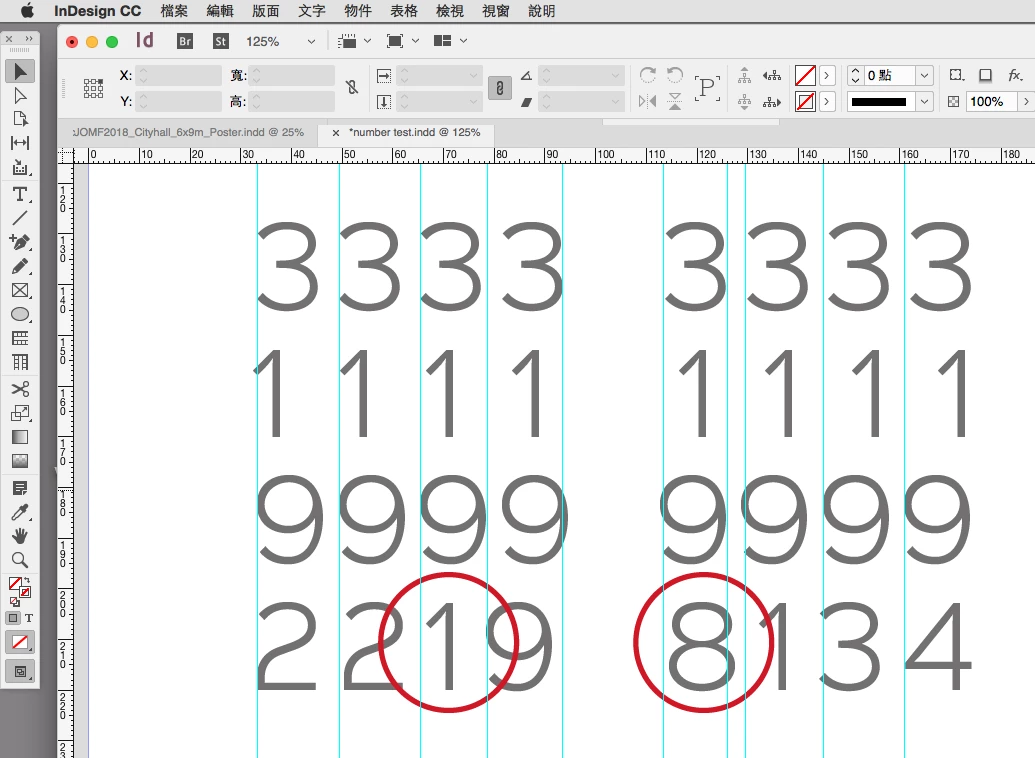
My client need align their tel and fax alphabet by alphabet.
Open type font: Sinkin Sans 300 light
Who can do that, or indesign cannot do that?
Thanks
James

Dear Expert,
My client need align their tel and fax alphabet by alphabet.
Open type font: Sinkin Sans 300 light
Who can do that, or indesign cannot do that?
Thanks
James
InDesign cannot do this for you.
If you are in luck, this font supports both "tabular" (same width) and "proportional" digits (your "alphabetics" more usually means "a to z".), and "proportional" is just the default chosen by its designer. Select some digits and check the OpenType submenu in the Character panel menu. At the bottom you will typically see "Default Figure Style" selected. If "Tabular lining" is available, choose that and see if it fixes this issue.
If not:
Option 1: use kerning to manually align the digits
Option 2: use a font that does have tabular digits.
Already have an account? Login
Enter your E-mail address. We'll send you an e-mail with instructions to reset your password.
 AdChoices