
Known Participant
October 21, 2019
Answered

Align image to frame edge

  • October 21, 2019
  • 4 replies
  • 3579 views

I have an image that is smaller than the frame it is in. I would like to simply use the align tools to align the right edge of the image against the right edge of the frame. If I could select the frame and the image I could use the align selected option, but I cannot. What is the best way to achieve this so that if I have multiple image within a frame they an all be aligned in one step?
 

    Correct answer Barb Binder

    "...is it better to simply make the frame fit the size of the image and then use the align tools on the frame itself, aligning it to other objects, guides etc?"

    Yes.


    ~Barb

    4 replies

    John Mensinger
    Community Expert
    Community Expert
    October 21, 2019

    "I would like to simply use the align tools to align the right edge of the image against the right edge of the frame. If I could select the frame and the image I could use the align selected option, but I cannot."

    Right, it's simply not intended to work that way. The frame in which the image resides is the dedicated "vehicle" for that image; there is really no reason to design within it. You can't position anything else wthin that frame, so what is the value of having the frame larger than its contents, and subsequently, what is the value of aligning its contents with its edge? They are effectively one entity, so unless you want to use the frame to crop the image (which ostensibly isn't the case), just fit it to the image and align to other objects, guides, grid, page, spread, etc., as desired.


    Known Participant
    October 21, 2019

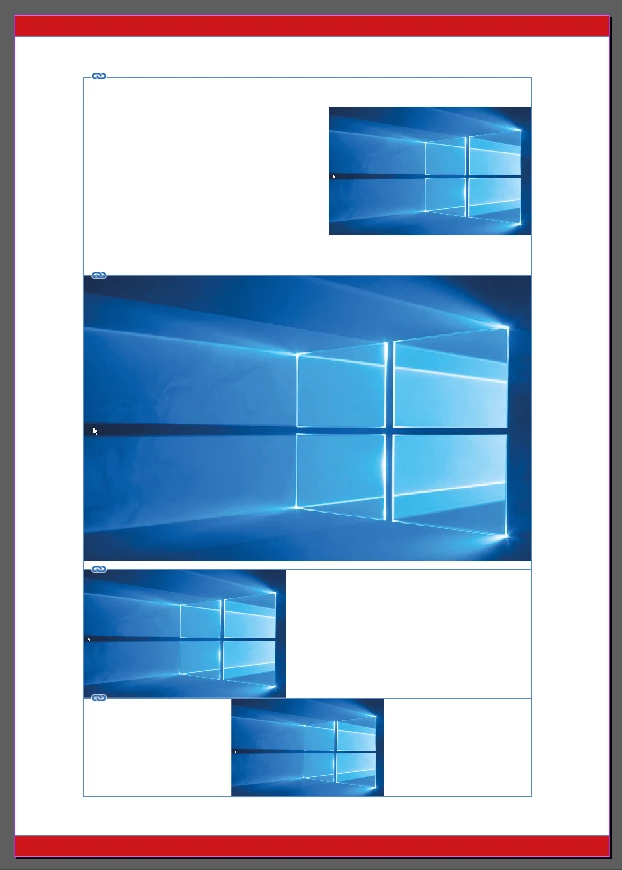
    Hi John ok that helps a lot, it appears frames are not what I am looking for, if you could recommend how to achieve the following please. I have udated my question with the entire page for more context. Essentially what I am trying to do is setup a responsive grid/layout on the page so that I can then insert the content and adjust the different layout cells/boxes as required.


    For example with the text frame you can easily align text to the left, center or right edges of the frame with the dedicated align text buttons, and I had assumed you could do a similar thing with images inside an image frame, so it sounds like that that is not possible and you can only align images manually inside frames?

    So referring to the screenshot of the entire page, if I select the top most image in its frame (align right edges at the moment), I am looking for a way to be able to use the align tools to align the image to the right, center, bottom etc since moving it manually each time is less precise and tedious. However from what you are saying, is it better to simply make the frame fit the size of the image and then use the align tools on the frame itself, aligning it to other objects, guides etc?

    Known Participant
    October 22, 2019

    "...is it better to simply make the frame fit the size of the image and then use the align tools on the frame itself, aligning it to other objects, guides etc?"

    Yes.


    ~Barb


    Thank you Barb

    Participating Frequently
    October 21, 2019

    Hi,

    I think you can not have multiple images within one frame, unless you group them and then insert them in the frame.

    It is a bit unclear of what you are trying to achieve.

    Some more information would help.

    thnx

    Known Participant
    October 21, 2019

    Ah ok, so by placing a group of images inside a frame they can all be aligned at the same time, that helps. But if I need to place multiple images inside a "container" section (eg. header with bg image, logo image) and want a fast way to play around with the different alignment combinations (eg. bg image aligned left and logo aligned right, vs bg image aligned right and logo aligned left etc) is it best just to align the frames the images are in to other objects, guides etc and not try to place all the images into a single frame?

    Sunil Yadav
    Legend
    October 21, 2019

    Select Image inside frame and make x-axis value "0". Like this :


    Image will align left to that frame in which it is.

    Otherwise just make that frame fit to content like this:

    Right click on frame after selecting it and choose option "Fitting"-->"Fit Frame to Content" click this option:


    Best

    Sunil

    Known Participant
    October 21, 2019

    This only works for aligning left edges and centering though, it doesn't work for any of the other alignment options:

    Sunil Yadav
    Legend
    October 21, 2019

    Are those images placed outside frame or achored in that text frame?

    Some screenshots would be more easy to understand your concern...!


    Sunil

    Known Participant
    October 21, 2019

    I have a frame with an image in it. Screenshot added