Inspiring
June 5, 2024
Answered

align text to baseline grid

  • June 5, 2024
  • 4 replies
  • 1347 views

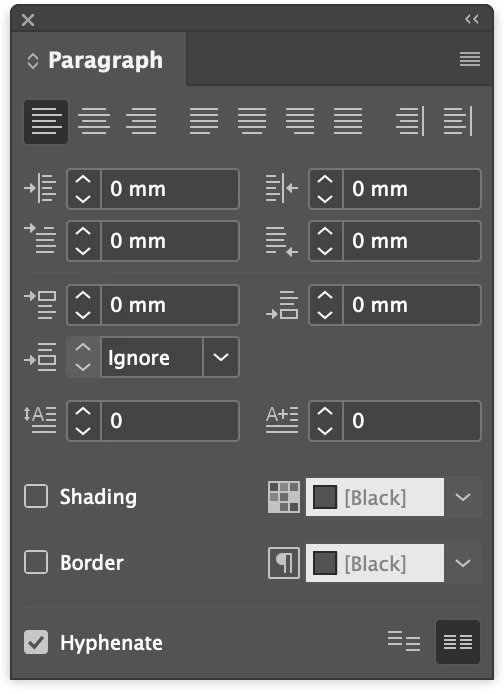
I constantly forget where the "align text to baseline grid" is. According to Adobe's Help it's in the paragraph menu (where it should be) but it's not. Where do I find it? Thanks!

This topic has been closed for replies.
Correct answer _Andy.White_


For a one off text box it's in the control panel at the top of the screen or at the base of the para panel... if you are using para styles you can assign it in the para style options under 'Indents and Spacing' – Align to grid

4 replies

Inspiring
June 5, 2024

Thank you!

Barb Binder
Community Expert
Community Expert
June 5, 2024
quote

According to Adobe's Help it's in the paragraph menu (where it should be) but it's not. 


By @Grundoon Groundhog


Hi @Grundoon Groundhog!


It's been a while. Hope you've been well. The helpx files can be wrong so I checked. I think your mind read menu where it correctly says panel. 😉 Plus it's also a paragraph style attibute, as per @TᴀW.


~Barb


https://helpx.adobe.com/indesign/using/aligning-text.html

~Barb at Rocky Mountain Training
Inspiring
June 5, 2024

Thanks, Barb. I didn't realize those were different things (you'd think I'd know by now). I've never had as much trouble as I'm having with this project. 

Hope you are well and happy.

Barb Binder
Community Expert
Community Expert
June 5, 2024

Oh, I'm sorry it's been so difficult. Let us know when we can help!


~Barb

~Barb at Rocky Mountain Training
_Andy.White_Correct answer
Participant
June 5, 2024


For a one off text box it's in the control panel at the top of the screen or at the base of the para panel... if you are using para styles you can assign it in the para style options under 'Indents and Spacing' – Align to grid

TᴀW
Legend
June 5, 2024


Visit www.id-extras.com for powerful InDesign scripts that save hours of work — automation, batch tools, and workflow boosters for serious designers.
