Known Participant
December 19, 2017
Answered

Alignment issue when aligning large font-sized text

  • December 19, 2017
  • 4 replies
  • 721 views

Hi, hoping someone can help with this...it's been bugging me for ages.....

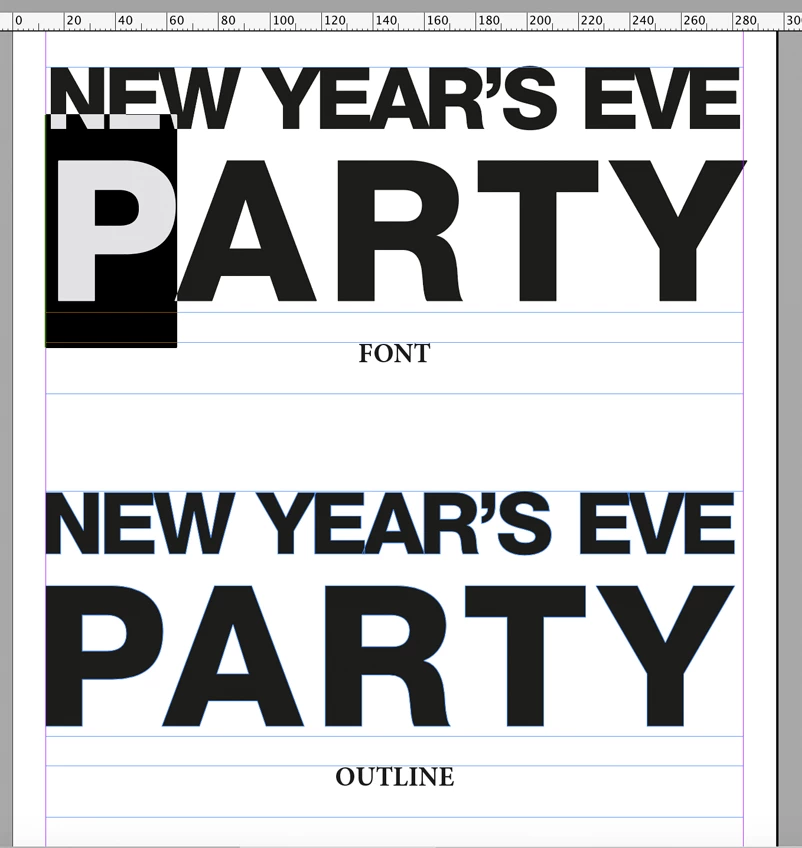
When I full-justify text for poster work, the text doesn't always align properly when using different font-size per line -in screenshot below "PARTY" isn't sitting right, there is space before the "P" and the "Y" extends over the right edge of the text frame. I have looked at text frame options, but not seeing anything I can tweak. anyone have a solution other than splitting the lines of text into separate frames and manually adjusting frames?

many thanks

A3 -  20mm margins - Helvetica 85 Heavy

Font size by line:
95 pt
217 pt
33 pt

26 pt

21 pt
This topic has been closed for replies.
Correct answer cinziamarotta

The alignment depends on the space occupied by the typeface. As you can see from the image, if you convert the text into outlines the alignment is perfect. You can solve the problem with separate text frames aligning with guides or converting the text (TYPE > Create outlines).

4 replies

Sean5CF1
Inspiring
May 15, 2023

Hi 

Why is this the correct answer?

Sure it solves the problem, but surely aligning any text should be a basic feature without having to converting it?

What happens when i need to edit the text? Unconvert it, edit, reconvert?

This is software failure


rob day
Community Expert
Community Expert
December 19, 2017
cinziamarotta
cinziamarottaCorrect answer
Participating Frequently
December 19, 2017

The alignment depends on the space occupied by the typeface. As you can see from the image, if you convert the text into outlines the alignment is perfect. You can solve the problem with separate text frames aligning with guides or converting the text (TYPE > Create outlines).

hammer0909
Community Expert
Community Expert
December 19, 2017

I run into the same thing. I think it has to do with the kerning area around each character but I could be wrong. I usually get around this by aligning the text to the center and then adjusting kerning/tracking to fine tune the alignment.