Participant
November 6, 2018
Answered

All my InDesign pdfs have changed to Illustrator documents

  • November 6, 2018
  • 1 reply
  • 339 views

Not sure if this is the right place to put this but after the small update to Illustrator 2019 a few days ago, all my pdfs that have been created in InDesign have changed to Illustrator documents and when you click to open them try to open in illustrator? How to I get them back to viewing in Preview. Preview is still showing as the default. Any ideas?
    This topic has been closed for replies.
    Correct answer Bill Silbert

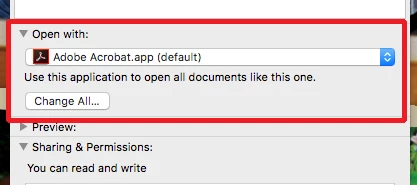
    To fix this on a Mac for all of your pdfs go to File>Get Info (Command-i) and set the "Open with:" to Acrobat (or Preview if you insist—Bob's right Preview is a very poor pdf viewer) and hit the Change All button to make this the default for all pdfs. See screen shot:

    1 reply

    BobLevine
    Community Expert
    Community Expert
    November 6, 2018

    This is not an InDesign, it’s an operating system issue. Change the file association and I highly recommend choosing Acrobat. Preview is a horrible PDF reader.

    Participant
    November 6, 2018

    But why did it only happen after the Illustrator update. PDFs created in non adobe apps are all displaying as usual. It still says that Preview is the default browser. All adobe created pdfs going back years have changed.

    Bill Silbert
    Community Expert
    Bill SilbertCommunity ExpertCorrect answer
    Community Expert
    November 6, 2018

    To fix this on a Mac for all of your pdfs go to File>Get Info (Command-i) and set the "Open with:" to Acrobat (or Preview if you insist—Bob's right Preview is a very poor pdf viewer) and hit the Change All button to make this the default for all pdfs. See screen shot: