
davecourtemanche
Inspiring
May 15, 2025
Answered

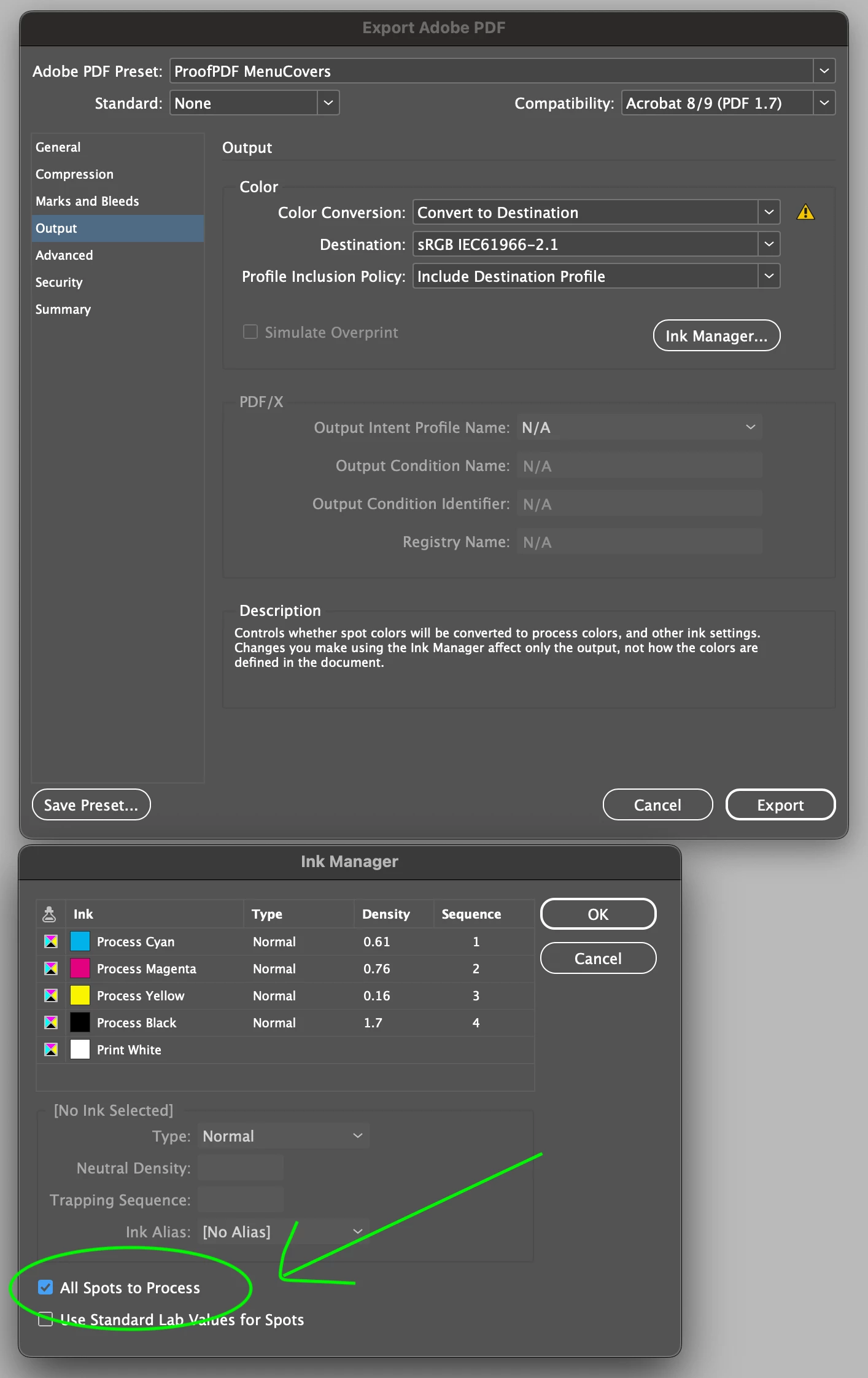
All Spots To Process as part of saved PDF export preset

  • May 15, 2025
  • 5 replies
  • 656 views

Is it possible to have All Spots to Process stick as part of a PDF export preset?

Correct answer Laubender

To filter the export event, script should be executed only when PDFs are exported, see this script code snippet by Manan Joshi:

#targetengine "session"
app.eventListeners.add("beforeExport",
        function ex(e){
			alert(e.format)
})

See source:

https://community.adobe.com/t5/indesign-discussions/an-event-listener-before-exporting-to-pdf/m-p/13020413#M481591


Regards,
Uwe Laubender
( Adobe Community Expert )

5 replies

davecourtemanche
Inspiring
June 3, 2025

Thanks all for the feedback. I was just looking at the request as part of the export pre-set, not running a script, converting in Acrobat or using the checkbox in the Ink Manager settting. I've added a feature request, for what it's worth. 

Community Expert
June 3, 2025

Well in case it's not obvious - the answer is no.

The only way I could do it is by exporting to Interactive PDF which would do it  and doesn't require a script.


I offered a script for a double click or assign a shortcut to it as a offering to make it easier.


Others have created more robust scripts that does it. 


So you can make an interactive PDF - either manually or using my attempt of a script

Use one of the scripts posted here. 

Or convert in Acrobat after you export

Or convert swatches before making a PDF. 

Or I think someone mentioned using the ink manager also. 


So there's no direct way - but if you need it it can be done. 

You could be a while waiting for a solution from Adobe.

Community Expert
May 16, 2025

If you export to PDF Interactive then you won't have to do any conversion, spots are automatically changed - in my tests anyway.


File>Export>PDF Interactive from the drop down. 


It's a menu proof setting by your name in the setings - so this would make it all RGB. 


Does that help?


A script can do it for your proofs so you don't have to remember toggle to interactive pdf each time. 


// InDesign JavaScript (ExtendScript)
if (app.documents.length !== 0) {
    var doc = app.activeDocument;

    // Prepare default file name: DocumentName_proof.pdf
    var baseName = doc.name.replace(/\.indd$/i, "");
    var defaultName = baseName + "_proof.pdf";

    // Prompt for save location with default name
    var pdfFile = File.saveDialog("Save Interactive PDF", defaultName);

    if (pdfFile !== null) {
        // Clean up document metadata to avoid "Proof" titles
        doc.metadataPreferences.documentTitle = baseName;
        doc.metadataPreferences.author = "";
        doc.metadataPreferences.description = "";

        // Set export options
        var pdfExportPreset = app.interactivePDFExportPreferences;
        pdfExportPreset.pageRange = PageRange.ALL_PAGES;
        pdfExportPreset.exportReaderSpreads = false;

        // Ensure file has .pdf extension
        if (!/\.pdf$/i.test(pdfFile.name)) {
            pdfFile = new File(pdfFile.fsName + ".pdf");
        }

        // Export to interactive PDF
        doc.exportFile(ExportFormat.INTERACTIVE_PDF, pdfFile, false);
        alert("Exported to Interactive PDF:\n" + pdfFile.fsName);
    }
} else {
    alert("No document open. Please open an InDesign document first.");
}
Brad @ Roaring Mouse
Community Expert
Community Expert
May 16, 2025

I personally just do the switch in the Ink Manager in InDesign before export. You can always toggle back to spots (as a whole or selectively) if you need them spot for another purpose.

Robert at ID-Tasker
Legend
May 15, 2025

Or done in Acrobat? 


leo.r
Community Expert
Community Expert
May 15, 2025

Can't be done in the UI (as far as I know).


Can probably be done with a script that's invoked "on export".

LaubenderCommunity ExpertCorrect answer
Community Expert
May 24, 2025

To filter the export event, script should be executed only when PDFs are exported, see this script code snippet by Manan Joshi:

#targetengine "session"
app.eventListeners.add("beforeExport",
        function ex(e){
			alert(e.format)
})

See source:

https://community.adobe.com/t5/indesign-discussions/an-event-listener-before-exporting-to-pdf/m-p/13020413#M481591


Regards,
Uwe Laubender
( Adobe Community Expert )