
Inspiring
April 2, 2026
Question

Alt Text popup keeps appearing on image placement even after disabling in Preferences (InDesign 21.3)

  • April 2, 2026
  • 3 replies
  • 21 views

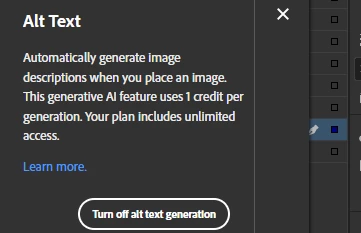
I am getting this notification whenever I drag and drop image into InDesign. This has started coming up ever since I updated to version 21.3. It is very annoying. When I close it and drag and drop another image, it comes again. 
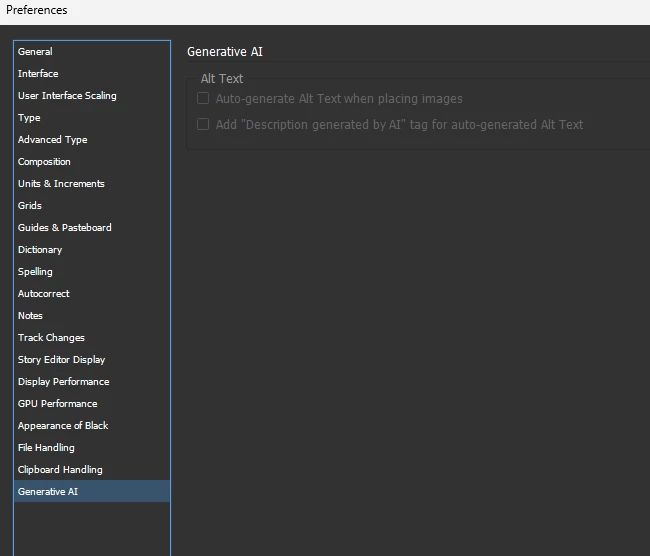
I have turned off this feature but this popup appears the moment I bring any image in any document. What should I do to permanently disable it?
 

    3 replies

    Abhishek Rao
    Community Manager
    Community Manager
    April 2, 2026

    Hi @Mike_Red,


    Sorry to hear that you're experiencing this issue, I understand how annoying that can be. From your screenshot, it looks like the Generative AI settings in Preferences are greyed out. Could you please confirm if that's the case on your end? If yes, please try closing InDesign completely, then reboot your machine and relaunch InDesign. After that, check if the Preferences are accessible again. Once they are, disable the Alt Text generation options and test if the popup still appears when placing images.

    Also, I wanted to let you know that this behavior has been logged as a bug and the product team is currently working on a fix. I'll keep you posted here as soon as I have any updates to share. You can also follow the discussion here: 


    Let me know how it goes after trying the steps. Looking forward to your update.

    Abhishek

    Mike_RedAuthor
    Inspiring
    April 3, 2026

    Hi ​@Abhishek Rao . The options are greyed out indeed. I tried closing InDesign and rebooting my machine but the issue of alt text popup still comes. I hope this bug gets resolved. I’m curious to know, why you shared the link of this same discussion here?

    Abhishek Rao
    Community Manager
    Community Manager
    April 3, 2026

    Hi ​@Mike_Red,


    Apologies for the mix-up earlier, and thanks for flagging that. I’ve now corrected the link in my previous message.

    Appreciate your patience while we continue to look into this issue. I’ll be sure to share any updates here as soon as I have more information.


    Thanks again for your understanding and do let me know if you notice anything new in the meantime.

    Abhishek 

    Participating Frequently
    April 2, 2026

    This is a common issue. It is coming at my end as well. 

    Mike_RedAuthor
    Inspiring
    April 2, 2026

    I am getting this notification whenever I drag and drop image into InDesign. This has started coming up ever since I updated to version 21.3. It is very annoying. When I close it and drag and drop another image, it comes again. 

    I have turned off this feature but this popup appears the moment I bring any image in any document. What should I do to permanently disable it?


    I have made another post also regarding this. I am unable to edit the heading of that post. So I request the moderators to delete that post.