Inspiring
August 20, 2014
Answered

alternate row shading in tables

  • August 20, 2014
  • 3 replies
  • 1166 views

Hi,

I am working in financial tables. the tables having alternate row colours.

I have applied cell styles to all table body rows. In additionally  i need alternate row colors in all tables, in table style alternate row option not working. but once i remove the cell styles in body rows it will working.

Can any one please give me a solution regarding this issue?
This topic has been closed for replies.
Correct answer VeluVK

Hi,

I am working in financial tables. i need script for the below requirement. any one suggest.

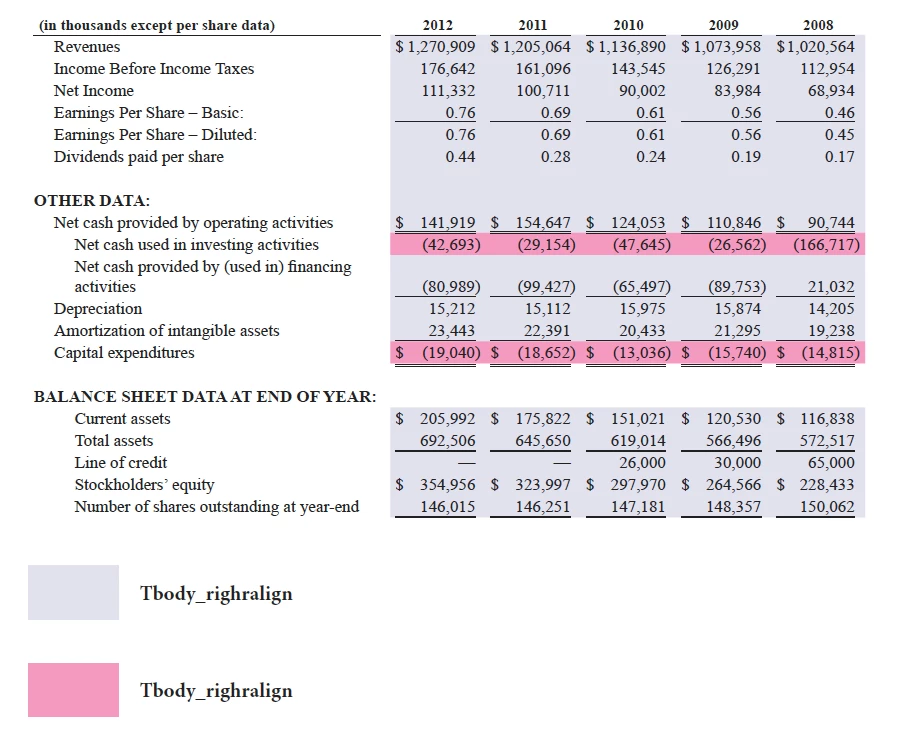
For all tables from second column onwards ""Tbody_rightalign" paragraph style. and all parenthesis values should be "Tbody_bracket" style, but these changes to be omitted in first rows because column head having separate style.

3 replies

VeluVKAuthor
Inspiring
August 22, 2014

I am working in financial tables. i need script for the below requirement. any one suggest.

For all tables from second column onwards ""Tbody_rightalign" paragraph style. and all parenthesis values should be "Tbody_bracket" style, but these changes to be omitted in first rows because column head having separate style.

Grey should be Tbody_rightalign style.

Pink color should be Tbody_bracket style.

Any one help me pls. i am having 150+ tables.

Thanks,

Velu

VeluVKAuthorCorrect answer
Inspiring
August 22, 2014

Hi,

I am working in financial tables. i need script for the below requirement. any one suggest.

For all tables from second column onwards ""Tbody_rightalign" paragraph style. and all parenthesis values should be "Tbody_bracket" style, but these changes to be omitted in first rows because column head having separate style.

Chinnadk
Legend
August 20, 2014

Try this,

var doc = app.activeDocument,

    _tables = doc.stories.everyItem().tables.everyItem().getElements();

for(var i =0;i<_tables.length;i++)

{

        var _rows = _tables.rows;

        for(var j=1;j<_rows.length;j+=2)

        {

                _rows.fillColor = doc.colors.item("red");

            }

    }

Regards,

Chinna

Trevor:
Legend
August 21, 2014

I think this is what you want

var doc = app.documents.add(),

    tf = doc.pages[0].textFrames.add({

        geometricBounds: ["12.7mm", "12.7mm", "100mm", "197.3mm"],

        contents: "Head 1\tHead 2\tHead 3\r1a\t1b\t1c\r2a\t2b\t2c\r3a\t3b\t3c\r4a\t4b\t4c\r5a\t5b\t5c"

        }),

    myTable = tf.texts[0].convertToTable();

myTable.rows[0].rowType = RowTypes.headerRow;

myTable.alternatingFills = AlternatingFillsTypes.alternatingRows;

myTable.startRowFillColor = doc.colors.itemByName("Magenta");

myTable.startRowFillTint = 60;

myTable.endRowFillColor = doc.colors.itemByName("Cyan");

myTable.endRowFillTint = 50;

Trevor

Trevor:
Legend
August 21, 2014

P.s. for all the tables etc. use doc = app.activeDocument and myTable(s) = doc.stories.... as per China's example

I was just showing how to do the alternating bit in the snippet above