
Amazon KDP paperback proof - margins not good
Hi, I have just received my paperback print proof from Amazon/KDP for my first book that I designed in InDesign. I followed their online specifications for a book of my size and page numbers, including margins. Unfortunately, with the proof copy they’ve sent me in the mail, it's very hard to read the text on the inside pages next to the spine as the margin isn’t big enough. Also, the outside margin looks unprofessionally small.
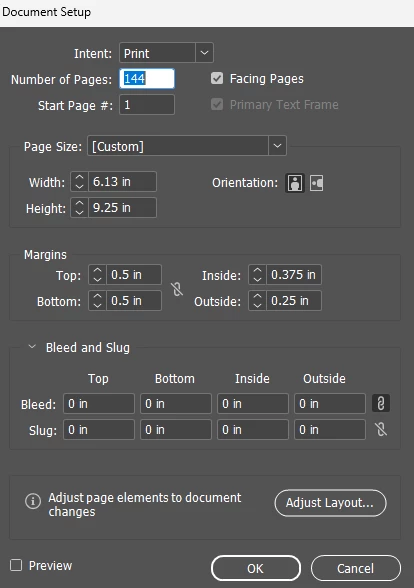
When I designed my book, it started out as 6 x9 inches with 144 pages. I set the top and bottom margins to 0.5 inches. Then I set the other margins as per KDP's online guide (screenshot below): inside 0.375 inches and outside 0.25 inches. There’s no bleed as my content doesn’t extend over the margins. I don’t have columns.
When KDP online wouldn’t accept the book when I uploaded it, I spoke to a KDP agent in chat and he told me to increase the book size to 6.13 x 9.25 inches and to leave the margins as I had them. After receiving the proof, I contacted them today via online chat to ask why it looked so bad. They told me the manuscript size should be: 6.125 x 9 inches. This agent also told me at one point in the chat it was correct to have no bleed then later said there should be bleed, so I am hoping to get a more definitive answer here.
As a newbie, I’m now so confused I don’t know how to move forward. Please can you tell me what size I should increase the margins to? Should I leave the book size at 6.13 x 9.25 inches since KDP did accept that.
The first screenshot below is KDP’s specs for a book my size. Then a screenshot of my document setup.
KDP specs

My setup


 AdChoices