Known Participant
September 6, 2022
Answered

Amazon Kindle Direct Publishing (KDP) rejects print file for book with Adobe Font

  • September 6, 2022
  • 4 replies
  • 7792 views

My design studio designed and formatted a book for a self-published author using InDesign and two fonts, one being an Adobe Font (Linux Libertine and Aaux Next). We provided the author with a print PDF in CMYK to upload. We have an active Adobe Cloud subscription for anyone using the files. We've designed and had dozens of books printed and never ran into this issue Amadon Kindle Direct Publishing (KDP) presented


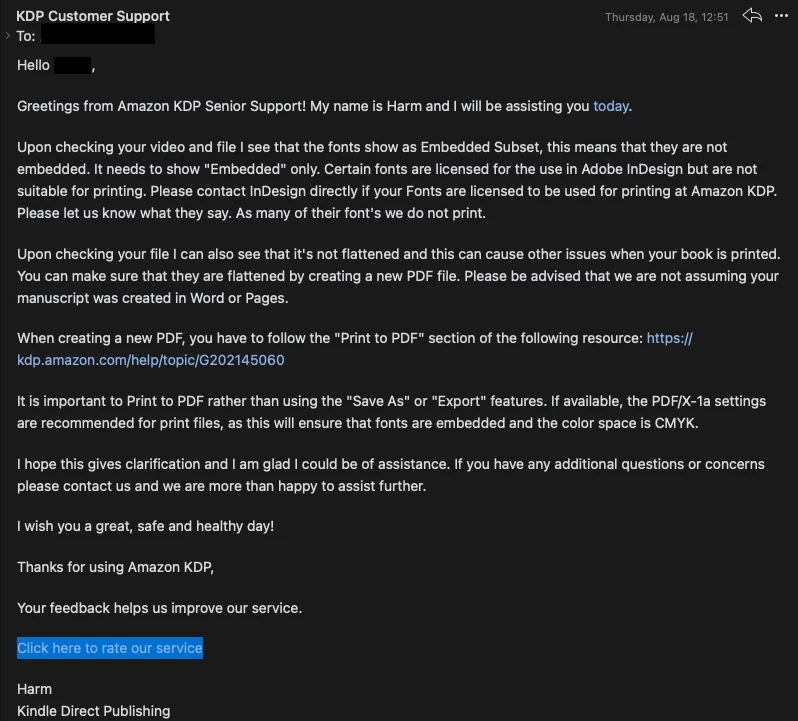
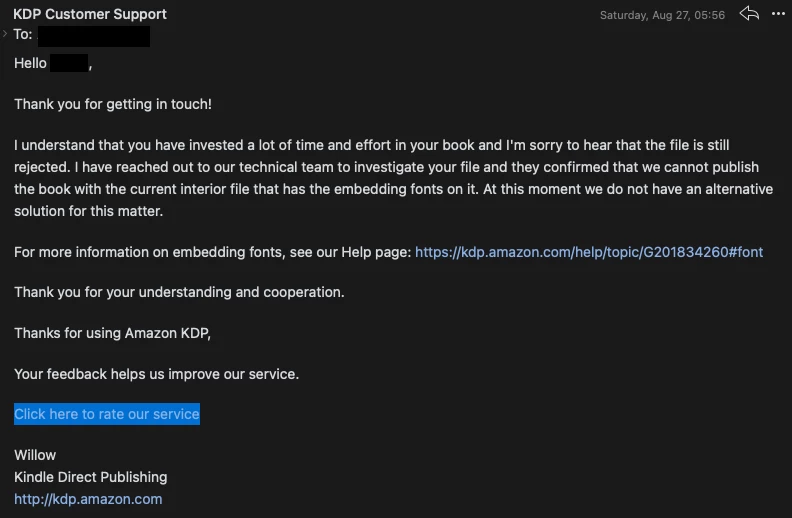
The author has spent the last several weeks going back and forth with KDP support about the proper file format they need and the Adobe Font used. KDP support told the author they couldn't print his book because KDP doesn't hold the license to the Adobe Font. 🙎


Amazon KDP support responses seem to contradict Adobe documentation on font licensing for printed books unless they're considered a print bureau. Even if they are that, we didn't provide packaged files so that wouldn't apply to this situation right?


https://helpx.adobe.com/fonts/using/font-licensing.html#act-comm

https://helpx.adobe.com/fonts/using/font-licensing.html#act-pdf


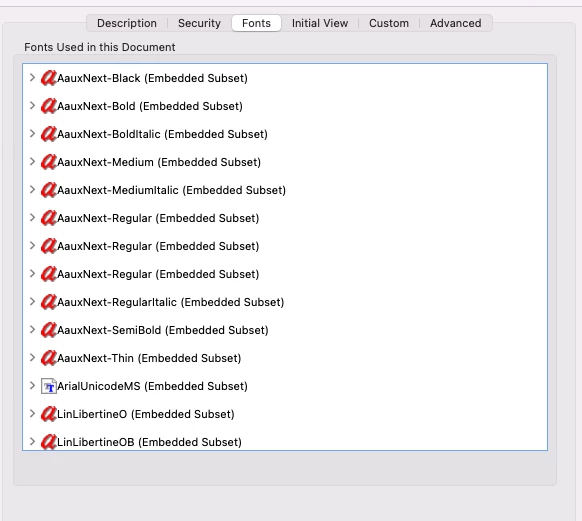
1. Amazon KDP claims that fonts that say "Embedded Subset" aren't actually embedded and may not print correctly. In Acrobat when viewing the Properties > Fonts panel, all fonts show as "Embedded Subset".

https://www.adobe.com/uk/acrobat/resources/embed-fonts-in-pdf.html


2. Amazon KDP claims they are a print bureau and referenced this page: https://helpx.adobe.com/fonts/using/package-font-files.html. They claim they must have the license to the Adobe Fonts to print the book. We did not provide packaged files from InDesign. Only a PDF.


3. Amazon KDP mentioned the PDF x/1-a format and a flattened file. We provide a file in that format.


In Acrobat we used the Print Production Tool > Flattener Preview to convert all text to outlines using the '100' setting for raster. Is changing that to 0 so all text is converted the only way to use a custom font with Amazon KDP? Rasterizing the entire book? It is just black text on the interior and very few images, but still, it seems ridiculous to have to do that.


Has anyone else run into this issue with Amazon KDP for a print version of a book? This book is scheduled to release later this month and right now won't print with the custom fonts.


The author gave up and changed the fonts (every designer's nightmare) instead of attempting to use a fully rasterized PDF made from Acrobat with the raster setting on '0'


I also love KDP's resources that all reference how to use MS Word to format your book... 🙄


Help!
Correct answer MooksGoo_howdy

Just to pile on, KDP is 95% bots and about 4.8% human staff that is, from all evidence, both ESL and working from a rigid playbook. Communication is extremely difficult and answers outside the bot-generated errors and (often outdated and incomprehensible) playbook/interaction guide are not seen.


But yes, the above is contradictory and meaningless gibberish. The trick, as always, is to find out what's really causing the problem and fix it. (That is, your car might overheat for five different reasons; just because your onboard system says your coolant is low may or may not be any factor.)


The extremely odd specificity (that the font fault is on page 11, for example) indicates to me that the real problem lies elsewhere. Something is tripping a bot's rules, but what's being reported is collateral or coincidental or just plain secondary.


It's not really possible to do more than guess at fixes without seeing the source, which I don't know if you're willing to share (even privately). But one thing you might try is to NOT subset fonts; that's a very reasonable practice, but in a PDF for a destination as fussy as KDP there might be, say, stray or hidden characters whose glyphs are omitted, triggering the "not embedded" or "not licensed" warnings.


And even simple graphics out of AI can be... too complicated for print export, with too many layers, wrong color modes, transparency issues etc. Everything you place in a project for export to PDF for print should be the simplest, most-reduced form to avoid these secondary issues. (You don't say whether this is B+W or color, either — color, of course, adds more problems.)


SOLVED!

Just a little update: My book is a coloured paperback (not Kindle). I finally embedded all the fonts, which was a big fat faff! I unchecked ‘ligatures’ in the character panel for all paragraph styles and the master pages. Also, PDFs saved from Illustrator and imported into InDesign brought in the fonts too, so I outlined them for ease.


KDP’s ‘dense vector graphics’ flag was silly. Even underlined text with colour is considered a vector! I didn’t change much as that’s the design.


When exporting the PDF, KDP prefers the preset ‘PDF/X-1a:2001’ (I’ve never used this setting before). Then, under ‘Advanced', ‘Subset fonts when percent of characters used is less than..' and change it to 0%. By doing all of the above actually massively reduced my PDF file size.


To check fonts are embedded and the print file is good to go, open the print-ready PDF in Acrobat. Go to File, Document Properties, Fonts. They should all say Embedded. Then, go to Print Production under Tools (on the left hand side for me - I’m using a Mac) and click Preflight to analyse. It should say ’no errors’! FINALLY!


I resubmitted my manuscript, and the book is live again. I spent a stressful day trying to figure this out with the help of my mate, Chat GPT. I’d be thrilled if my struggles help even just one other person. Good luck!

4 replies

Participant
May 24, 2023

How about outlining all the text on the file so there is no font involved at all?

James Gifford—NitroPress
Legend
May 25, 2023

Because outlining fonts is an extremely poor practice other than for very selective 'graphical' use.


This thread is also approaching a year old, not worth extending further.

MooksGoo_howdy
Inspiring
January 6, 2025

I am having this exact same issue for KDP (UK) paperback. The hardcover version is fine however, even though it's the same file! I have already sold hundreds of books (since November 2024), but it has just been put 'on hold' now (Jan 2025). Did anyone get this issue resolved? If so, how? I have used Indesign with Adobe Cloud subscription also with licensed fonts. 

Frans v.d. Geest
Community Expert
Community Expert
September 29, 2022

Deleted

v2thegAuthor
Known Participant
September 29, 2022

Strange because they passed the KDP preview test with flying colors 😐 ¯\_(ツ)_/¯ 

James Gifford—NitroPress
Legend
September 29, 2022

<singing> "Wouldn't it be nice if..." KDP actually responded to questions? This is the kind of thing that could be resolved with 20 seconds of a human's attention, but Amazon resolutely maintains that information firewall for KDP.


Instead, confused users and experts with limited information have to keep guessing at what nit might be causing the rejection.


Either more detailed error messages or more comprehensive/up-to-date docs would go a long ways, too.


Legend
September 6, 2022

"In Acrobat we used the Print Production Tool > Flattener Preview to convert all text to outlines using the '100' setting for raster. " That is not what this tool is for, though it will SOMETIMES by good luck do that. It is a transparency flattened, and it outlines fonts ONLY IF that is necessary to flatten transparency. Very risky.

James Gifford—NitroPress
Legend
September 6, 2022

The third or fourth time you get a "Sorry... Dave... we can't... do that" response from KDP, risk becomes a very minor factor. 🙂


James Gifford—NitroPress
Legend
September 6, 2022

To start with, KDP is almost impossible to resolve problems with. You fly through the keyhole, or you don't get past the door. Knocking will do no good. All you will get, in nine responses out of ten, is an AI-generated cloud of fog that something isn't good enough. And KDP documentation ranges from the six-pages-on-one-trivial-point to two paragraphs summarizing a complex procedure to links that no longer go anywhere to clear, concise and detailed guidance that is five years out of date.


If this is for a print book, type licensing should be absolutely irrelevant. The font will be dead letters on a page. It becomes a lot more significant with e-books, where some live form of the font is embedded and must meet licensing and encryption requirements. I don't think I've ever heard of a PDF for print being rejected because of font licensing issues. It also doesn't really matter whether KDP has the font or not; that's the whole freakin' point of PDF, or one of them, anyway.


Even as a very experienced dancer with KDP, I can neither determine what the actual problem is nor suggest any good way to resolve it, other than by changing to a similar font and re-flowing the book.


ETA: Try not subsetting any fonts. It may be that the preview is finding a (phantom) glyph that is not in the subset ones, and since they don't have the font, they can't fill in. Embed all of the fonts and try again.


v2thegAuthor
Known Participant
September 6, 2022
quoteIt also doesn't really matter whether KDP has the font or not; that's the whole freakin' point of PDF, or one of them, anyway.


ETA: Try not subsetting any fonts. It may be that the preview is finding a (phantom) glyph that is not in the subset ones, and since they don't have the font, they can't fill in. Embed all of the fonts and try again.

By @James Gifford—NitroPress


I was screaming with rage the same about PDFs as I replied to each email my client forwarded me from them. Thank you for the suggestion on not subsetting fonts. Will look into that.

James Gifford—NitroPress
Legend
September 6, 2022

"In an Amazon warehouse, no one can hear you scream."


I once had a battle over some copy on the back page of a paperback. Their arguments made no sense whatsoever. I finally submitted a cover with a 'post it note' stuck across the image saying, "Hey, Humans, this word is not being misused here."


I got back an AI-generated rejection that "extraneous objects appeared to be covering part of the layout."


I gave up and deleted the back cover text.