
Inspiring
May 3, 2023
Answered

Anchored Objects | Anchor Point | Blue Dashed Line Not Showing | How to View It?

  • May 3, 2023
  • 3 replies
  • 1230 views

I've been very successful at anchoring objects. However, I never see where the anchored objects are anchored to after anchoring. I see the "nautical" anchor symbol, but I don't see the blue dashed line (that I see in videos) that directs the author to the anchor point for each anchored object. How does one view the blue dashed line?


I've tried viewing in normal mode, as well as View > Extras > Show Text Threads, to no avail.
This topic has been closed for replies.
Correct answer Steve Werner

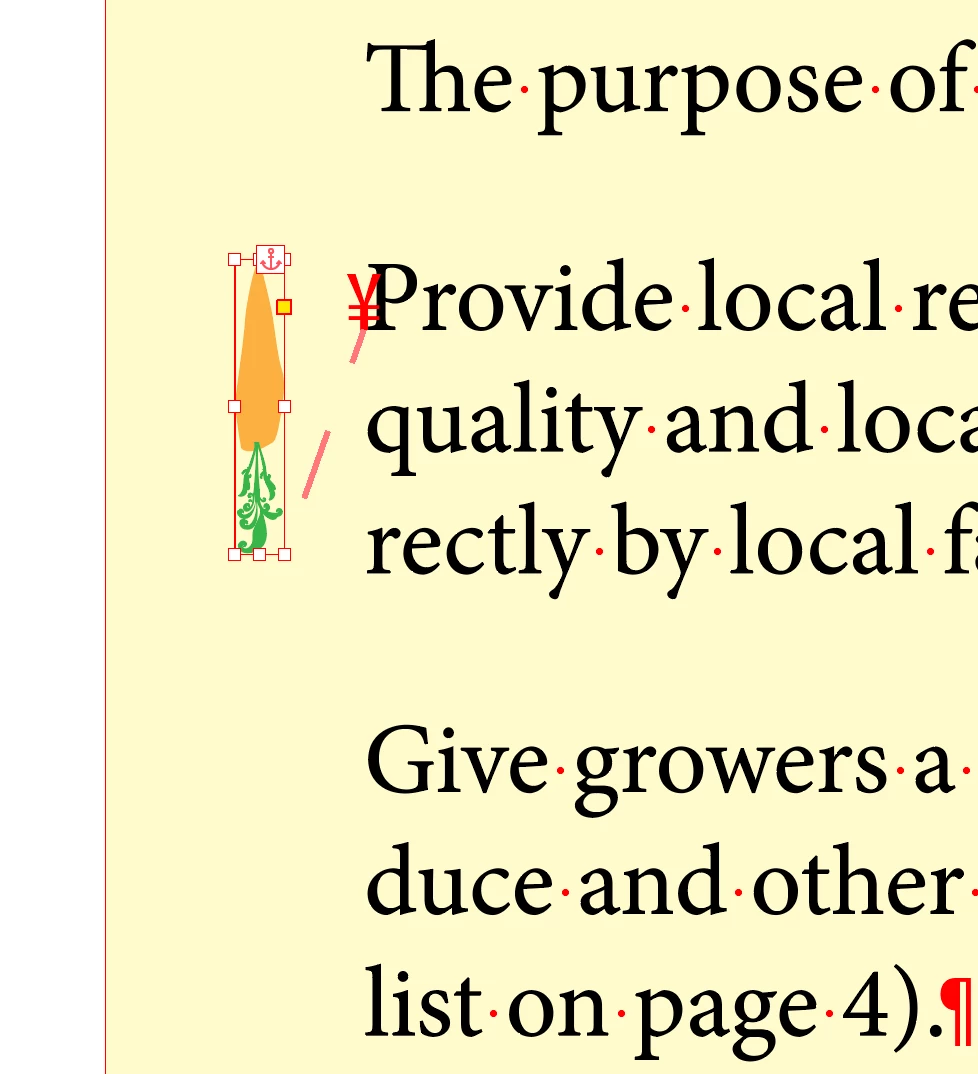
View > Extras > Show Text Threads always works for me as shown below. If it doesn't work try restoring your InDesign preferences:


3 replies

Steve Werner
Community Expert
Community Expert
May 3, 2023

By the way, the dashed line is not always blue. The color comes from the current layer color, in my example, red.

Inspiring
May 3, 2023

Steve:  OK. Good to know. Thanks.

Mike Witherell
Community Expert
Community Expert
May 3, 2023

And bear in mind that being in Preview mode would hide any and all symbolic onscreen things.

It might help to double-check whether Show Hidden Characters is turned on, too.

Mike Witherell
Inspiring
May 3, 2023

Mike:  Thank you. I tried toggling this setting. The results are the same.

Steve Werner
Community Expert
Steve WernerCommunity ExpertCorrect answer
Community Expert
May 3, 2023

View > Extras > Show Text Threads always works for me as shown below. If it doesn't work try restoring your InDesign preferences:


Inspiring
May 3, 2023

Steve:  Thank you. I checked Edit > Preferences and didn't see anything on this, so I'm not sure what to restore.