
Jongware
Community Expert
Community Expert
June 25, 2012
質問

[Ann] IndyFont Demo: make your own (1 character) font

  • June 25, 2012
  • 返信数 7.
  • 24139 ビュー

Missing a special accented character? Want to create your own custom bullet? Need a logo as a font? Here is a script that could be useful: create your own font, right from within InDesign. IndyFont converts the vector art in an InDesign document straight into a real OpenType font, which you can use in InDesign itself but also in all other software that supports OTFs.

Download the One-Character Demo from http://www.jongware.com/binaries/indyfont_demo.zip, unpack and copy it into your User Scripts folder. Run the script once to set up a font template, draw your custom character -- the default is a bullet --, then run the script again to convert it to an OpenType font.

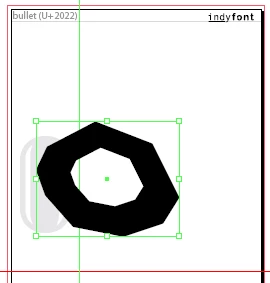
Change the font name to "A Donut bullet" (the actual font name will be prefixed with "IF"):

... draw a donut ...
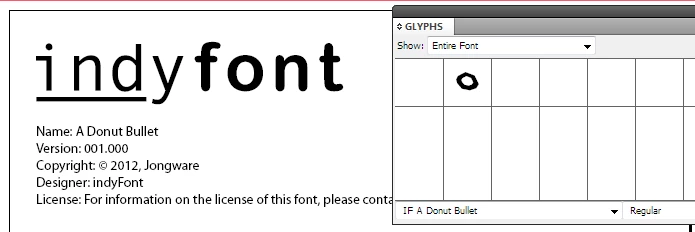
Look! A new font!
(Uh. I realize those instructions are a bit concise. For starters, there's really nothing more to it -- but IF has a fair lot of rather advanced options as well! I guess at some point a Full Manual could be useful. For the moment, feel free to experiment )


DISCLAIMER: Tested with CS4 and newer, on Windows and Apple OS X. Nevertheless, Your Mileage May Vary.

The free One-Character Demo is limited to exporting just a single character. The font name will always be prefixed with "IF". Full version release date, pricing and ordering information to be announced.

    このトピックへの返信は締め切られました。

    返信数 7

    Inspiring
    April 20, 2013

    I saw you post about this recently in an Illustrator thread. Impressive output of the OpenType specification from InDesign, great work. What an astounding idea and solution, it looks wonderful (also nice GUI Marc), nice execution on this concept Jongware, super work. Really looking forward to find out more about this script, workflow, its release date, pricing and availability.

    Marc Autret
    Legend
    April 25, 2013

    Thanks a lot for your encouragement

    IndyFont 1.1 Sneak Peeks:

    http://www.indiscripts.com/post/2013/04/indyfont-1-1-sneak-peeks

    @+

    Marc

    Trevor:
    Legend
    April 25, 2013

    Hi Marc & Jongware,

    This thread caught my eye when it first came out.

    I was wondering what OTF features it will have in the final version.

    If not included at present take them as a feature request to include in version 1.01

    The bellow are important to me, as I mostly work with right to left complex scripts - i.e. Hebrew,

    But there's a lot of Chinese and Arabs out there who are also quite complex, so I'm sure they would also like these features, not to mention some nice Ukrainians, Germans and some great French and Dutch blokes that occasionally roam around this forum.

    1) Assign the language block of the font.

    I don't want to have to look through all the English fonts to find my Hebrew font, also It can well be that the fonts won't type anything unless the correct language is set. This can be a major flaw in the font.

    2) I want to be able to include multiple languages in a font so that I can have English and Hebrew text without having to change fonts.

    3) If I am feeling lazy, which happens occasionally, and can't be bothered to create yet another English font I would like to be able to allocate an English font that should be used for typing English while on my Hebrew font.

    4) Need to be able to tag 'marks' for diacritics with decent kerning feature for different types of marks and not just letters.

    5) Discretionary ligatures "dlig" and Character composition "ccmp" tags

    6) Right to left control characters

    7) The marks kerning is very important and substitutions is very important to me.

    This is an example of the Hebrew letter Shin with a real collection  of diacritics marks. The main letter is in black the 4 different diacritics marks are colored here to show each different one.

    Regards Trevor


    Marc Autret
    Legend
    April 2, 2013

    Hey Theunis,

    As it seems I can no longer reach you by e-mail (?) I take the highway to give you some news

    IndyFont 1.1 ALPHA is ready to test (privately!):

    http://indiscripts.com/blog/public/IndyFont-preview.jpg

    Please, contact me.

    @+

    Marc

    Jongware
    Community Expert
    JongwareCommunity Expert作成者
    Community Expert
    April 2, 2013

    Ain't that a pretty interface! People, all that is Marc's work -- and April 1st is over, this is no joke!

    Marc, I replied this weekend but my mail bounced as well. Will try later again.

    Marc Autret
    Legend
    April 12, 2013

    Hi Theunis,

    Still trying to communicate with you by e-mail, but you do not seem to receive anything.

    Please, use your PM Inbox to read my messages.

    @+,

    Marc

    dave c courtemanche
    Inspiring
    August 15, 2012

    @Jongware,

    Really like this. Have you come up with pricing for the full version? Haven't been able to find.

    Jongware
    Community Expert
    JongwareCommunity Expert作成者
    Community Expert
    August 15, 2012

    Dave, I still need some time to come up with a full version! Unfortunately, summer is haydays at the office, so I haven't got around finalizing it ...

    Negotiations with a re-seller are in full swing but we're not Quite There Yet.

    dave c courtemanche
    Inspiring
    August 15, 2012

    Thanks. Eagerly awaiting.

    Participant
    July 4, 2012

    Simply amazing but the font is not correctly recognized by FontExplorer 1.2.3 (tested on a Mac with OS X 10.6.8 and InDesign CS 5.5). Seems to work with Suitcase 2 or FontBook…

    Community Expert
    June 26, 2012

    @Jongware – what can I say?

    Simply fantastic!

    Uwe

    Marc Autret
    Legend
    June 25, 2012

    Just prodigious. Once again you've set a very very high standard, Theunis.

    Congrats!

    Marc

    Franck Payen
    Inspiring
    June 25, 2012

    That's crazy But good !

    What i don't understand is "why from inD ?" whether than Ai (which sounds better at playing with vectors…)

    Franck

    Peter Spier
    Community Expert
    Community Expert
    June 25, 2012

    I think the point of keeping it in ID is that it's a familiar work environment. A lot of ID users don't have Illustrator, but you can certainly paste an Illy vector into the ID file and run the script.

    This is really an amazing tool.