

Participating Frequently
July 13, 2026
Question

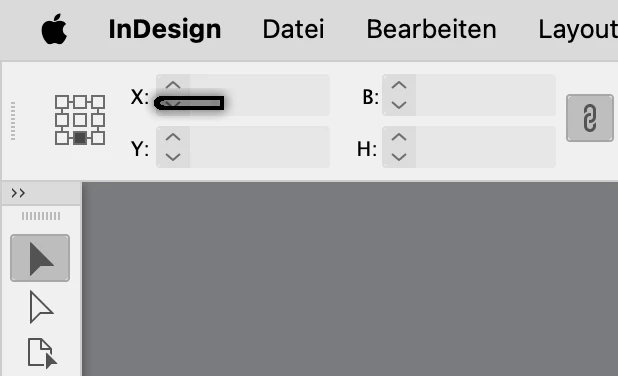
Annoying optical glitch in InDesign 21.4

  • July 13, 2026
  • 5 replies
  • 63 views

Since updating to 21.4 there’s a strange shape over the left upper corner of the screen, rendering the X-value of the transformation panel more or less inoperable.

MacMini M1, Mac OS 26.5.2


    5 replies

    leo.r
    Community Expert
    Community Expert
    July 13, 2026

    Ha. I actually have the same thing:


    It appeared relatively recently (unless I didn’t notice it before). I think its appearance is somehow related to my opening the Story Editor, but I can’t vouch for this.


    In my case it doesn’t cover anything thus I don’t spend any time troubleshooting this thing.


    I know that the first step would be resetting preferences and caches.


    @stefang78982396  But I’m not going to reset the preferences …


    I understand how annoying it can be to have to restore your preferences.


    But resetting preferences might be an inevitable step.


    But first, you can export your settings prior to this, then restore them: File > User Settings… (I don’t know if this will preserve all preferences).


    Second, try resetting your caches first as described here:

    https://www.rockymountaintraining.com/adobe-indesign-rebuilding-preferences-cache/


    It’s caches that are often responsible for UI glitches.


    If resetting caches doesn’t help, then try to reset preferences.


    Abhishek Rao
    Community Manager
    Community Manager
    July 13, 2026

    Hi ​@stefang78982396,


    I'm sorry you're experiencing this issue, and thanks for reaching out.

    Could you first update to InDesign 21.4.1 and check if the issue persists? If it does, please manually reset your InDesign preferences by following the steps shown in the video at the bottom of this HelpX article, then test again:
    https://helpx.adobe.com/indesign/using/setting-preferences.html

    If the issue still occurs, please try resetting your workspace. Before doing so, back up any custom workspaces by navigating to: ~/Library/Preferences/Adobe InDesign/Version <version>/en_US/Workspaces
    Move the Workspaces folder to your Desktop, relaunch InDesign, and check whether the issue persists. If it does, restore the original Workspaces folder to its previous location and remove any newly created folder. You can then also try Window > Workspace > Reset [Current Workspace], or switch to another workspace (for example, Essentials) and then switch back.

    Additionally, please try toggling between View > GPU Preview and View > Preview on CPU to see if the issue is related to display rendering.


    Please let us know how these steps go. If the issue persists, we'll continue investigating further.

    Abhishek

    Participating Frequently
    July 13, 2026

    I am actually on 21.4.1, and I had tried the workspace change/reset and the GPU settings beforehand. But I’m not going to reset the preferences …

    By the way the thing is not attached to the taskbar but sticks to the monitor.


    Abhishek Rao
    Community Manager
    Community Manager
    July 17, 2026

    Hi ​@stefang78982396,


    Thanks for the update and I completely understand your hesitation about resetting the preferences. The video I shared in the HelpX article first walks you through backing up your existing preferences and then resetting them, so your preferences will be safely backed up and you can restore them afterward by following the same steps shown in the video. The reason I'm suggesting this is simply to help isolate whether the issue is related to the preferences or if something else is causing it.

    In the meantime, could you also try renaming the CEP folder to CEP.old from /Library/Application Support/Adobe? If that doesn't help, please rename the UXP folder to UXP.old from both /Library/Application Support/Adobe and ~/Library/Application Support/Adobe.

    I'm also checking this further with the product team. Additionally, could you let me know if you're using an external monitor? If so, does this issue appear on the external monitor, or are you seeing it on your primary display as well?


    Looking forward to your update.

    Abhishek
