
ekke287
Participant
August 10, 2017
Answered

Annoying Spell Check Bug (Dark)

  • August 10, 2017
  • 2 replies
  • 316 views

Hi all, apologies if this has been answered elsewhere but I can't seem to find a solution (and it's highly annoying!)

When running a spell check, the flagged word is always in a dark box on the interface as shown, making it very difficult to see the issue. I assumed it was potentially an interface issue, so I ran the same on the lighter grey interface but encountered the same issue. A previous colleague had this issue and removed / reinstalled Indd CC which fixed it, but I've done this twice and the issue seems to remain.
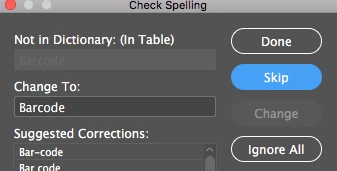
Any ideas? Is this just a common bug or is there a way to fix it?

Any help greatly appreciated!

Thanks, Ekke

    This topic has been closed for replies.
    Correct answer amaarora

    Hi,

    Yes, this is a known readability issue(and a bug) with the CC 2017.1 release.

    I suggest you try changing the UI theme color (from preferences) and see if any of those colors improve readability.

    Or if it is really hampering your workflow, and is something you cant do without; you can install the CC 2017.0 version of InDesign.

    How to Find and Install Previous Version of Adobe Apps in CC 2015 | Adobe Customer Care Team

    Currently, you are on CC 2017.1(latest) and CC 2017.0 comes as part of your subscription.

    -Aman

    2 replies

    amaarora
    amaaroraCorrect answer
    Inspiring
    August 10, 2017

    Hi,

    Yes, this is a known readability issue(and a bug) with the CC 2017.1 release.

    I suggest you try changing the UI theme color (from preferences) and see if any of those colors improve readability.

    Or if it is really hampering your workflow, and is something you cant do without; you can install the CC 2017.0 version of InDesign.

    How to Find and Install Previous Version of Adobe Apps in CC 2015 | Adobe Customer Care Team

    Currently, you are on CC 2017.1(latest) and CC 2017.0 comes as part of your subscription.

    -Aman

    Bill Silbert
    Community Expert
    Community Expert
    August 10, 2017

    This is a known bug in CC 2017. It has been widely reported.