dublove
Legend
March 20, 2024
Question

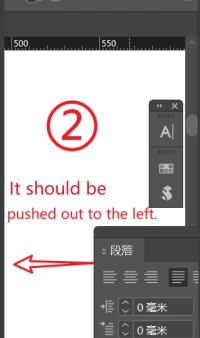
Another bug? When the floating panel is on the right, double clicking should push it out to the left

  • March 20, 2024
  • 3 replies
  • 714 views

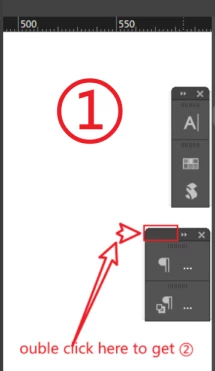
Note that it is parked on the right side, not on the edge.
The current situation is to push to the right, and as a result, the unfolded part is obstructed.
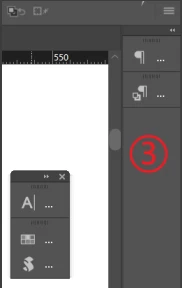
Why didn't I use Tiebian ③? Because I want to double-click ① to temporarily not shrink the panel.
③ I can push to the left, but it takes up too much space and I don't really like it.
 

This topic has been closed for replies.

3 replies

leo.r
Community Expert
Community Expert
March 20, 2024

After testing your exact situation I understand what you mean.


As @Robert at ID-Tasker already said, that's because your panel group is not docked. Make sure to dock it, that is move it so that it "magnetically sticks" to the right edge of the monitor. Then it will expand to the left on double-click.


After testing this, I do see that it can be annoying that InDesign can expand the panel beyond the monitor edge unless it's docked. In an ideal world, InDesign should detect the monitor edge and expand the panel accordingly (that's how menus already behave after all). As Robert also mentioned, second monitor considerations can also affect this behavior (of which I know nothing).


dublove
dubloveAuthor
Legend
March 20, 2024

@adobe

I just don't want to magically stick.
Magically sticks will occupy the screen. I just want to get closer.
There are issues with Adobe's handling here. Looking forward to improvement.

Robert at ID-Tasker
Legend
March 20, 2024
quote

@adobe

I just don't want to magically stick.
Magically sticks will occupy the screen. [...]


By @dublove


Just connect 2nd monitor - even with a lower resolution - your eyes will thank you.


Robert at ID-Tasker
Legend
March 20, 2024

@dublove


(3) is docked - (1) & (2) are just close the the right edge of the monitor. 


InDesign is not checking if it's your only monitor or you have another one connected. 


Community Expert
March 20, 2024

What OS? What version of InDesign?


It works for me no problems.


Try resetting your preferences:

Windows: Start InDesign, and then press Shift+Ctrl+Alt. Click Yes when asked if you want to delete preference files.
macOS: While pressing Shift+Option+Command+Control, start InDesign. Click Yes when asked if you want to delete preference files.
A dialog will appear asking to delete the InDesign Preferences, select 'Yes' on this dialog.
Further info and instructions here if needed:
https://helpx.adobe.com/in/indesign/kb/indesign-preferences-support-file-locations.html


dublove
dubloveAuthor
Legend
March 20, 2024

There is no problem at work.
It's just flawed, not perfect enough.
What I mean is: when the panel is docked to the right, it should be expanded to the left.
If the panel is unfolded to the right, the unfolded part will be obscured.

Community Expert
March 20, 2024

I don't know what you mean.

The panel expands and collapses as expected. 

What do you want to happen exactly?


You can resize the panel once expanded to by grabbing the edge and resize it.