
SebastiaoV
Known Participant
December 17, 2024
Answered

Any way to format text with two stroke lines faster than going manually?

  • December 17, 2024
  • 3 replies
  • 1182 views

Hi!
I am doing a magazine where the authors appear among two lines and the text varies in length according to the author name and has two strokes lines at a constant separation. Besides everything has to be center aligned. The way I do it now is going manually by each author and taking two rectangles as distance references. Considering sometimes there are more than 30 writers, it takes a white to do it right and also text boxes does not close exactly where a word ends. Is there any way I could do it with a Script or object Properties or else? 


Here is the design problem



Thanks for your help. 😉
 

This topic has been closed for replies.
Correct answer SJRiegel

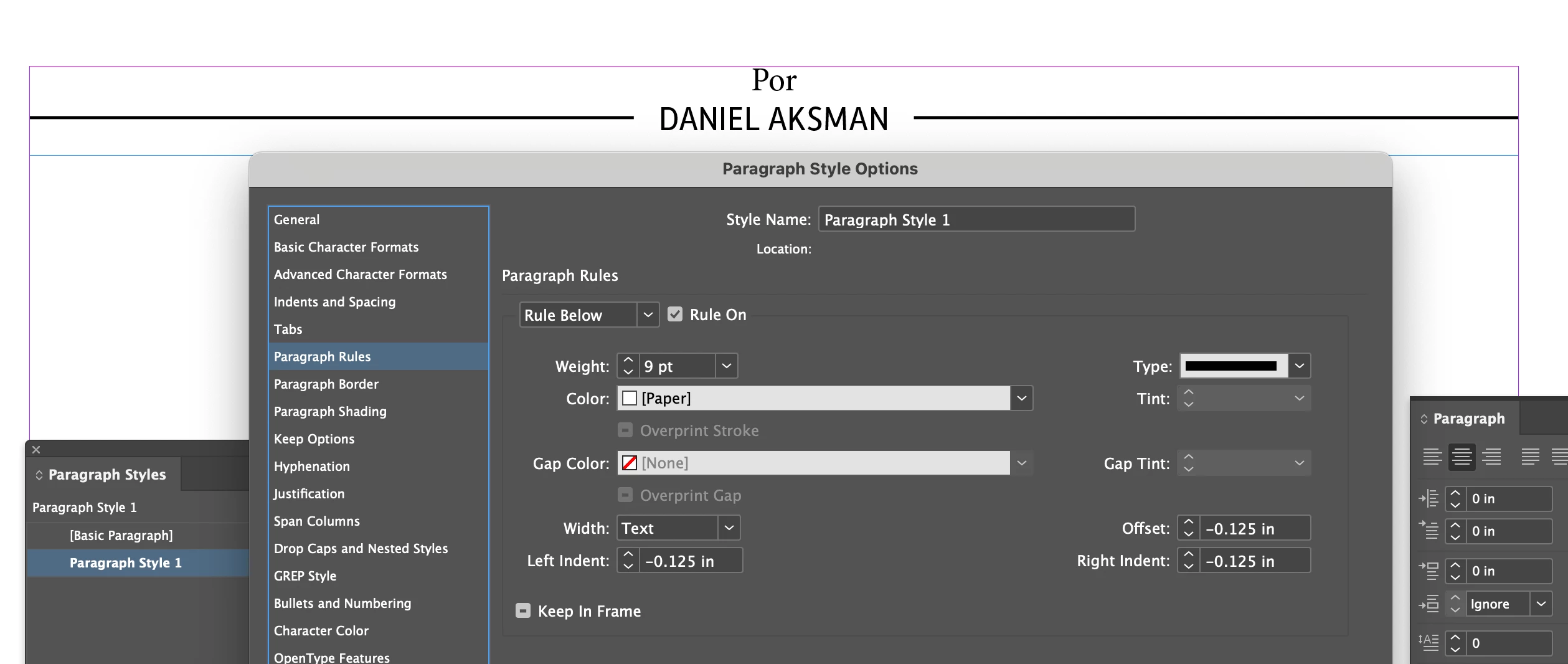
Paragraph Rules - rule above and rule below, will handle this quite neatly. Rule above is set to Column Width, and Rule Below (in Paper color) is set to Text Width (this covers and obscures the black rule), with Left and Right Indents to offset the rule from the text. 

3 replies

SJRiegelCorrect answer
Legend
December 18, 2024

Paragraph Rules - rule above and rule below, will handle this quite neatly. Rule above is set to Column Width, and Rule Below (in Paper color) is set to Text Width (this covers and obscures the black rule), with Left and Right Indents to offset the rule from the text. 

James Gifford—NitroPress
Legend
December 18, 2024

Eh, brilliant! It never occurred to me that P Rules had a stacking order that could be exploited (or that both are, effectively, behind the text).


Only caveat is that it has to be set up for a fixed number of lines, but the OP says all of the instances are 2-line, and creating a 1-line variant would be trivial.

Willi Adelberger
Community Expert
Community Expert
December 17, 2024

A combination od Paragraph rules, above and below and Paragraph Frames and Paragraph Shaddow filling wild do it.


James Gifford—NitroPress
Legend
December 17, 2024

Hmm. A Paragraph Rule could be used to create the horizontal black stroke, and Paragraph Border to create the two magenta bars, but the problem is getting the horizontal line to break/hide behind the bars and text.


The only solution I can think of is to give the text a large white outer stroke and adjust things so that that outline blanks out the horizontal line.


Experimenting now...


ETA: Shoot, this is as close as I can get with a single paragraph style. The yellow represents a (white) outline; the blue is Paragraph Shading. But no combination of settings, including "Overprint," will make that horizontal bar stop at the outer edges of the vertical bars. I also tried the Effect 'Outer Glow" but it affects all of the "text" objects at one.


ETA2: Underline and Strikethrough don't work well, either  — underline hides under the "white," strikethrough doesn't, but neither can be extended to the margins in any simple way.


Anyone have a trick, here? The only solution I can come up with is some second object (Para Style, Text Frame, etc.) which would be fussy to manage.

SebastiaoV
Known Participant
December 17, 2024

Hi James,
Thanks for the fast reply and the experiment. It looks like a nice solution. I will try to follow your steps to see how to get the same result. 
By the way, the magenta bars are just for showing the separation, betwen the author name and the black strokes. This is how it goes when printing. 


Best 😉

FRIdNGE
December 17, 2024


Just "Tab + Space + Your Text + Space + Tab"!


(^/)  The Jedi