Inspiring
October 15, 2025
Answered

Anybody know why this grep regex doesn't work?

  • October 15, 2025
  • 6 replies
  • 982 views

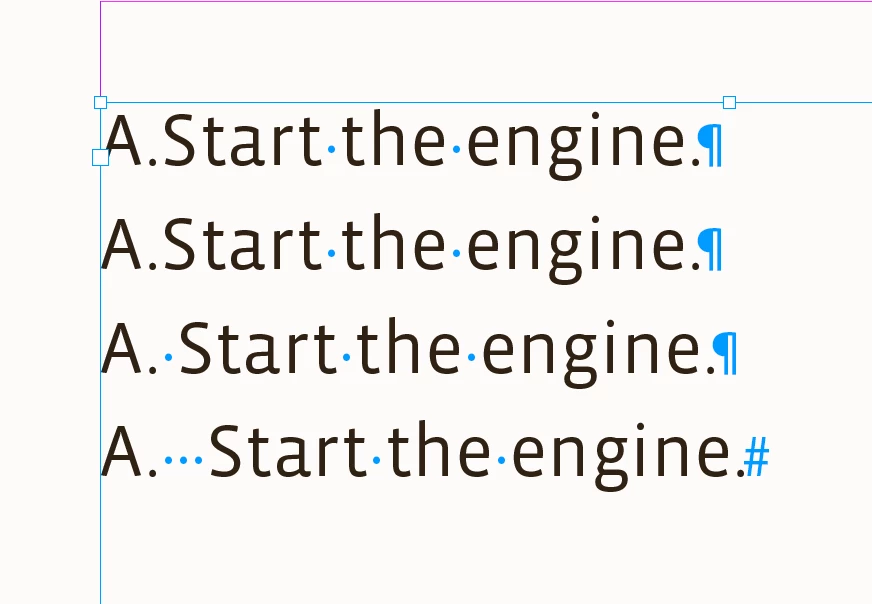
I'm trying to find periods with zero or more whitespace characters after them. Everything I can find says this should work, but it doesn't work for strings that have no whitespace (looking for a capital letter followed by a period):


var capitalExpression = "^[A-Z]\\.\\s*";
 
This finds
A. Start the engine.
 
but not
A.Start the engine.
Correct answer rob day

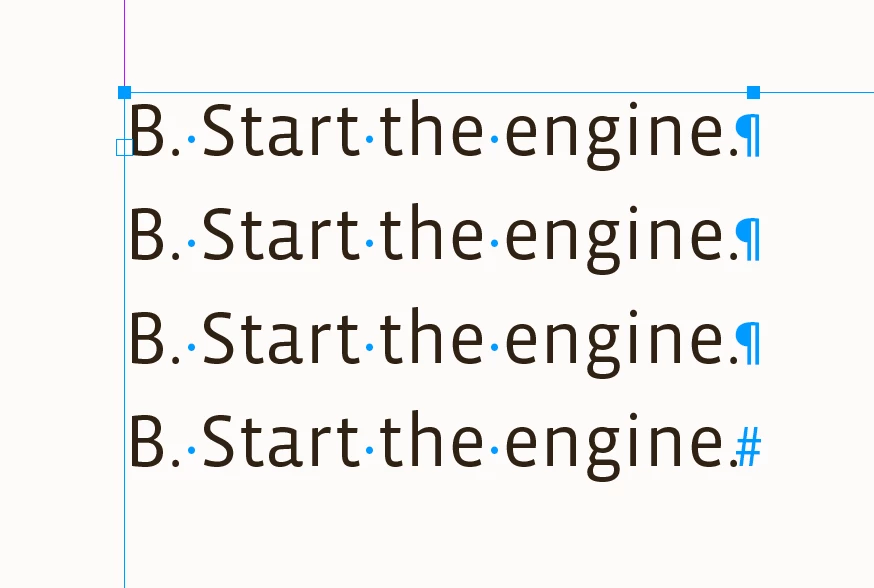
Hi @Thomas_Calvin , It’s also working for me with ExtendScript. Here it is via a function:


grepSearch("^[A-Z]\\.\\s*", "B. ")

/**
* Document Grep find and change 
* @ param f the find grep string 
* @ param c the change grep string
* @ return void 
*/
function grepSearch(f,c){
    app.findGrepPreferences = app.changeGrepPreferences = app.findChangeGrepOptions = null;
    app.findChangeGrepOptions.properties = app.findChangeGrepOptions.properties = {includeFootnotes:true, includeHiddenLayers:true, includeMasterPages:true, wholeWord:false}  
    app.findGrepPreferences.findWhat = f;
    app.changeGrepPreferences.changeTo = c;
    app.activeDocument.changeGrep( true )
}


6 replies

rob day
Community Expert
rob dayCommunity ExpertCorrect answer
Community Expert
October 16, 2025

Hi @Thomas_Calvin , It’s also working for me with ExtendScript. Here it is via a function:


grepSearch("^[A-Z]\\.\\s*", "B. ")

/**
* Document Grep find and change 
* @ param f the find grep string 
* @ param c the change grep string
* @ return void 
*/
function grepSearch(f,c){
    app.findGrepPreferences = app.changeGrepPreferences = app.findChangeGrepOptions = null;
    app.findChangeGrepOptions.properties = app.findChangeGrepOptions.properties = {includeFootnotes:true, includeHiddenLayers:true, includeMasterPages:true, wholeWord:false}  
    app.findGrepPreferences.findWhat = f;
    app.changeGrepPreferences.changeTo = c;
    app.activeDocument.changeGrep( true )
}


Inspiring
October 16, 2025

Thanks Rob.

In the end, it works fine. The UXP developer tool did not pick up my source-code changes for some reason (despite "watch" being on), and was running an old version that didn't have the asterisk.

Peter Kahrel
Community Expert
Community Expert
October 16, 2025

Yes, you found out the hard way that the UXP developer tool can't save changes you made to the code. It's pretty awful, but that's the way it is.

Community Expert
October 16, 2025

Noticed you tagged 'UXP Scripting' - are you writing a UXP script? 

It might need to be something like this

/^[A-Z]\.\s*/
Inspiring
October 16, 2025

It is a UXP script. A plug-in, in fact.

Joel Cherney
Community Expert
Community Expert
October 16, 2025

I don't think that the problem is with your query. Maybe something else is going on somewhere else in your script? Your query seems to work for me, at least when I put it in the simplest script possible:


Inspiring
October 16, 2025

Yep, thanks. It turns out that it works fine for me too. The UXP developer tool neglected to reload the source after I changed and saved it, despite "watch" being on. Usually this works fine. I noticed the wrong expression being used when stepping through with the debugger.

brian_p_dts
Community Expert
Community Expert
October 16, 2025

The ens should be \\s+? I think

Inspiring
October 16, 2025

Thanks for the reply. Everything I've looked at says + means "one or more" not zero or more.

Barb Binder
Community Expert
Community Expert
October 16, 2025

Oh darn. I focused on your GREP expression as per your title, and missed that you need this included in a script. Not sure that my answer will be helpful. Sorry!


~Barb

~Barb at Rocky Mountain Training
Inspiring
October 16, 2025

I appreciate it Barb! I have a working script and a mostly-working expression. But the asterisk doesn't work.

Barb Binder
Community Expert
Community Expert
October 16, 2025

How about:


\u\.\s*


~Barb

~Barb at Rocky Mountain Training