SureshRaji
Inspiring
May 8, 2013
Answered

Applescript to run javascript

  • May 8, 2013
  • 1 reply
  • 2387 views

Hi all,

I got error in this script. Could anyone help on this?

tell application "Finder"

    activate

    set myApps to {"CS3", "CS4", "CS5"}

    set selectedApp to choose from list myApps with prompt "Choose Application:" with title "Launch Application"

    if the result is not false then

        set myApp to "Adobe InDesign " & selectedApp

        display dialog myApp

        set myFile to "Applications:" & myApp & ":Scripts:Scripts Panel:Sample.jsx"


        tell my application myApp

            activate

            run script file myFile   // error "Adobe InDesign CS4 got an error: A unknown token can’t go after this “)”." number -2740

        end tell

    end if

end tell

Regards

Suresh
This topic has been closed for replies.
Correct answer -hans-

Hi Mark

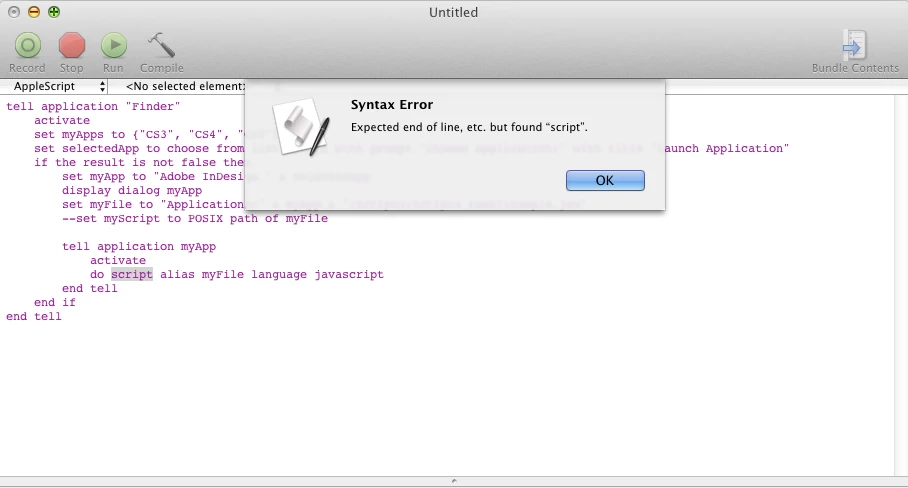
Thanks for your reply. But it shows an error at this line

do script alias myFile language javascript


Hi,

you're right. The script does not compile. I don't know the reason, perhaps Shane reads the thread and knows the answer. Macscripter.net may be a good point for posting this.

A workaround: Create the whole ID-Tellblock as string and do a vanilla run script command.

tell application "Finder"

    activate

    set myApps to {"CS3", "CS4", "CS5.5"}

    set selectedApp to choose from list myApps with prompt "Choose Application:" with title "Launch Application"

    if the result is not false then

        set myApp to "Adobe InDesign " & selectedApp

        set myFile to "Applications:" & myApp & ":Scripts:Scripts Panel:Sample.jsx"

    end if

end tell

set myString to "tell application " & "\"" & myApp & "\"" & return ¬

    & "do script alias " & "\"" & myFile & "\"" & " language javascript" & return ¬

    & "end tell"

run script myString

It runs here.

1 reply

Vamitul
Legend
May 8, 2013

hey suresh..

can't realy remember the last time i used applescript, but still here are my two cents:

the javascript you are trying to run has a error somwhere in it. open it in estk and try a "Check Syntax" (form the edit menu)

SureshRaji
Inspiring
May 8, 2013

Hi Vamitul,

Thanks for your quick response. I  checked the javascript in ESTK which shows no error.

Even if I write a simple javascript (an alert message), applescript throw an error in the same line.

Regards

Suresh

Vamitul
Legend
May 8, 2013

ok...

tell application "Finder"

    activate

    set myApps to {"CS3", "CS4", "CS5"}

    set selectedApp to choose from list myApps with prompt "Choose Application:" with title "Launch Application"

    if the result is not false then

        set myApp to "Adobe InDesign " & selectedApp

        display dialog myApp

        set myFile to "Applications:" & myApp & ":Scripts:Scripts Panel:Sample.jsx"

        set myScript to POSIX path of myFile


        tell my application myApp

            activate

            run script file myScript

        end tell

    end if

end tell