

rob day
Community Expert
Community Expert
June 19, 2023
Question

Application Missing From VS Code Evaluation List

  • June 19, 2023
  • 4 replies
  • 3156 views

Hi All, I’ve run into a problem with Visual Studio Code not seeing all of my installed Adobe apps. If I click Eval in Adobe... the application list doesn’t show Photoshop CC2020—it does show PS CC2019 and CC2021:
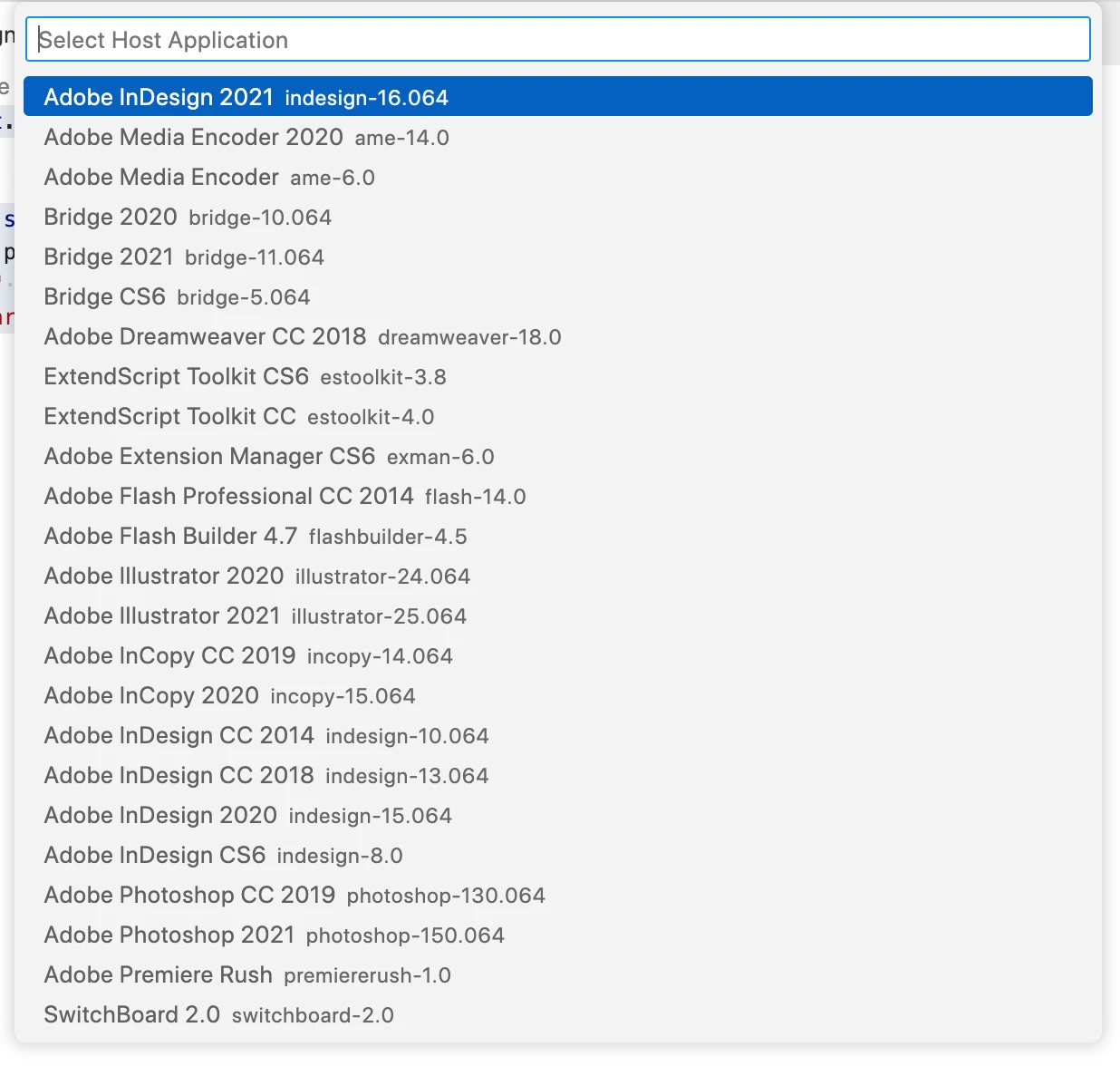


I would try reinstalling CC2020, but that’s no longer possible. Anyone know how VS Code gets the list of Adobe apps?

This topic has been closed for replies.

4 replies

Community Expert
June 21, 2023

Hi Rob,

you could also try the following:

Sign out from the Adobe Creative Cloud Desktop App.

Restart your machine.

Sign in to the Adobe Creative Cloud Desktop App.


After doing this, the CC Desktop App should check for all installed apps.

If you are lucky PhotoShop 2020 will be registered again.

Maybe that will update the BridgeTalk connections...


Regards,
Uwe Laubender
( Adobe Community Expert )

rob day
Community Expert
rob dayCommunity ExpertAuthor
Community Expert
June 21, 2023

Good Idea, but it didn’t work.


The odd thing is I have a clone of my startup drive from a year ago that has CC2020 and not CC2021 installed, and if I startup from that drive, VS Code lists PS CC2020 in the evaluation list. It does seem like there is something wrong with whatever database VS Code gets the app list from. Don’t know where to begin looking for that. Luckily leaving both 2020 and 2021 in my Applications folder works—I just have to pay attention to which version is running.

sberic
Legend
June 21, 2023

@rob day wrote:

It does seem like there is something wrong with whatever database VS Code gets the app list from. Don’t know where to begin looking for that.


To be clear, VS Code gets its list from BridgeTalk itself (via code within the adobe_caps.dll which is included with the extension and is the reason that there is no Apple Silicon version). At the risk of angering the gods, I would point you to the domain_data table in this file:


  • /Library/Application Support/Adobe/Adobe PCD/pcd.db


I do not pretend to understand the Schema, nor what might minimally constitute "an entry", but it certainly looks promising. Good luck on your spelunking adventure.

Community Expert
June 21, 2023

Hi Rob,

could you run BridgeTalk diagnostics from VS Code using e.g. InDesign?

BridgeTalk.__diagnostics__;


That should get you an InDesign document with a text frame showing the results:


// ExtendScript for InDesign

var results = BridgeTalk.__diagnostics__;
var resultDoc = app.documents.add();
resultDoc.textFrames.add
(
	{ 
		geometricBounds : [ 0,0,"250mm","200mm"] , 
		contents : results 
	}
);


Could you see this as part of the results?

/*
photoshop-140.064: 
	Path = /Applications/Adobe Photoshop 2020/Adobe Photoshop 2020.app
	Display Name = Adobe Photoshop 2020
	MsgAuthentication = ON
	MsgDigest = ON
	ESTK = ON
	BundleID = com.adobe.Photoshop
	Status = (not running)
	ExeName = Adobe Photoshop 2020.app

*/


Regards,
Uwe Laubender
( Adobe Community Expert )

rob day
Community Expert
rob dayCommunity ExpertAuthor
Community Expert
June 21, 2023

Hi Uwe, I’ve attached the result text—Bridgetalk can’t find PS CC2020 even though it is running.

Legend
June 19, 2023

What happens if you $.writeln from a script launched within the application?

That sometimes helped ESTK to see an InDesign Server ...

rob day
Community Expert
rob dayCommunity ExpertAuthor
Community Expert
June 20, 2023

Hi Dirk, just to clarify it’s only Photoshop CC2020 that’s missing from the evaluation list in Visual Studio Code (I’m not using the ESTK application). If I run a $.writeln from VS Code with PS 2020 running I get this:


If I run the same code from Photoshop’s Scripts menu, it launches the ESTK application and nothing happens. If I run a script directly from PS2020 that has no $.writeln requests, the script runs as expected.


When I try to get the PSCC2020 installer via Adobe’s chat as David @Dave Creamer of IDEAS 

{Modified by MOD}

sberic
Legend
June 20, 2023

I'm not sure why the PS2020 would not show up in the list of installed applications. That is strange. To debug that, you might need to go into the SQLite databases where the host applications install their information to verify that they exist as expected. That's simply how the list of installed applications is discovered.


quote

If I run the same code from Photoshop’s Scripts menu, it launches the ESTK application and nothing happens. If I run a script directly from PS2020 that has no $.writeln requests, the script runs as expected.


To be clear, when you're trying to run things from VS Code, you haven't also opened ESTK at some point, correct? If so, you will need to restart Photoshop and try again. This is because all host ExtendScript engines are hard-coded to see the ESTK debugger and then disallow connections to any other debugger. I think this is actually a bug in the initial design but it never manifested because ESTK was the only debugger for a very long time. The v1 VS Code extension lied about its identity and claimed to be ESTK 4.0. That was one of the reasons that you couldn't open ESTK and have VS Code open at the same time (with the v1 extension installed) - BridgeTalk identifier collision. The v2 VS Code extension uses its own custom BridgeTalk identifier and makes use of the instance portion of the identifier to enable multi-window support (you can have two separate VS Code windows debugging two separate applications at the same time).


At any rate, it is odd that you are unable to connect to Photoshop 2020. Please try the following:


  1. Close VS Code, Photoshop, and ESTK.
  2. Start Photoshop.
  3. Start VS Code.
  4. Attempt to run the script.


If that doesn't work, please answer the following questions:


  1. What is your process for evaluating scripts from VS Code?
  2. If you are specifying a custom host application specifier to make the connection to Photoshop 2022, what is the precise specifier that you are using?
Dave Creamer of IDEAS
Community Expert
Community Expert
June 19, 2023

You can [try] to get 2020 if you contact support via the online chat. As long as you have a decent reason, you should be able to get a link. I was able to get the software for training purposes.


David Creamer: Community Expert (ACI and ACE 1995-2023)