johnpredmore
Inspiring
August 10, 2016
Answered

Apply Export Tag to Paragraph Style

  • August 10, 2016
  • 1 reply
  • 1648 views

Hi,

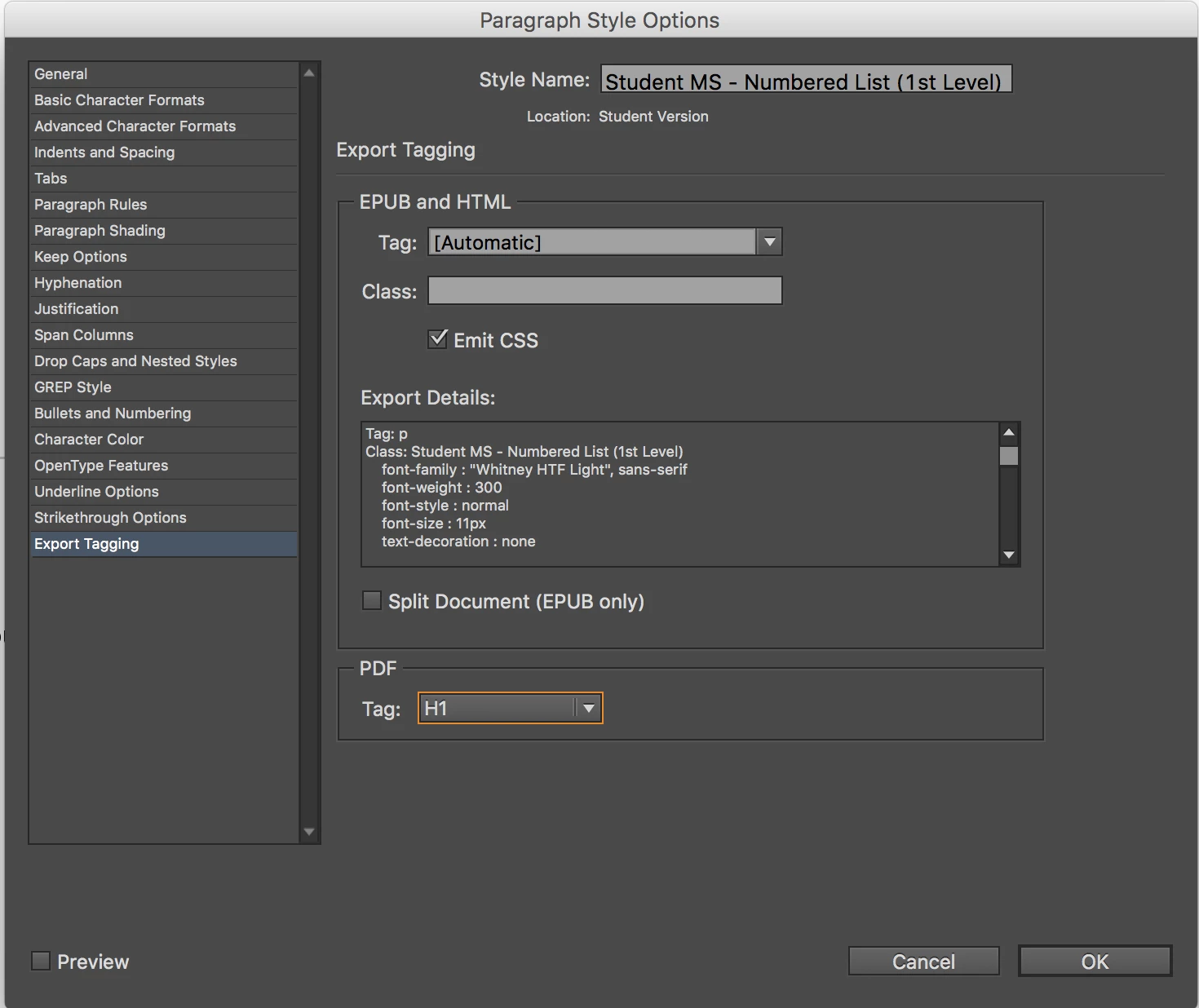
I'm learning basic scripting and today I need to apply an export tag to a paragraph style for PDF export (see screenshot) across dozens of documents. I thought this would be the perfect opportunity to use a script to automatize this time intensive process.

Does anybody have any tips on how to do that?

Correct answer Jongware

Look in to InDesign's DOM (Document Object Model), and specifically at Paragraph Style properties: ParagraphStyle

In there you can find a property "styleExportTagMaps" – a plural, probably because you can add multiple tags to a single style (?). Browsing to that, you get StyleExportTagMap , which, in turn, has a simple string property called "exportTag".

So if style points to a valid Paragraph Style, you can do this to add either a tagName or a className to it (only one of these; you must set the other to an empty string):

style.styleExportTagMaps.add({exportType:"PDF", exportAttributes:'', exportTag:tagName, exportClass:className});

I've only used this with an exportType of "EPUB", but if I'm remembering correctly "PDF" is 'the' other option.

I haven't used those exportAttributes before. If you want to find out what it can contain, set a number of options in the user interface for a random style and then read out the styleExportTagMap of that style to see what values it holds.

1 reply

Jongware
Community Expert
JongwareCommunity ExpertCorrect answer
Community Expert
August 10, 2016

Look in to InDesign's DOM (Document Object Model), and specifically at Paragraph Style properties: ParagraphStyle

In there you can find a property "styleExportTagMaps" – a plural, probably because you can add multiple tags to a single style (?). Browsing to that, you get StyleExportTagMap , which, in turn, has a simple string property called "exportTag".

So if style points to a valid Paragraph Style, you can do this to add either a tagName or a className to it (only one of these; you must set the other to an empty string):

style.styleExportTagMaps.add({exportType:"PDF", exportAttributes:'', exportTag:tagName, exportClass:className});

I've only used this with an exportType of "EPUB", but if I'm remembering correctly "PDF" is 'the' other option.

I haven't used those exportAttributes before. If you want to find out what it can contain, set a number of options in the user interface for a random style and then read out the styleExportTagMap of that style to see what values it holds.
johnpredmore
Inspiring
August 11, 2016

Thanks Jongware,

You pointed me in the right direction; here's what I came up with:

  var myDoc = app.activeDocument;


            // Body Text

            var body = myDoc.paragraphStyles.itemByName("Body Text");

                body.styleExportTagMaps.add({exportType: "EPUB", exportTag: "p", exportClass: "", exportAttributes: ""});

                body.styleExportTagMaps.add({exportType: "PDF", exportTag: "P", exportClass: "", exportAttributes: ""});   


            // H1

            var h1 = myDoc.paragraphStyles.itemByName("H1");

                h1.styleExportTagMaps.add({exportType: "EPUB", exportTag: "h1", exportClass: "", exportAttributes: ""});

                h1.styleExportTagMaps.add({exportType: "PDF", exportTag: "H1", exportClass: "", exportAttributes: ""});  


            // H2

            var h2 = myDoc.paragraphStyles.itemByName("H2");

                h2.styleExportTagMaps.add({exportType: "EPUB", exportTag: "h2", exportClass: "", exportAttributes: ""});

                h2.styleExportTagMaps.add({exportType: "PDF", exportTag: "H2", exportClass: "", exportAttributes: ""});  


            // H3

            var h3 = myDoc.paragraphStyles.itemByName("H3");

                h3.styleExportTagMaps.add({exportType: "EPUB", exportTag: "h3", exportClass: "", exportAttributes: ""});

                h3.styleExportTagMaps.add({exportType: "PDF", exportTag: "H3", exportClass: "", exportAttributes: ""});      

            // Tables - Body Text

            var tablesBody = myDoc.paragraphStyles.itemByName("Tables - Body Text");

                tablesBody.styleExportTagMaps.add({exportType: "EPUB", exportTag: "p", exportClass: "", exportAttributes: ""});

                tablesBody.styleExportTagMaps.add({exportType: "PDF", exportTag: "P", exportClass: "", exportAttributes: ""}); 


            // Student Version     

                // Student MS - Body Text

                var StudentBody = myDoc.paragraphStyleGroups.item("Student Version").paragraphStyles.item("Student MS - Body Text");

                    StudentBody.styleExportTagMaps.add({exportType: "EPUB", exportTag: "p", exportClass: "", exportAttributes: ""});

                    StudentBody.styleExportTagMaps.add({exportType: "PDF", exportTag: "P", exportClass: "", exportAttributes: ""});     


                // Student Cover - H1

                var StudentCoverH1 = myDoc.paragraphStyleGroups.item("Student Version").paragraphStyles.item("Student Cover - H1");

                    StudentCoverH1.styleExportTagMaps.add({exportType: "EPUB", exportTag: "h1", exportClass: "", exportAttributes: ""});

                    StudentCoverH1.styleExportTagMaps.add({exportType: "PDF", exportTag: "H1", exportClass: "", exportAttributes: ""});                   


                // Student Cover - H2

                var StudentCoverH2 = myDoc.paragraphStyleGroups.item("Student Version").paragraphStyles.item("Student Cover - H2");

                    StudentCoverH2.styleExportTagMaps.add({exportType: "EPUB", exportTag: "h2", exportClass: "", exportAttributes: ""});

                    StudentCoverH2.styleExportTagMaps.add({exportType: "PDF", exportTag: "H2", exportClass: "", exportAttributes: ""});                   

Jeremy bowmangraphics
Inspiring
August 5, 2025

I have exactly the same problem. I can apply 'P', 'H1', 'H2', etc., but InDesign doesn't seem to recognize 'Artefact' as a valid exportTag for exportType 'PDF'!