


Participant
September 28, 2024
Question

Apply override to styles

  • September 28, 2024
  • 6 replies
  • 642 views

Hello,


I have created the revelant and appropriate Paragraph and Character styles as required and am using them per best practices. However, there are some instances, when I wish to apply an override.


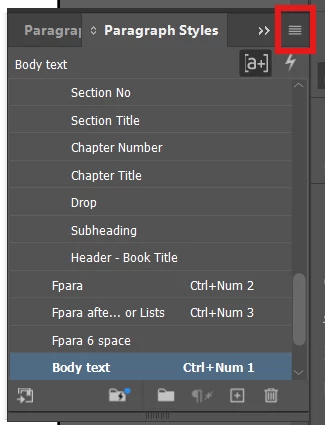
I am using the latest version of CC, In-Design 19.5 x64. In the previous versions, we could select the paragraph style and then do a right click on the 3 horizontal lines in the panel that would open a menu where one could change Justification, Tracking, and other items for the selected item only. Am unable to open this menu panel on right-click.


This topic has been closed for replies.

6 replies

Willi Adelberger
Community Expert
Community Expert
September 29, 2024

I think it is better to create a new style than to do manual overrides. If I create such a style, e. g.  a child from paragraph style "basic" I will name this style "basic.child-property". So I can see in the name its dependency and that it is obvious, that a change in the parent style will influence this style. 

Community Expert
September 29, 2024

Like @James Gifford—NitroPress  I've never known this 'trick' or ever used it, didn't realise you might be able to do that - I don't ever remember it being a way to access the menus.


The 3 lines are essentially a way to access the sub menu of the panel - and it's typically accessed through a Left Click. 


You're better off duplicating the style you are altering and then used the 'Based On' style - make your tweaks - and then apply that paragraph style. It's far more efficient for editing later on. 


I typically like to have no overrides in text - but often have small tweaks to push/pull text - rather than making too many paragraph styles that could get confusing.


There's always exceptions to rules.


I do wish though that if you did make tweaks to text that you could 'lock' those settings so when you clear overrides the little tweaks you make aren't overridden - and don't show up in the style highlighter. 


Kinda like a tolerance allowance for the styles.

Mike Witherell
Community Expert
Community Expert
September 28, 2024

Just curious, but what are your Hyphenation and also your Justification settings for the paragraph style named "Body text"?

Mike Witherell
Robert at ID-Tasker
Legend
September 28, 2024

@aartim99668366


You mean left-click? 


But as others pointed out - you are doing it in the wrong place - you need to use Paragraph and/or Character panels. 


rob day
Community Expert
Community Expert
September 28, 2024

Hi @aartim99668366 , To override a Paragraph Style all you have to do is edit a range of text in the paragraph and then when any part of that text is selected a + sign will show next to the style name. If you hover over the style in the Paragraph Style panel, the override changes will be listed:


James Gifford—NitroPress
Legend
September 28, 2024

I don't remember that every being a feature, but TBH I'd never have used or recommended it anyway.


I won't say there's never a place for overrides, but they really should be avoided except in the case of text-fitting tweaks for long documents.


All of those settings are available in the Control Bar at the top of your UI, unless you've disabled it, and of course in the various palettes, where you have more options and controls.


In general, I'd say what you're looking for, been using, is something of a bad habit better replaced by other choices. 🙂

Dave Creamer of IDEAS
Community Expert
Community Expert
September 28, 2024

I never say never, but I don't remember that option either. Perhaps the OP is thinking of the Paragraph panel (not styles)?

David Creamer: Community Expert (ACI and ACE 1995-2023)