A soft return lets you manually break a line into two lines without creating a new paragraph. The problem is if you edit the text in the first line, the soft return remains (instead of the line breaking/rewrapping naturally) and it can look stupid. A lot of work to keep reviewing your text to see if there are any stupid-looking lines you need to fix. Thus most people avoid soft-returns and use other methods to keep lines together or modify line breaks.
To solve your justification problem, note that you can only make last/final line in a paragraph left-aligned if the rest of the paragraph was justified. If you're trying to make a line in the middle of a paragraph left-aligned to solve ugly spacing issues (which are occurring because your soft return is severely limiting InDesign's ability to equalize word spacing by changing the line breaks) you will have to use a hard return instead, and split the paragraph into two.
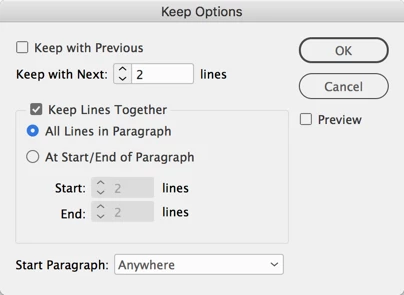
To keep two separate paragraphs together in the same page or column, use Keeps settings (Control panel menu > Keep Options... or in your paragraph styles):
- First, to keep all the lines in a paragraph together without splitting across columns or frames/pages, apply the Keep Lines Together: All Lines in Paragraph option to it. Apply this to both paragraphs if you don't want either to split.
- Then, click inside the first paragraph and turn on "Keep with Next 2 Lines" (the default, or even just 1 line will work) as shown in the screen shot below. This will force ID to jump the 1st paragraph to the top of the next column if the any part of the 2nd paragraph ends up there. Don't apply the Keep with Next Lines setting to the 2nd paragraph, only to the first.
Hope that helps!
AM

 AdChoices