
Applying fontFamily while retaining fontStyle to paragraph Styles
Hi everybody,
I am working on a script for InDesign that will allow batch operations on several paragraphStyles. Unfortunately, I'm stuck with a particular function. What I'm trying to do is applying a different fontFamily to several paragraphStyles while retaining their current fontStyleName (even if the fontStyleName doesn't exist or isn't loaded in the system for the selected fontFamily). I suspected this to be pretty easy but I can't get it to work properly.
Can you please have a look at the code below and let me know if you understand how InDesign works?
________________________________________________________________________
Example 1
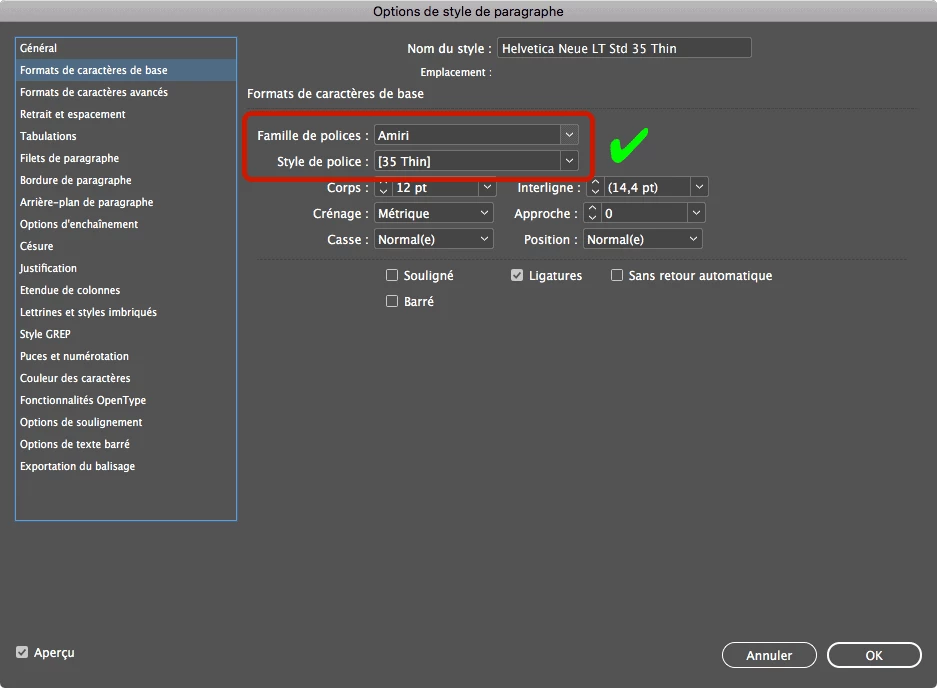
Cycling through all styles (omitting [No style]) -- OK! The paragraphStyle actually shows "Amiri [35 Thin]"
I suspect this is working because the first paragraphStyle ([Paragraphe Standard]) fontStyle was "Regular" and "Amiri Regular" is actually loaded in the system. Look below for code and screenshot of result.
var myPStyles = app.activeDocument.allParagraphStyles;
var myFontFamily = "Amiri";
for (var i=1; i<myPStyles.length; i++) {
try {myPStyles.appliedFont = myFontFamily+"\t"+myPStyles.fontStyle;}
catch(err){$.writeln(err);}
}
________________________________________________________________________
Example 2
Cycling through specific paragraphStyles -- DOESN'T WORK The paragraphStyle still shows "Helvetica Neue LT Std 35 Thin"
The first paragraphStyle hasn't been modified because its original fontStyle was "Thin" and "Amiri Thin" isn't loaded in the system (nor does it actually exist).
Is there any way to obtain the same result as in Example 1 without having the need for the first paragraphStyle fontStyle to be valid? (I hope my question makes sense)
var myPStyles = app.activeDocument.allParagraphStyles;
var myFontFamily = "Amiri";
for (var i=2; i<myPStyles.length; i++) {
try {myPStyles.appliedFont = myFontFamily+"\t"+myPStyles.fontStyle;}
catch(err){$.writeln(err);}
}
Returns in the console:
Error: La famille de polices demandée n'est pas disponible.
(Roughly translating to "The requested Font Family is not available")
Any idea how to solve this? Any help is greatly appreciated!
Thomas Rüesch
 AdChoices