
Participant
April 2, 2024
Answered

Applying Master Pages

  • April 2, 2024
  • 2 replies
  • 311 views

I am using InDesign CS6 to produce a 92+ page catalogue for an annual photographic exhiibition. I have created a number of spreads (23) for this with left and right hand headers. However, our printer requires the pdf we produce to be in single pages and I am finding it impossible to allocate the correct handed version to each page. Is there a way that this can be done? Obviously. I don't know what hand the pages are going to be until the whole catalogue is completed and the pages are in order. Any help would be appreciated.
This topic has been closed for replies.
Correct answer Barb Binder

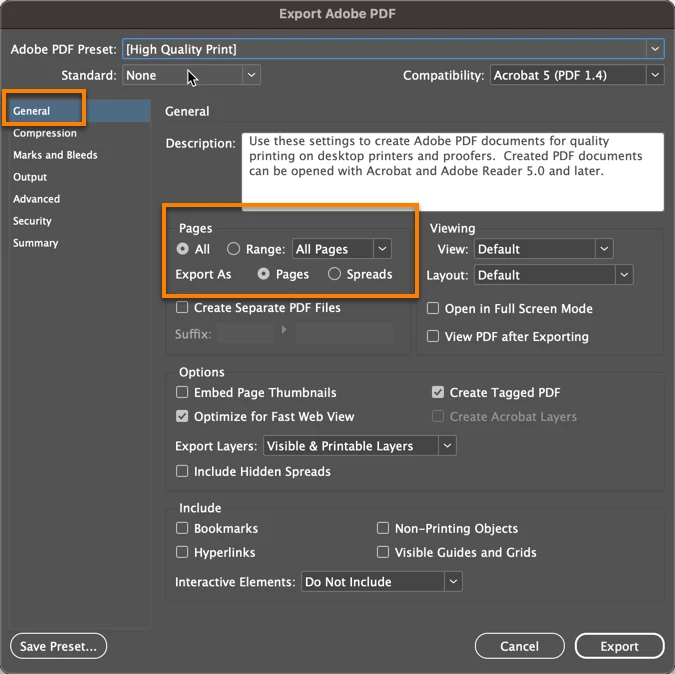
When you export to PDF, you can choose to export a double-sided document as pages or spreads


~Barb


2 replies

Barb Binder
Community Expert
Community Expert
April 2, 2024

Haha! Now you know where to find me (and all the other helpers, too). 🙂


~Barb

~Barb at Rocky Mountain Training
Barb Binder
Community Expert
Barb BinderCommunity ExpertCorrect answer
Community Expert
April 2, 2024

When you export to PDF, you can choose to export a double-sided document as pages or spreads


~Barb


~Barb at Rocky Mountain Training
litemanAuthor
Participant
April 2, 2024

Where have you been all my life!!!!!!!! Such a simple solution, and its been eluding me for all this time. Thank you so much - now I needn't tear out what little hair I have left.