

Mana Lucine
Participating Frequently
January 28, 2026
Question

Arabic diacritics in front of base characters?

  • January 28, 2026
  • 3 replies
  • 130 views

Hello

This is again on the issue of rendering Arabic marks in front of characters in InDesign, there were great contributions made by ​@Joel Cherney ​@Dirk Becker ​@Barb Binder regarding the rendering of marks in general in InDesign for Latin (LTR), where the mark renders in front of the base character but in Arabic (RTL) the mark goes behind it like this:
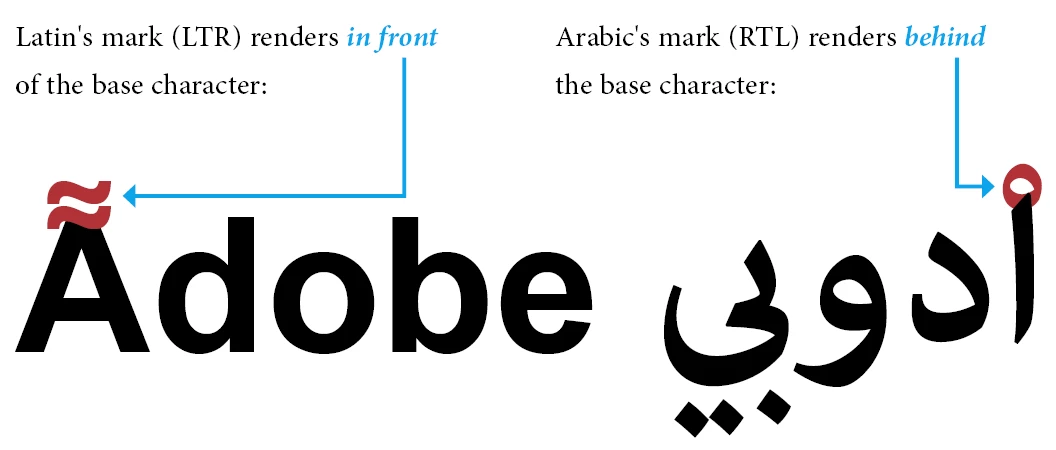
In my case I have a book that it is dedicated for kids learning with custom colorized marks that must be put slightly in front of some base characters, the result is absolutely the mark will render behind the base character making part of it invisible (as shown above).

To experiment this problem, we can copy this the Arabic word "اْدوبي" (Adobe) and paste it in InDesign using any font that supports Arabic script (Adobe Arabic or Arial), this word has Arabic Sukun on the first letter Alef, by colorizing the mark only and selecting them both (base & mark) using Diacritic Positioning in InDesign we can move the mark vertically (-90), the mark will go behind the base letter not in front (as in Latin):
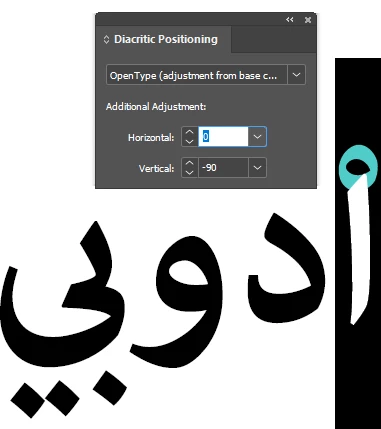
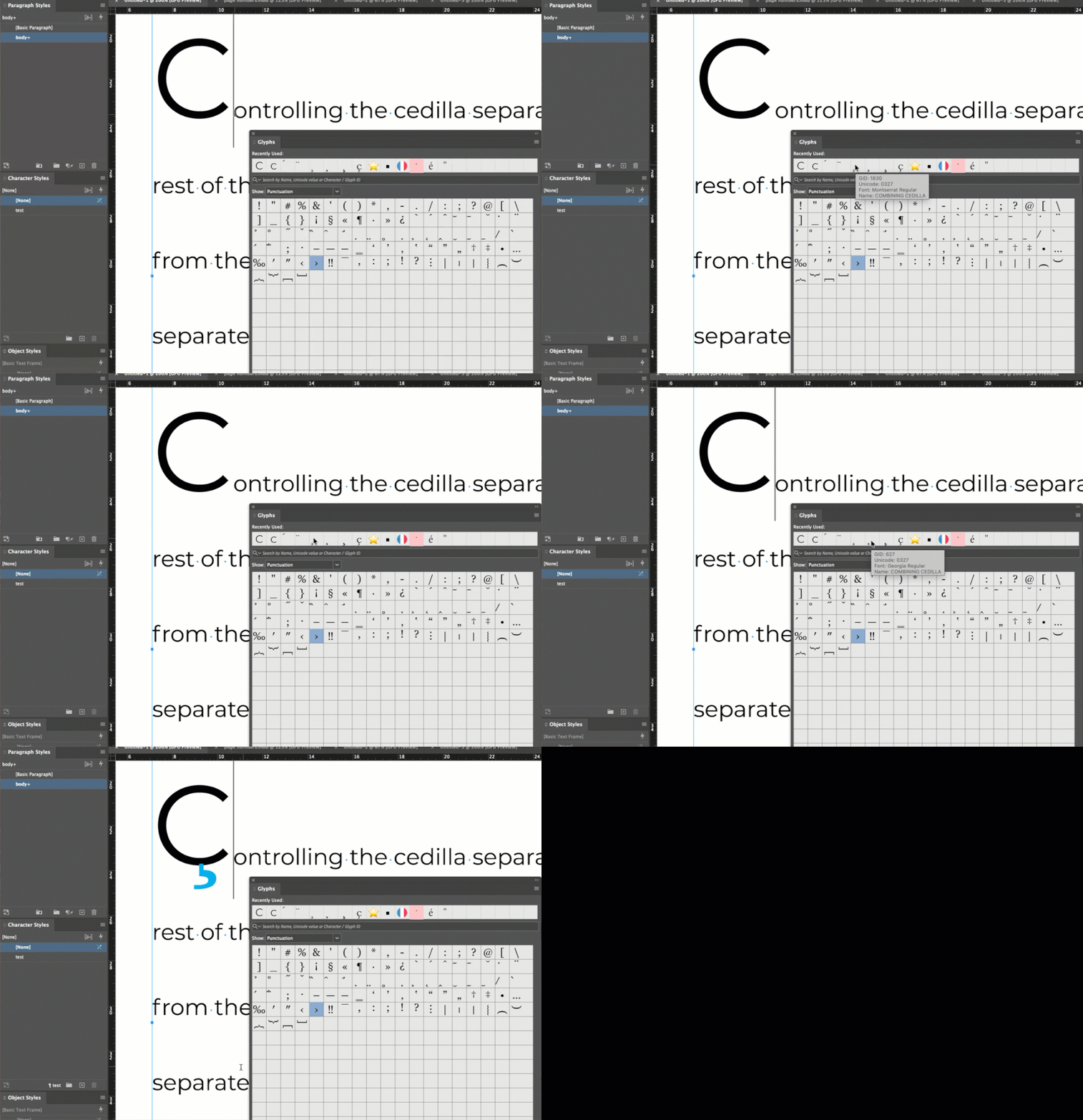
@Barb Binder made a demonstration on how the colored mark renders in front of the base character in Latin script:

@Barb Binder ‘s commentary:

In the recording (above), I'm using Montserrat and if I add the Montserrat combining cedilla, it matches the color of the C, but if I use a different font—the 2nd one is Georgia—then InDesign sees my GREP style, and changes the cedilla to cyan. It appears in front. Changing the composer and/or the Legacy Character Shaping Engine doesn't have an impact. When I swap fonts, the same holds true. Adding a Georgia combining cedilla to text set in Georgia takes on black, I then need to use the Montserrat combining cedilla for the GREP style to kick in. I don't get it. Is needing to use two fonts a bug? Intentional?

So it is truly needed that we can have an option in InDesign Arabic & Hebrew versions to have the diacritics render in front (not behind) the base characters. Colorizing the marks is oftenly used in RTL scripts.

Thanks.

3 replies

Barb Binder
Community Expert
Community Expert
January 28, 2026

I just want to say nice work, Mana, capturing the content from Tuesday so that we can pick it right back up here! You were one of the people I worried about when I learned that morning that we would lose recent threads for six weeks.

~Barb at Rocky Mountain Training
Mana Lucine
Participating Frequently
January 29, 2026

Thank you so much @Barb Binder  for your care and kindness 😊 I was lucky that you notified me on time so I was able to back the discussion up.

M.Hasanin
Inspiring
January 28, 2026

You must to use InDesign ME Version to Direct Control the Arabic Diacritic using Diacritic Positioning Palette as in the screen shot :
 

but if you dont want to use the ME version you can use scripts to solve your problem, i will provide you with two script works on the selected text 
 

//Set Diacritic Offsets Prompt for Selected Text
// Created by : Mohammad Hasanin
// https://hasaninscripts.com/

function main() {

var text = app.activeDocument.selection[0];
if (
text != undefined
&& text.hasOwnProperty('xOffsetDiacritic')
) {

var xd = Number(prompt('Enter horizontal diacritic offset:', text.xOffsetDiacritic,'Set Diacritic Horizontal Offsets')),
yd = Number(prompt('Enter vertical diacritic offset:', text.yOffsetDiacritic,'Set Diacritic Vertical Offsets'));

if (!isNaN(xd))
text.xOffsetDiacritic = xd;

if (!isNaN(yd))
text.yOffsetDiacritic = yd;
}

}

app.doScript(main, ScriptLanguage.JAVASCRIPT, undefined, UndoModes.ENTIRE_SCRIPT, 'Set Diacritic Offsets');

also you can use palette interactive version :
 

// Move Diacritics v1.0
// Created by : Mohammad Hasanin
// https://hasaninscripts.com/

#targetengine "hasanain"

var myPalette = new Window("palette", "Move Diacritics v1.0", undefined, {closeButton: true});
myPalette.preferredSize.width = 150;

var rightButton = myPalette.add("button", undefined, "\u2192");
rightButton.onClick = function() {
app.activeDocument.selection[0].xOffsetDiacritic += 10
}

var leftButton = myPalette.add("button", undefined, "\u2190");
leftButton.onClick = function() {
app.activeDocument.selection[0].xOffsetDiacritic -= 10
}

var upButton = myPalette.add("button", undefined, "\u2191");
upButton.onClick = function() {
app.activeDocument.selection[0].yOffsetDiacritic += 10
}

var downButton = myPalette.add("button", undefined, "\u2193");
downButton.onClick = function() {
app.activeDocument.selection[0].yOffsetDiacritic -= 10
}

var CreatorWeb = myPalette.add("statictext", undefined,"https://hasaninscripts.com/");
CreatorWeb.alignment = "Center";

// Set the size and position of the buttons
rightButton.size = [30, 30];
rightButton.bounds = [10, 10, 40, 40];
leftButton.size = [30, 30];
leftButton.bounds = [50, 10, 80, 40];
upButton.size = [30, 30];
upButton.bounds = [90, 10, 120, 40];
downButton.size = [30, 30];
downButton.bounds = [130, 10, 160, 40];

myPalette.show();


Mohammad Hasanin
Mana Lucine
Participating Frequently
January 28, 2026

I am having InDesign ME installed and I am really very glad to see your super scripts! Very useful for those who do not have ME versions, I think ​@Dirk Becker you can thankfully use ​@M.Hasanin script to experiment exactly the problem I am talking about if you don’t have InDesign ME. Also I wish ​@M.Hasanin think of a solution for the problem in question: Rendering Arabic diacritics in front of base characters not behind.

M.Hasanin
Inspiring
January 28, 2026

Hi ​@Mana Lucine , oh i didn't take attention that you are already have InDesign ME, any way thanks for clearing things!, i was in a hurry already catching a cold!, strange that i discovered that the problem also exist in Adobe illustrator ME version!,  I Shocked!, its First time to think in that, but i think this is a bug related to Arabic or double bytes fonts (maybe) any way i created a new script to solve the problem, but it will convert selected word or text to outline first then it will make the diacritics in top (Above) after finish, all will be collected via script to a group, this is the only solution i can made, it take a lot of time to finish, anyway test it and tell me so i can upload it to my scripts website later, download from here :
Convert Selected Text to Outline v1.3


Mohammad Hasanin
Legend
January 28, 2026

As I wrote in the old forum, please provide a snippet or document.

When I follow your instructions and copy paste the text the ring is far away and the text direction is reversed because of LTR.


There is no diacritic positioning or RTL support in western InDesign UI, and even if there were one can never know which other attributes or “obvious” settings are missing.

Having no real examples around is a severe limitation when attempting to support foreign scripts. For comparison imagine you’d be asked to whip up a representative example with named grids and ruby - that would be Japanese InDesign.

Mana Lucine
Participating Frequently
January 28, 2026

Here’s the snippet (the forum here doesn’t allow attaching .idms files):

https://drive.google.com/file/d/1CL9Cz5lfKdpIcXyJhIXmpdSHy-Q8Vsp6/view?usp=drive_link

Legend
January 28, 2026

Thanks for the snippet.

When I place it in my working horse – InDesign Debug build (thus no ME version available), InDesign 19.4 (because I have newer versions only in VMs), and have a look with my plug-ins, the red ring has plenty more relevant attribute ovrerides: ligatures off, no contextual alternates, opentype positioning, the vertical adjustment. (all those with an A* indicator)

At least changes in paragraph or character direction are missing, I can’t tell which others. It takes those from document defaults which appear to be different for the ME version in general, or you changed your document defaults.

The 2026 release build has the same problem as described above, at least the direction is still wrong.

New lesson (to me and the occasional observer) that snippets are less self-contained/complete than one might hope. Could you please provide an IDML then?