
January 21, 2026
Question

Arabic diacritics in front of characters?

  • January 21, 2026
  • 4 replies
  • 138 views

Hello

I am working on a book that includes colored Arabic diacritics that should appear in front of letters using custom OpenType font for that purpose, however due to the direction of Arabic (RTL) the diacritics in InDesign appear behind characters like this:
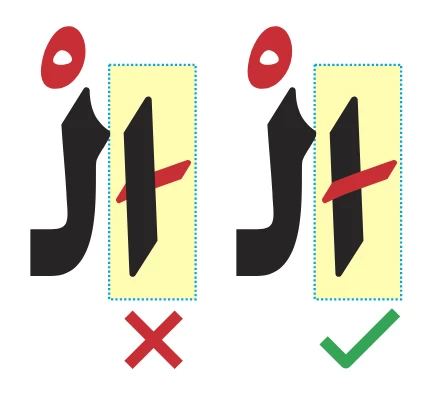
Screenshot 2026-01-21 091418.png

Is there any solution for this?.

Thanks.

4 replies

Barb Binder
Community Expert
Community Expert
January 26, 2026

Heads up, @23517440, @Joel Cherney and @Dirk Becker:


We are migrating to a new forum platform tomorrow and this thread—which is still seems to be on-going—is going to be gone in the morning. It will reappear after the data migration is completed in March.


"So in conclusion, my problem (and many others may face it too) that we can not render Arabic diacritics (RTL) in front of characters like what Latin (LTR) does, except if InDesign developpers put that into consideration"


So, Mana, you can repost this question tomorrow if you like (maybe be proactive and copy the content). Or if this is resolved in your mind as an issue only Adobe can address you will want to post a bug report on https://indesign.uservoice.com/ (not impacted by the forum upgrade).


I will wait to post my follow-up questions in a new thread until tomorrow.


~Barb

~Barb at Rocky Mountain Training
January 27, 2026

Thank you @Barb Binder for your care and help, I am waiting the new forum to be opened and then I will repost, I made a copy of the full thread conversation.

January 26, 2026

@Joel Cherney thank you so much for your great experiment, regarding the font I am using it is based on SIL's open source Arabic fonts that I altered in shape as well as I recoded to produce custom marks that "touches" some letters for my educational book for the kids using Microsoft VOLT tool.

As you see, this is something essential for Arabic publishing, specially in educational or children books, as mark colorizing is necessary and as you mentioned for the Quranic scripts requirements too.

In my case I have a book that it is dedicated for kids learning with custom colorized marks that must be put slightly in front of some base chararacters, the result is absolutely the mark will render behind the base character making a part of it invisible, and this case doesn't happen to Latin as seen here using both Adobe Arabic and Arial fonts:

Screenshot 2026-01-26 042228.png

This is obviously due to "the problem" of RTL direction with the consideration that any character instancing must be "reversed" when rendering indespite Arabic (RTL) is like Latin (LTR) has its own marks that might be colorized in some cases (world has tremendous dialect scripts and some irregular marks that can be colorized for educational purposes).

So that's why even in Latin we may need to colorize marks for cutsom languages as @Barb Binder wondered why one would do this with latin characters.

And regarding changing the character engine for Latin marks to be seperated, this is also another "problem" of decomposed characters in Unicode, we have letters with marks integrated in one character, even in Arabic we have the problem of Alef with Madda Above (U+0622), these are two glyphs: a base and a mark, but in unicode they are one character, having changing the mark appearance is tricky same way as in Latin composite glyphs.

So in conclusion, my problem (and many others may face it too) that we can not render Arabic diacritics (RTL) in front of characters like what Latin (LTR) does, except if InDesign developpers put that into consideration or there is a script for that.

Thank you all for your valuable inputs.

Legend
January 26, 2026

Could you please share a font and snippet in arabic text so we can have something to play?

Need not be your full proprietary modifications if that's your selling point.


Appreciating Barb's experiment, it should be an implementation detail per font whether the sequence of glyphs is merged into one or whether the font just needs to adjust positioning. Long ago I've also seen it with dieresis umlaut dots, mentioned somewhere as funny effect. For the other side we can also watch glyph substitution on some fractions 1/2 that may get merged to their dedicated glyph and char, and of course afterward won't show in different colors.


I can think of multiple approaches to the problem:


One could apply some post processing to the resulting PDF that moves the red glyphs to a different layer. Open your output in Illustrator (if that works at all), do those glyphs end up in a different text frame for their different color? If so, could an Illustrator script perform the adjustments, or maybe even some weird appearance trick? Don't know.


Within InDesign a script could duplicate text frames on top of each other for output, and set the black text to something transparent on the upper copy so that red text exactly stays in place. Variations – turn the upper copy into a placed PDF?


A plug-in might also perform the draw in two passes, effectively sorting red on top. Thinking of different approaches but haven't tried any of them yet.


All of those can have an impact on non-print output formats, namely in reading order. Is that ok for you? Maybe we could even hide the upper copy for screen readers, but again I haven't tried that and would that be relevant at all?

January 27, 2026

@Dirk Becker I can tell you that this is something I tremendously thought of, the possibilty of color layering in InDesign!, if this is possible we wouldn't be facing any such problem. Regarding duplicating text frames on each other, this can be useful for short sentences but unachievable in long documents. For the snippet just try this Arabic word "اْدوبي" (Adobe) on any Arabic font (Adobe Arabic as an example or Arial or any), this word has Arabic Sukun on the first letter Alef, select them both, using Diacritic Positioning in InDesign move the mark vertically to amount such of -90, you will be watching that the mark goes behind the base letter not in front as in Latin (See @Barb Binder's great video demonstration on top on Latin cedilla). 

Barb Binder
Community Expert
Community Expert
January 25, 2026

@Joel Cherney:


I do not want to direct the focus from @23517440's question but now that you are here, and seem to have a good understanding of the combining diacritics, I have questions. If the answers seems too complicated, send me a DM and I will just move this to a new thread so that we can keep the focus on Mana.


So, I wasn't even aware of the concept of combining diacritics until I saw this question earlier this week. I couldn't track down much information online so I sat and played with the combining cedilla that afternoon until I could replicate Mana's observation.


In the recording below, I'm using Montserrat and if I add the Montserrat combining cedilla, it matches the color of the C, but if I use a different font—the 2nd one is Georgia—then InDesign sees my GREP style, and changes the cedilla to cyan. It appears in front. Changing the composer and/or the Legacy Character Shaping Engine doesn't have an impact. When I swap fonts, the same holds true. Adding a Georgia combining cedilla to text set in Georgia takes on black, I then need to use the Montserrat combining cedilla for the GREP style to kick in. I don't get it. Is needing to use two fonts a bug? Intentional?


And really, I'm here to ask why one would do this with latin characters. I'm guessing in a playful design? And why isn't Combining Diacritics listed the Show menu in the Glyphs panel for the fonts that offer them? 🤔 🤔 It feels like this is a secret.


~Barb


2026-01-25_13-47-09 (1).gif

~Barb at Rocky Mountain Training
Joel Cherney
Community Expert
Community Expert
January 25, 2026

Hi, Barb! We should totally have a separate thread for most of your questions, but a few of them are absolutely relevant to Mana Lucine's post.


And really, I'm here to ask why one would do this with latin characters. I'm guessing in a playful design?


I suspect that they're only being used here to demonstrate that it's not working correctly in Arabic. The kind of Arabic used in the Quran uses many more diacritic marks than ordinary secular day-to-day Arabic, and it's my understanding as an outsider that the colored diacritics are used for teaching Quranic Arabic.  So there isn't really any call for this technique in Latin script, at all. It's part of Arabic typesetting practice.


Changing the composer and/or the Legacy Character Shaping Engine doesn't have an impact. 


Are you recomposing after switching character shaping engines? It has an impact, but it's not visible unless you force a recompose with the Control + Alt + / shortcut (I think it's Command + Option + / on the Mac). This is really why I'm posting here instead of just DMing you saying "post the thread! it would be so much fun!" - because if Mana Lucine wants to test both character shaping engines on their custom font, the need to do a recompose after switching engines isn't necessarily obvious. 


And why isn't Combining Diacritics listed the Show menu in the Glyphs panel for the fonts that offer them? 🤔 🤔 It feels like this is a secret.


The complete answer to this question belongs in the new thread you haven't yet posted, but in short:  I note that all of the base-install Microsoft fonts from the last fifteen-twenty years (like Times New Roman or Calibiri or whatever) all have a complete and robust selection of combining accents, while the base-install Adobe fonts over the same era (Minion, Myriad, etc) typically don't have any combining Latin-script accents at all.  

Abhishek Rao
Community Manager
Community Manager
January 21, 2026

Hi @23517440,


Thanks for reaching out. Could you please confirm the exact InDesign version you're using and the OS you're working on? Also, please make sure the Adobe World-Ready Paragraph Composer is enabled and the correct RTL settings are applied, as outlined in this help article:
https://adobe.ly/49yg1HC


Please let us know your observation. 

Abhishek


January 22, 2026

Thank you @Abhishek Rao for your reply. Infact this 'problem' is cross systems and in all versions of InDesign, it is due -as I mentioned above- to the direction of Arabic script (RTL) and it doesn't happen to Latin script (LTR) where an accent or mark can be in front of the letter because it appears before the mark, while in Arabic RTL the marks appear behind the letters. So I wish there's a work around in InDesign to have the marks appear in front of letters not behind them specially in the case of color diacritics.

Anubhav M
Community Manager
Community Manager
January 23, 2026

Hello @Mana23517440h2l2,

Thanks for confirming. Could you try installing the Arabic/Hebrew version of InDesign (https://adobe.ly/464oDmT) if it hasn't already been installed to see if it helps?

Looking forward to hearing from you.

Anubhav