
roulaa177142
Participant
August 25, 2020
Question

Arabic text not showing upon export to EPub on version 15.1.1

  • August 25, 2020
  • 3 replies
  • 956 views

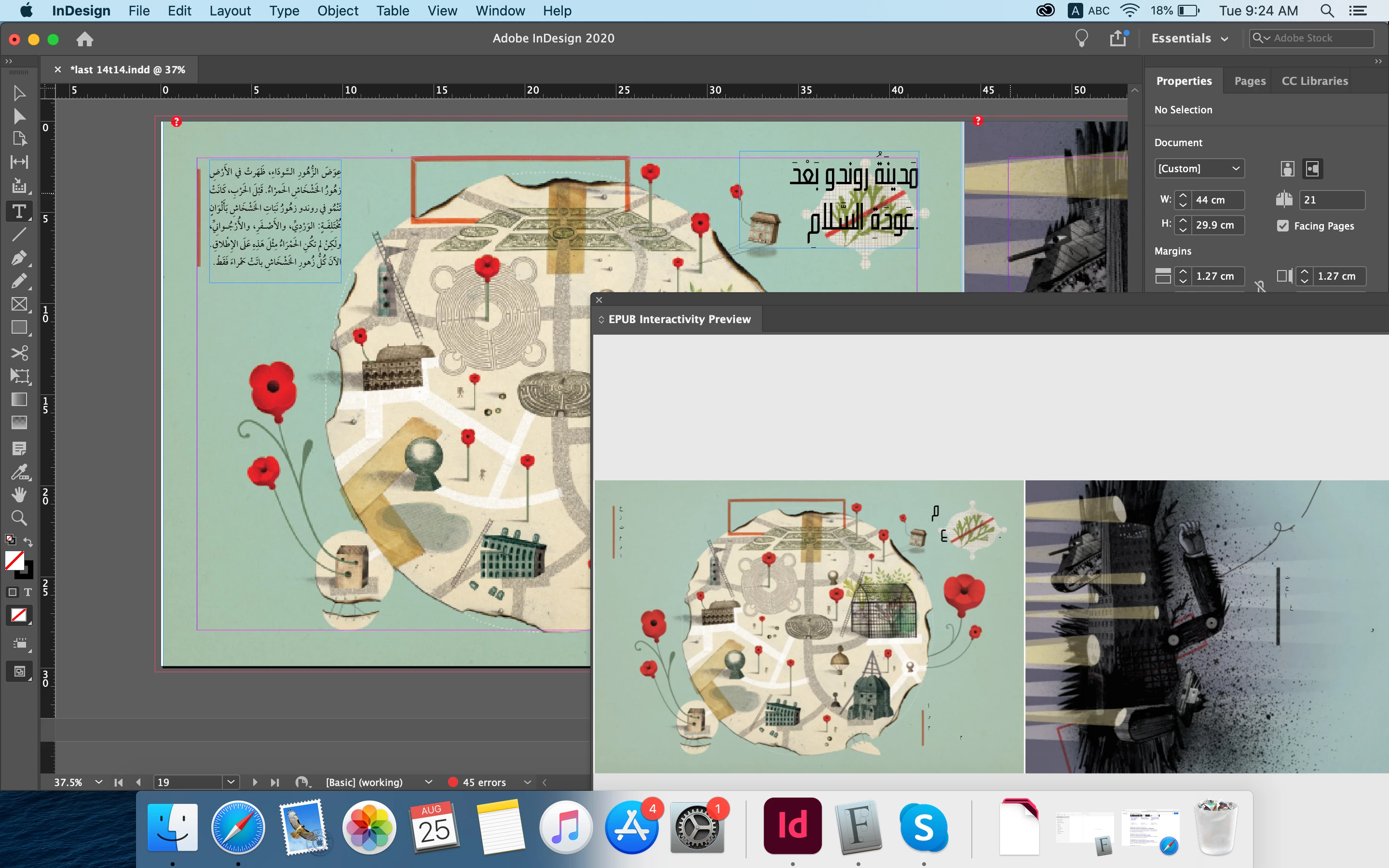
Hy, I'm facing the issue of inDesign received from customers, upon trying to export to epub fixed layout the arabic text disappear and only few letters remain as in the attached photo, where the same result show in "Epub Interactive Preview".

This issue is not faced on a previous version on inDesign 14.1, I have on an a different pc. 
This topic has been closed for replies.

3 replies

Srishti Bali
Community Manager
Community Manager
September 6, 2020

Hi there,


Sorry to hear about this trouble. We are currently investigating this issue. Will it be possible for you to share a sample file? You can upload it to the Creative Cloud (https://helpx.adobe.com/in/creative-cloud/help/share.html) and share the download link. 


Also, could you please try opening Epub file in some other reader like Readium. Let us know if this helps or the issue still persists.


Regards,

Srishti

Zaid Al Hilali
Community Expert
Community Expert
September 7, 2020

Tested on Readium, the same results where Arabic text is missing and messed up similar to Adobe Digital Editions, and Apple Books.


Srishti Bali
Community Manager
Community Manager
September 14, 2020

Thanks for trying this, Zaid. I have reported this to the Product team. 

Zaid Al Hilali
Community Expert
Community Expert
September 6, 2020

Hi Roula,

This issue has been reported to Adobe as a bug, you may vote to grab InDesign's development team attention to this matter here… https://indesign.uservoice.com/forums/601180-adobe-indesign-bugs/suggestions/41322403-arabic-exported-to-epub-fixed-layout-doesn-t-sho

Ashutosh_Mishra
Inspiring
August 26, 2020

Hi there,


Sorry to hear about your experience. Would you mind sharing version of the OS? Does it happen with a specific file or all?

Have you tried resetting preferences? If not, please try doing that and let us know if it helps,

**Please note that resetting preferences will remove all the custom settings and InDesign will launch with default settings. You can also take a backup of the folders in case you want to. Location is mentioned in the article.

Let us know how it goes. Looking forward to your response.


Regards,

Ashutosh

roulaa177142
Participant
August 26, 2020

Dear Sir, 

Thank you for your reply, 

The OS version of the mac is 10.15.4 (Catallina). 

The inDesign has been recently installed on it and settings are still set to default. 

This behavior is occuring to many of our files with several clients.

Kindly note that we also tried the same file on another pc Windows 10 pro, with inDesign version 15.0.2, with same behavior.

It's currently only working on 1 mac with os version 10.13.6 (High Sierra) and inDesign version 14.1.

Thank you for your assistance,