Participant
July 28, 2022
Answered

Arabic text problem in Indesign

  • July 28, 2022
  • 1 reply
  • 1193 views

Hi,
There are a few issues that I haven't been able to find solution to yet. I would like to ask the question that bothers me the most:
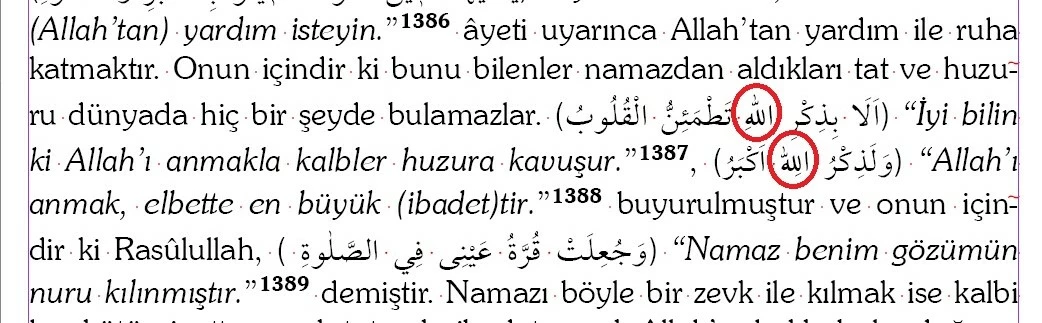
When the Turkish and Arabic text are in the same paragraph, it sometimes puts the "vowel points" (harakah) of Arabic words on top of the other letters (as in the photo). I haven't been able to figure out why it do that. Indd does this very often, especially if the Arabic text is on the same line as the footnote text or within the footnote reference.

Any ideas on how I can solve this problem? 
 

This topic has been closed for replies.
Correct answer Zaid Al Hilali

Salam Çelik,

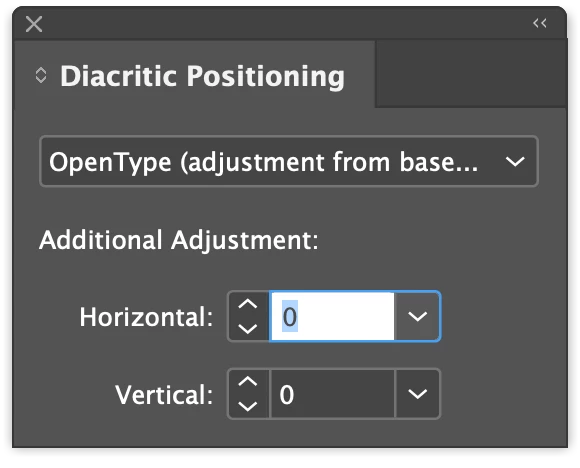
Yes, you need the Middle Eastern version to see the Diacritic Positioning panel.

However, the issue you're facing is not related - in my opinion - to the diacritic positioning panel, you may check this post and the bug report for further details.

Note, in the post, I linked above, @eduard dimasov posted a "fix" which I didn't try.

1 reply

Rishabh_Tiwari
Legend
July 28, 2022

Hi @Çelik25425569c0jw ,


Thanks for reaching out. I found a similar discussion which you can refer to here https://community.adobe.com/t5/indesign-discussions/arabic-footnote-references-and-harakats/m-p/10353016/thread-id/133867#M133880 


Please try the suggestions shared there and let us know if this helps or if you need any further assistance.


Regards

Rishabh

Participant
July 28, 2022

Dear @Rishabh_Tiwari ,

Thank you for your kind and fast reply. 

The issue is exactly the same. But what's mentioned there doesn't appear in my Indd version. It's been said that for manual adjustment, it is necessary to open Window > Type and table > Diacritic Positioning. But it doesn't show up on mine (which I have the latest version). Could the "Diacritic Positioning" feature be unique to the ME version?

Thanks in advance

Zaid Al Hilali
Community Expert
Zaid Al HilaliCommunity ExpertCorrect answer
Community Expert
August 5, 2022

Salam Çelik,

Yes, you need the Middle Eastern version to see the Diacritic Positioning panel.

However, the issue you're facing is not related - in my opinion - to the diacritic positioning panel, you may check this post and the bug report for further details.

Note, in the post, I linked above, @eduard dimasov posted a "fix" which I didn't try.