Inspiring
Nov 17, 2021 10:47 AM UTC
Answered

Are selection and direct selection tools symbols changed?

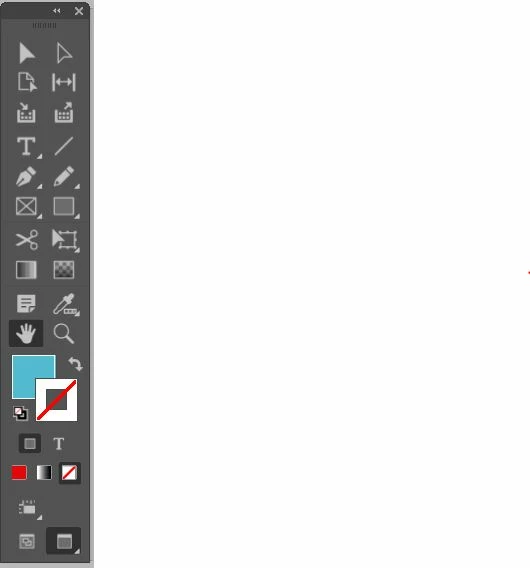
Hi, I'm using the new Indesign 17.01 and I found something strange in the selection & direct selection tools regarding their symbols: I expect to use the black arrow for the selection tool and the white one for the direct selection but they are inverted as can be seen from the screenshot.  The white one on the left activates the selection tool while the black one on the right the direct selection. 

Is it normal due to any new update or is something strange?


LaubenderCorrect answer
Community Expert
Nov 17, 2021 11:09 AM UTC

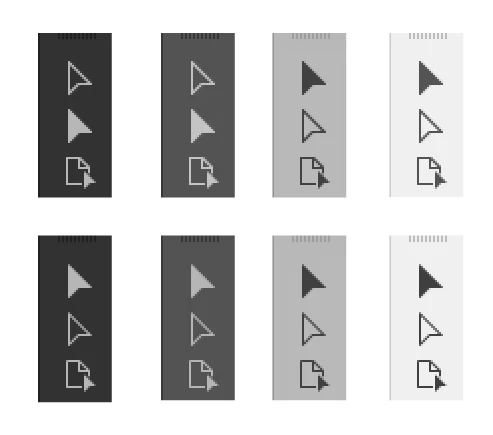
The positions of the tools did not change.

Switch to the lightest UI. There is no change in appearance at all.

Just in the two dark UI settings.


We already had some discussions about the change here in the forum.


Top row is InDesign 2021, bottom row is InDesign 2022.

Check the consistency of the little triangle in the Page Tool between 2021 and 2022.

The same happened now with both selection tools:


Regards,
Uwe Laubender

( ACP )

18 replies

Adam G Ash
Participant
Jan 18, 2022 1:42 PM UTC

This is confusing me as well. I am now constantly clicking on the wrong selection tool. I don't actually like the lighter UI, prefer the darker one. I cannot believe changing the appearance of these tools was considered a priority?

Translate
Known Participant
Jan 18, 2022 1:51 PM UTC

Me too! This is ongoing and driving me mad. I switch between InDesign and Illustrator all the time and it is a nightmare, as not only are the icons different, but they are in different places. It's crazy that Adobe have done this!

Translate
erik@ggsir
Participant
Jan 6, 2022 11:00 PM UTC

This is definitely an issue - I thought I was losing my memory or something because I couldn't keep straight which was the Direct Select tool vs. Select. I switch between Illustrator and InDesign a lot and finally realized that they are appearing differently in each one. Hope this gets fixed soon!!

Translate
Community Expert
Dec 9, 2021 11:39 AM UTC

Hi Laura,

The first tool is always the Selection tool.

The second one is always the Direct Selection tool.

This has not changed.


FWIW: If you would switch to one of the two lighter UIs you would see no difference at all compared to older CC versions.


Regards,
Uwe Laubender

( ACP )

Translate
Known Participant
Dec 9, 2021 11:47 AM UTC

I don't understad what has changed then, because since doing the update yesterday I am consistently clicking the direct selection tool instead of the selection tool and it's driving me mad. I have got used to the dark mode, so would rather not have to change it because the icons have changed. And in Illustrator they are the other way round too - direct selection at the top. I really wish Adobe would make everything consistent across apps. 😞


Translate
Known Participant
Dec 9, 2021 12:01 PM UTC

.. and in Illustrator - the direct selection tool is the filled in arrow, and in InDesign the selection tool is the filled in arrow!! No wonder I'm confused!

Translate
LaubenderCommunity ExpertCorrect answer
Community Expert
Nov 17, 2021 11:09 AM UTC

The positions of the tools did not change.

Switch to the lightest UI. There is no change in appearance at all.

Just in the two dark UI settings.


We already had some discussions about the change here in the forum.


Top row is InDesign 2021, bottom row is InDesign 2022.

Check the consistency of the little triangle in the Page Tool between 2021 and 2022.

The same happened now with both selection tools:


Regards,
Uwe Laubender

( ACP )

Translate
Da7Author
Inspiring
Nov 17, 2021 11:23 AM UTC

Thank you Uwe for the explanation and I checked what you say switching to the lightest UI.

But, I'm sorry, is something strange since both Illustrator and Photoshop in the newest versions keep the original symbols even in the darker UI. 

I don't like work with the lightest UI and in this way the new Indesign icons don't keep consistency with the Adobe ecosystem.

Translate
Known Participant
Dec 9, 2021 10:48 AM UTC

I have the same issue. In InDesign they have swapped the positions round so that the selection tool is now at the top (as it always used to be). I am constantly clicking on the wrong tool and it's wasting loads of time over the course of a day. It's infuriating!

Translate