
Known Participant
March 24, 2026
Question

Artboard blank when switching displays - InDesign on macOS 26.3.1

  • March 24, 2026
  • 4 replies
  • 42 views

I have a 14” MacBook Pro M1 Max with 32 gigs of ram. Running Tahoe 26.3.1

If I have to use my MacBook Pro screen with Indesigne, and this has been happening for a while now, I would say at least last 2 versions before current version. If I leave indesign open with a document open and close my MacBook Pro and plug into my external 27” 5K Samsung display via that usb-c / thunderbolt port the document window is the colour of the artborad and I cannot see the open document no matter what I do. Zooming out. command 0, etc. It can be in windowed mode or frameless mode. 
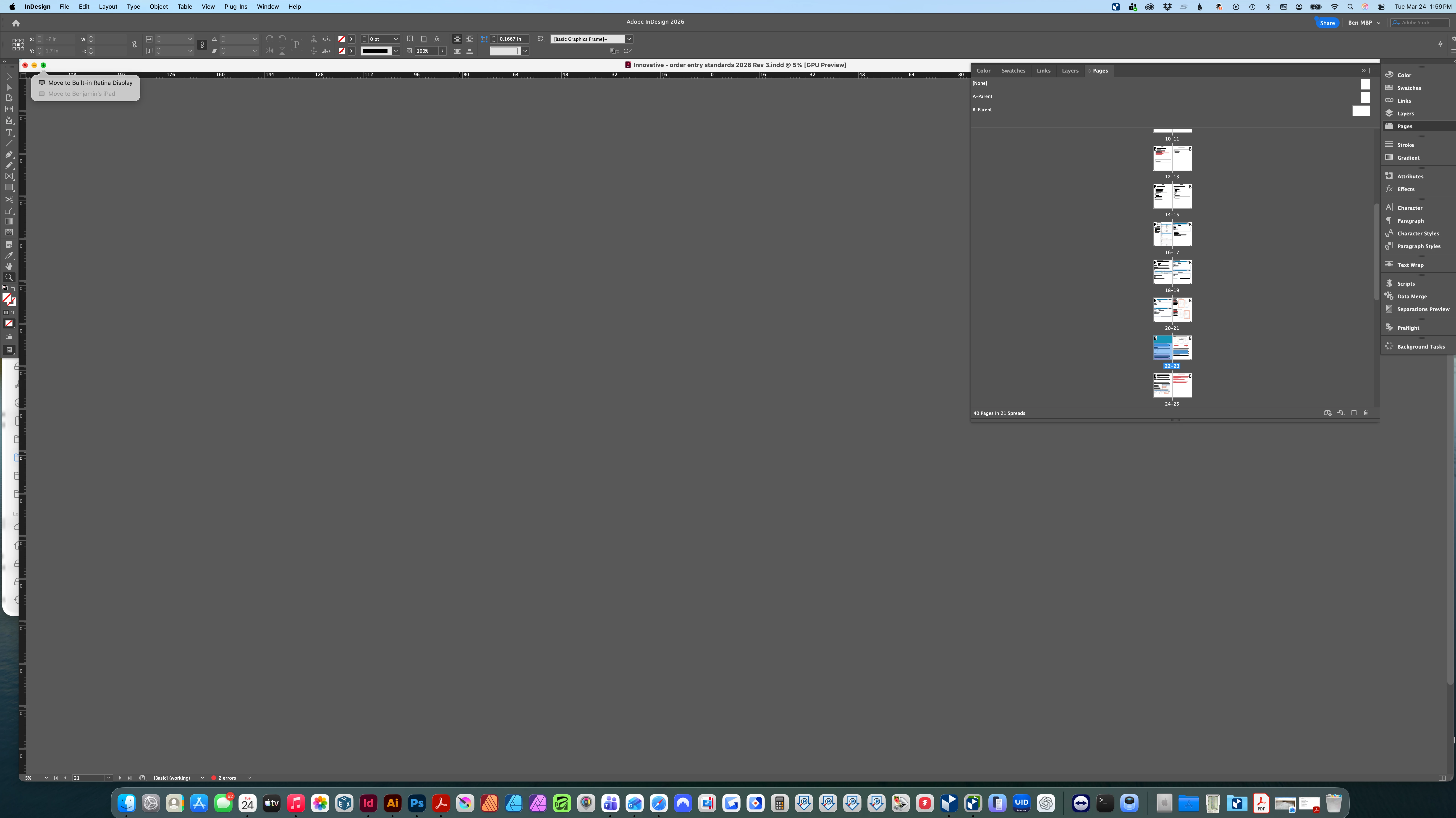
Screen shot above shows the document open but the artboard only being seen. 


Anyone else have this issue and found a solution for it? Keep hoping an update will fix it but it never does. 

    4 replies

    Abhishek Rao
    Community Manager
    Community Manager
    March 25, 2026

    Hi ​@Ben__P,


    Adding to the suggestions, could you please confirm if the issue you’re experiencing is similar to the one discussed here:
    https://community.adobe.com/questions-671/indesign-blank-window-when-switching-displays-887781?postid=3557065#post3557065

    If yes, this behavior has already been logged as a bug, and the team is actively working on a fix for it.

    In the meantime, I’d recommend trying to reset the InDesign preferences manually and see if that helps. You can follow the steps and the video at the bottom of this article:
    https://helpx.adobe.com/indesign/using/setting-preferences.html


    Please let us know your observations after trying this and confirm if the issue matches the one shared above so we can proceed accordingly.

    Abhishek

    rob day
    Community Expert
    Community Expert
    March 25, 2026

    Hi ​@Ben__P , Have you tried clearing you Caches, username/Library/Caches/Adobe InDesign/Version X.0, and if that doesn’t work resetting your Preferences?

    Also, your screen capture is showing the Zoom level as 5%. Have you tried setting the View to Fit Page in Window

    Anubhav M
    Community Manager
    Community Manager
    March 24, 2026

    Hello ​@Ben__P 


    That does seem strange. Could you try pressing Cmd+E on your keyboard to see if the problem persists?

    Also, try running InDesign under a different administrator account (macOS) and share your observations.


    Looking forward to hearing from you.
    Anubhav

    Ben__PAuthor
    Known Participant
    March 25, 2026

    I hit Cmd E on my keyboard and it just brings up the export to PNG, nothing changes in my view. I will try running under a different user account and see if the problem persists. 

    Dave Creamer of IDEAS
    Community Expert
    Community Expert
    March 24, 2026

    Does the open document show up at the bottom of the Window menu?

    David Creamer: Community Expert (ACI and ACE 1995-2023)
    Ben__PAuthor
    Known Participant
    March 25, 2026

    not sure what you mean, it shows the document open at the top of the window, and I can see the visual preview under the pages slide out panel.