
Participant
May 14, 2026
Answered

Article view tab order expoting in wrong order

  • May 14, 2026
  • 3 replies
  • 51 views

I spend a lot of time and effort adding tags with article view, and then after I export it as an interactive pdf, I open it in acrobat and the article tags are all out of order. Then I have to spend even more time and effort reordering them in acrobat because its all wrong. why does this happen
    Correct answer Mike Witherell

    Hi CoaF and Jamie,

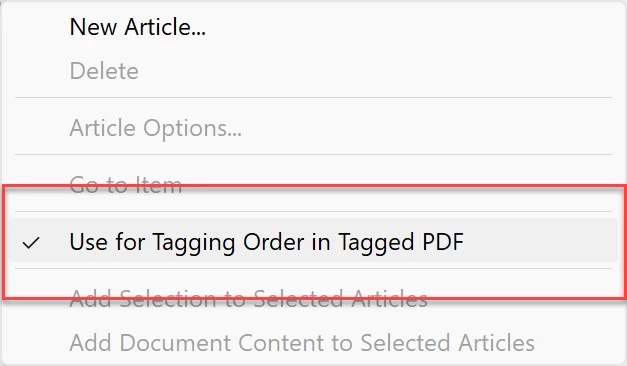
    Something I often forget about is this switch in the Articles panel menu button:

    This switch is off at default and must be turned on.

    3 replies

    Mike Witherell
    Community Expert
    Mike WitherellCommunity ExpertCorrect answer
    Community Expert
    May 19, 2026

    Hi CoaF and Jamie,

    Something I often forget about is this switch in the Articles panel menu button:

    This switch is off at default and must be turned on.

    Mike Witherell
    jamiejj
    Participant
    May 19, 2026

    Yeah, this is honestly one of the most frustrating parts of exporting accessible PDFs. InDesign’s article panel order and the final tag order in Acrobat don’t always match perfectly after export, especially with complex layouts, grouped elements, anchored objects, or multi-column designs.

    A lot of people assume article order = final PDF reading order, but during export the structure can get rearranged depending on how objects are layered or threaded internally. Then Acrobat ends up showing tags in a completely different sequence.

    I’ve had the same issue where I spend ages organizing articles properly, only to redo everything manually in Acrobat afterward. Really wish Adobe made this workflow more reliable for accessibility work.

    Abhishek Rao
    Community Manager
    Community Manager
    May 14, 2026

    Hi ​@Cicada_on_a_fork,


    I understand how frustrating this must be after spending time organizing the reading order in the Articles panel.

    Could you please share the InDesign version and OS details you are using? Also, let us know if this happens with all files or only specific documents.

    If possible, please share a sample packaged InDesign file for testing using the steps here:
    https://helpx.adobe.com/indesign/using/preflighting-files-handoff.html#package_files

    Additionally, kindly share screenshots of the reading/order setup in InDesign and how it appears in Acrobat after export. If the file is confidential, feel free to share it via DM using Google Drive, Dropbox, or any similar file-sharing service.


    Looking forward to your update.

    Abhishek

    Abhishek Rao
    Community Manager
    Community Manager
    May 19, 2026

    Hi ​@Cicada_on_a_fork  and ​@jamiejj,


    Would you mind trying the suggestion shared by the expert regarding enabling the option in the Articles panel menu and then exporting the interactive PDF again to check whether the reading order improves in Acrobat?

    If you still notice the article/tag order exporting incorrectly afterward, please let us know along with your observations and screenshots showing the tag order in both InDesign and Acrobat so we can continue investigating this further.


    Looking forward to your update.

    Abhishek

    Abhishek Rao
    Community Manager
    Community Manager
    May 29, 2026

    Hi ​@Cicada_on_a_fork and ​@jamiejj,


    Just following up to check whether enabling the option suggested by the expert in the Articles panel helped improve the reading order after exporting the Interactive PDF.

    If you're still experiencing the issue, please let us know and share any observations so we can continue investigating further.

    Thanks,
    Abhishek